Geo Sense Settings
To preselect the geometry items to be included in automatic dimensioning with Geo Sense:
1. Click Options in Dimension Settings.
2. Select Geo Sense from the Type list under Automatic Dimensioning Settings.
3. Select the geometric element types for Geo Sense:
|
Radius
|
Radius dimensions are generated for all circular elements in the selection set.
|
|
Diameter
|
Diameter dimensions are generated for all circular elements in the selection set.
|
|
Chamfer
|
Chamfer dimensions are generated for any valid chamfers in the selection set.
|
|
Arc
|
Arc dimensions are generated for any arc elements, including fillets, found in the selection set.
|
Following figure shows the effects of these options on the resulting dimensions.
Geo Sense Options
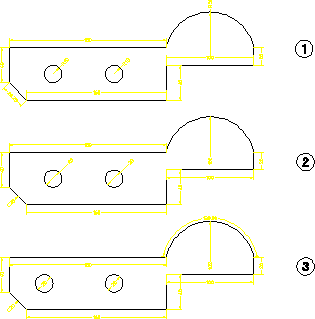
1. Defaults
2. Diameter and Chamfer On
3. Diameter, Chamfer, and Arc On