Drawing Parabolas
Creo Elements/Direct Drafting allows you to draw parabolas in your drawing using the Parabola buttons under  Spline in the Draw group on the Drafting tab.
Spline in the Draw group on the Drafting tab.To draw a parabola:
1. Click Drafting and then, in the Draw group, click the arrow next to Spline.
Spline.2. Click the required Parabola button and perform the associated procedure:
Parabola Button | Purpose | Procedure |
|---|---|---|
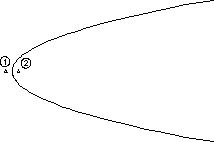
 Center & Focus Center & Focus | Draw a parabola using its center and focus. | a. Specify the center of the parabola (point 1) b. Specify the focus of the parabola (point 2) See Figure 35. |
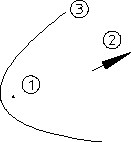
 Center, Direction & Point Center, Direction & Point | Draw a parabola in specific direction. | a. Specify the focus of the parabola (point 1). b. Specify the direction of the parabola (point 2). c. Specify the end of the parabola (point 3). Note that the other end point of the parabola is computed by symmetry. See Figure 36. |
Parabola by Center and Focus
Parabola by Focus, Direction and End Points