TopDownInheritanceReport
 |
For a general, step-by-step guide on using the corrector module, see Using the Data Inconsistency Corrector Module.
|
Description
This tool generates a top-down inheritance report, that is, a report that contains the differences in field configurations and permissions between a template tracker and all of its derived trackers, following the full chain of inheritance. That is, the report contains the template tracker, all trackers derived from that tracker, and all trackers derived from those derived trackers, and so on. This is done by checking the tracker-diffs of the derived trackers. Generating the top-down report requires the tracker ID of the template tracker to be entered as an execution parameter.
In Codebeamer, a derived tracker can inherit some or all of the configurations of its template tracker. A special data structure, called the tracker-diff, stores the differences between template trackers and their derived trackers. Every derived tracker has its own tracker-diff, which stores the tracker configurations that are not inherited from the template tracker by the derived tracker.
An entry in a tracker-diff indicates that inheritance for a tracker configuration has been broken, that is, that configuration is not inherited by the derived tracker when a change is made to the template tracker. Tracker-diffs are checked when a change is made to the template tracker, and the changes to configurations with an entry in the tracker-diff are not propagated from the template tracker to the derived tracker.
|
|
This is a tool for reporting only. This means there is no restore phase and the Restore button does not appear after clicking Detect.
|
Generating the Report
To generate top-down inheritance report using TopDownInheritanceReport:
1. Click Detect. The execution parameter window appears.
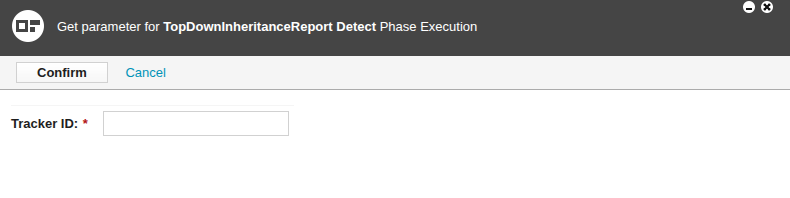
2. Enter the execution parameter. For TopDownInheritanceReport, the execution paramater is the tracker ID of a template tracker.
3. Click Confirm. The confirmation page appears, which shows the entered tracker ID.
4. Click Generate Signature. As a security feature, a login window appears.
5. Log in to Codebeamer. The login window disappears. The confirmation page shows that a signature has been generated and successfully signed.
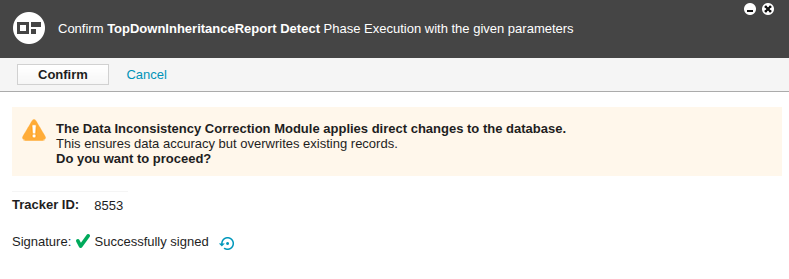
6. Click Confirm. The top-down inheritance report is generated.
7. Wait for the top-down inheritance report to be generated.
Viewing the Report
To view the top-down inheritance report:
1. Open the Data Correction Details page of TopDownInheritanceReport by clicking its name on the module page.
2. Click results.
The Data Correction Execution Results page is shown, which shows the completed top-down inheritance report.
Data Correction Execution Results Page
The Data Correction Execution Results page shows the top-down inheritance report in JSON format. The specific content of the report depends on what differences were found between the template tracker and its derived trackers.
The top-down inheritance report shows comparisons between pairs of derived trackers and their immediate template tracker. That is, the report shows the differences found between a derived tracker and its template tracker. The report does not show the differences between a derived tracker and the template tracker of its template tracker, and so on.
|
|
A derived tracker can also be the template tracker of another derived tracker. This means there is a chain of inheritance.
|
|
|
If a tracker ID was correctly entered as the execution parameter, but the resulting report is empty, the following explanations are possible:
• The entered tracker has no derived trackers, that is, the entered tracker is not a template tracker.
• There is no difference between the entered tracker and its derived trackers.
|
Example of a top-down inheritance report:
{
  "Tracker Name": "T1",
  "Project Name": "InheritanceReportCorrectionAutoTest",
  "Tracker Field Reports": [
    {
      "Tracker Name": "T2",
      "Project Name": "InheritanceReportCorrectionAutoTest",
      "Template Name": "T1",
      "Template Project Name": "InheritanceReportCorrectionAutoTest",
      "Path": "T1[8553] -- T2[8554]",
      "Field Differences": [
        {
          "Field Name": "Owner",
          "Attribute Differences": [
            {
              "Attribute Name": "Flags",
              "Value": "14"
            }
          ]
        },
        {
          "Field Name": "Assigned to",
          "Attribute Differences": [
            {
              "Attribute Name": "Flags",
              "Value": "14"
            }
          ]
        },
        {
          "Field Name": "Description",
          "Attribute Differences": [
            {
              "Attribute Name": "Description",
              "Value": "desc"
            }
          ]
        }
      ]
    },
    {
      "Tracker Name": "T3",
      "Project Name": "InheritanceReportCorrectionAutoTest",
      "Template Name": "T2",
      "Template Project Name": "InheritanceReportCorrectionAutoTest",
      "Path": "T1[8553] -- T2[8554] -- T3[8556]",
      "Field Differences": [
        {
          "Field Name": "Reached Coverage",
          "Status Specific": [
            {
              "Template Status": "Waiting for approval",
              "Status": "Waiting for approval",
              "Change Type": "allowed"
            }
          ]
        },
        {
          "Field Name": "Type",
          "Attribute Differences": [
            {
              "Attribute Name": "depends on",
              "Value": "Status"
            }
          ]
        },
        {
          "Field Name": "Resolution",
          "Choice Option": [
            {
              "Template Name": "Partly Implemented",
              "Name": "Partly Implemented",
              "Template Description": null,
              "Description": "Partly description"
            }
          ]
        },
        {
          "Field Name": "Release",
          "Tracker Reference Filter Inheritance": [
            {
              "Template Reference Filters": [
                {
                  "Project Name": "InheritanceReportCorrectionAutoTest",
                  "Status": "Any status",
                  "Qualifier": "Release"
                }
              ],
              "Default Reference Filters": [
                {
                  "Project Name": "InheritanceReportCorrectionAutoTest",
                  "Status": "Any status",
                  "Qualifier": "Bug, Release"
                }
              ]
            }
          ]
        },
        {
          "Field Name": "Modified at",
          "Field Permissions Settings": {
            "Access Type": "Unrestricted",
            "Template Access Type": "Same as"
          }
        },
        {
          "Field Name": "Story Points",
          "Field Permissions Settings": {
            "Access Type": "Single",
            "Field Permissions": [
              {
                "Status": "Default",
                "Field Permission Access": [
                  {
                    "Type": "Role",
                    "Role Name": "Scrum Master",
                    "Access Permission": "Read",
                    "Template Access Permission": "Read & Write"
                  }
                ]
              }
            ]
          }
        },
        {
          "Field Name": "Closed at",
          "Attribute Differences": [
            {
              "Attribute Name": "Description",
              "Value": "desc"
            }
          ]
        }
      ]
    },
    {
      "Tracker Name": "T4",
      "Project Name": "InheritanceReportCorrectionAutoTest",
      "Template Name": "T1",
      "Template Project Name": "InheritanceReportCorrectionAutoTest",
      "Path": "T1[8553] -- T4[8555]",
      "Field Differences": [
        {
          "Field Name": "Owner",
          "Attribute Differences": [
            {
              "Attribute Name": "Flags",
              "Value": "14"
            }
          ]
        },
        {
          "Field Name": "Assigned to",
          "Attribute Differences": [
            {
              "Attribute Name": "Flags",
              "Value": "14"
            }
          ]
        },
        {
          "Field Name": "Color",
          "Attribute Differences": [
            {
              "Attribute Name": "Description",
              "Value": "desc"
            }
          ]
        }
      ]
    }
  ]
}
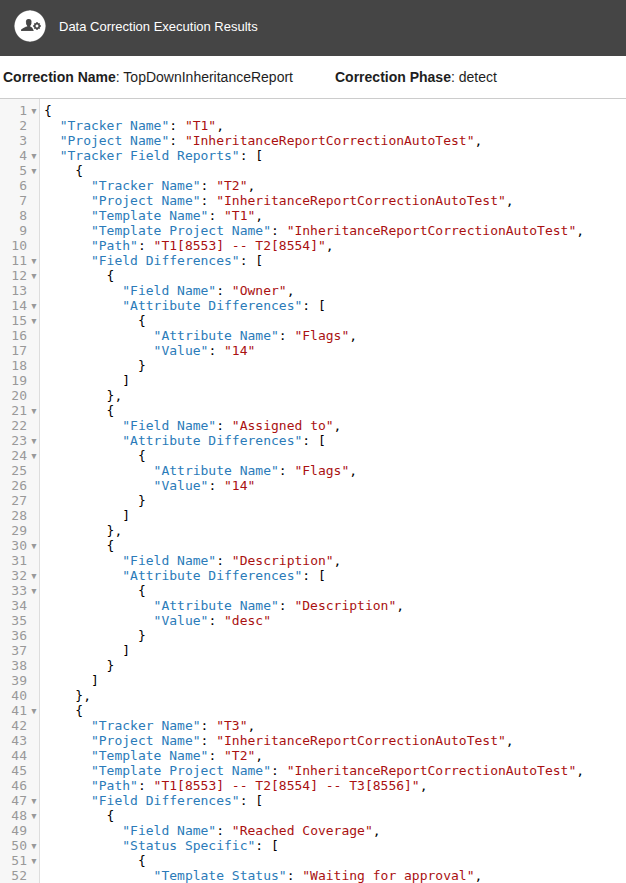
Example screenshot of a top-down inheritance report:
|
|
This example screenshot shows a report that is too large to fit one screen. This means the screenshot only shows part of the report.
|
The report contains the following information:
|
Name
|
Description
|
||
|---|---|---|---|
|
"Tracker Name"
|
The name of the template tracker.
This is the tracker whose ID was entered as the execution parameter.
|
||
|
"Project Name"
|
The name of the project that contains the template tracker.
|
||
|
"Tracker Field Reports"
|
Contains information for differences found in field values between the derived tracker and the template tracker.
|
||
|
"Tracker Field Reports" > "Tracker Name"
|
The name of a derived tracker.
|
||
|
"Tracker Field Reports" > "Project Name"
|
The name of the project that contains the derived tracker.
|
||
|
"Tracker Field Reports" > "Template Name"
|
The name of the template tracker.
|
||
|
"Tracker Field Reports" > "Template Project Name"
|
The name of the project that contains the template tracker.
|
||
|
"Tracker Field Reports" > "Path"
|
The names and IDs of the template tracker and its derived trackers.
The name and ID of the initial template tracker is shown first, then the name and ID of its immediate derived tracker, then the name and ID of the next derived tracker, and so on.
|
||
|
"Tracker Field Reports" > "Field Differences"
|
Lists the differences found in fields between the derived tracker and the template tracker.
|
||
|
"Tracker Field Reports" > "Field Differences"
> "Field Name"
|
The name of the field where a difference was found.
|
||
|
"Tracker Field Reports" > "Field Differences"
> "Attribute Differences"
|
Lists the differences found in the attributes of a given field.
|
||
|
"Tracker Field Reports" > "Field Differences"
> "Attribute Differences" > "Attribute Name"
|
The name of the attribute in a given field where a difference was found.
|
||
|
"Tracker Field Reports" > "Field Differences"
> "Attribute Differences" > "Value"
|
The value of the attribute in the derived tracker.
|
||
|
"Tracker Field Reports" > "Field Differences"
> "Attribute Differences" > "Template Value"
|
The value of the attribute in the template tracker.
|
||
|
"Tracker Field Reports" > "Field Differences"
> "Status Specific"
|
Lists the differences found in the statuses of a given field.
|
||
|
"Tracker Field Reports" > "Field Differences"
> "Status Specific" > "Template Status"
|
The status in the template tracker.
|
||
|
"Tracker Field Reports" > "Field Differences"
> "Status Specific" > "Status"
|
The status in the derived tracker.
|
||
|
"Tracker Field Reports" > "Field Differences"
> "Status Specific" > "Change Type"
|
The type of the status value where differences were found.
For example:
• If the value of Change Type is "default", this means that the default value of the given status for the given field has been changed.
• If the value of Change Type is "allowed", this means that the allowed value of the given status for the given field has been changed.
|
||
|
"Tracker Field Reports" > "Field Differences"
> "Choice Option"
|
Lists the differences found in the choice options of a given field.
|
||
|
"Tracker Field Reports" > "Field Differences"
> "Choice Option" > "Template Name"
|
The name of the choice option in the template tracker.
|
||
|
"Tracker Field Reports" > "Field Differences"
> "Choice Option" > "Name"
|
The name of the choice option in the derived tracker.
|
||
|
"Tracker Field Reports" > "Field Differences"
> "Choice Option" > "Template Description"
|
The description of the choice option in the template tracker.
|
||
|
"Tracker Field Reports" > "Field Differences"
> "Choice Option" > "Description"
|
The description of the choice option in the derived tracker.
|
||
|
"Tracker Field Reports" > "Field Differences"
> "Field Permissions Settings" >
|
Contains the differences found in the permission settings of a given field.
|
||
|
"Tracker Field Reports" > "Field Differences"
> "Field Permissions Settings" > "Access Type"
|
The access type of the permission.
|
||
|
"Tracker Field Reports" > "Field Differences"
> "Field Permissions Settings" > "Field Permissions"
|
Lists the field permissions where differences were found.
|
||
|
"Tracker Field Reports" > "Field Differences"
> "Field Permissions Settings" > "Field Permissions"
> "Status"
|
The status of the given permission.
Shows the status to which the changed permission configuration belongs. For example, if this value is "Verified", this means that the changed permission configuration belongs to the "Verified" status.
|
||
|
"Tracker Field Reports" > "Field Differences"
> "Field Permissions Settings" > "Field Permissions"
> "Field Permission Access"
|
Lists the differences found in a given permission.
|
||
|
"Tracker Field Reports" > "Field Differences"
> "Field Permissions Settings" > "Field Permissions"
> "Field Permission Access" > "Type"
|
The type of the permission where differences were found.
|
||
|
"Tracker Field Reports" > "Field Differences"
> "Field Permissions Settings" > "Field Permissions"
> "Field Permission Access" > "Role Name"
|
The name of the affected role in a permission where differences were found.
|
||
|
"Tracker Field Reports" > "Field Differences"
> "Field Permissions Settings" > "Field Permissions"
> "Field Permission Access" > "Access Permission"
|
The permission setting in the derived tracker.
|
||
|
"Tracker Field Reports" > "Field Differences"
> "Field Permissions Settings" > "Field Permissions"
> "Field Permission Access" > "Template Access Permission"
|
The permission setting in the template tracker.
|
||
|
"Tracker Permission Reports"
|
Contains information for differences found in permissions between the derived tracker and the template tracker.
|
||
|
"Tracker Permission Reports" > "Tracker Name"
|
The name of a derived tracker.
|
||
|
"Tracker Permission Reports" > "Template Name"
|
The name of the template tracker.
|
||
|
"Tracker Permission Reports" > "Project Name"
|
The name of the project that contains the derived tracker.
|
||
|
"Tracker Permission Reports" > "Tracker Permissions"
|
Lists the permissions where differences were found.
|
||
|
"Tracker Permission Reports" > "Tracker Permissions"
> "Name"
|
The name of the role where the permission applies.
For example, if the value of "Name" is "Developer", this means the permission where differences were found affects users with the "Developer" role.
|
||
|
"Tracker Permission Reports" > "Tracker Permissions"
> "Tracker Permission Accesses"
|
The name of the permission where differences were found.
|
||
|
"Tracker Permission Reports" > "Tracker Permissions"
> "Template Permission Access Value"
|
The value of the permission for the given role in the template tracker.
|
||
|
"Tracker Permission Reports" > "Tracker Permissions"
> "Tracker Permission Access Value"
|
The value of the permission for the given role in the derived tracker.
|