RemoveInvalidReferenceFilters
 |
Corrections related to reference filters and tracker views are strongly connected, and each correction relies on inconsistencies being fixed by previous corrections.
When using corrections related to reference filters and tracker views, it is recommended to start with this correction.
For additional information, see Corrections for Reference Filters and Tracker Views.
|
 |
For a general, step-by-step guide on using the corrector module, see Using the Data Inconsistency Corrector Module.
|
Description
This correction detects invalid reference filters, that is, reference filters that have configuration errors. In addition, this correction also detects duplicated reference filters applied to the same field. Invalid reference filters are automatically deleted. Duplicated reference filters require manual input in the report table to be deleted.
A reference filter is considered invalid if at least one of the following properties stored in the object_reference_filter table is invalid:
• type_id
• qualifier
• domain_type
• domain_id
• filter_id
• flags
If this correction detected an issue with a reference filter, but all of the above properties of the reference filter are valid, then that reference filter is considered duplicated.
Creating the Report Table
To create the report table:
1. Click Detect. Invalid and duplicated reference filters are detected, and the report table is created.
The action column of the generated report table may show the following values:
• DELETE—The reference filter is invalid and marked for deletion. Manual input is not required.
• Input required: Select filter to keep—The reference filter is duplicated and manual input is required.
Preparing the Report Table for Restore
Before using Restore, manual input must be entered in the report table.
To prepare the report table:
1. Find entries in the report table where the action column of the report table has the following value:
Input required: Select filter to keep
This means the correction requires manual input to determine which reference filter to keep and which reference filter to delete.

2. Change Input required: Select filter to keep to the index number of the selected reference filter.
The index number is the number of the selected reference filter in the JSON array contained in the duplicate_reference_filters column of the report table. Indexing starts at 1.
For example, change Input required: Select filter to keep to 2 to keep the 2nd reference filter listed in the duplicate_reference_filters column and delete the other reference filters.
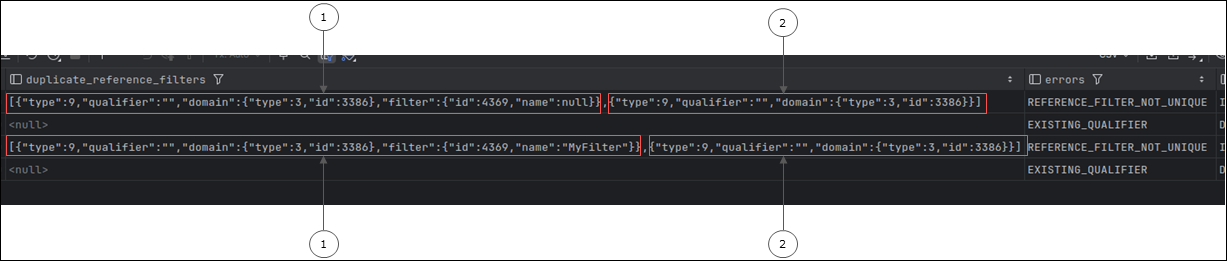
1. The reference filter in the duplicate_reference_filters column with index number 1.
2. The reference filter in the duplicate_reference_filters column with index number 2.
After the report table is prepared, you can use Restore. Clicking Restore performs the actions selected during preparation.
Report Table
The report table for the RemoveInvalidReferenceFilters correction is named remove_invalid_reference_filters_report_table. It contains the following information:
|
Column
|
Description
|
||
|---|---|---|---|
|
id
|
The ID number for the detected issue.
Detected issues are numbered, starting at 1.
|
||
|
object_id
|
The global ID of the field to which the invalid or duplicated reference filter is applied.
|
||
|
revision
|
If the invalid or duplicated reference filter is contained in the object_revision table1, this shows the revision number.
|
||
|
reference_filter_source
|
Shows the table that contains the invalid or duplicated reference filter. The invalid reference filter can be contained in the following tables:
• object_reference_filter—If the item that contains the field with the invalid reference filter has no revisions.
• object_revision—If the item that contains the field with the invalid reference filter has at least one revision.
|
||
|
type_id
|
Shows the type of reference contained in the field with the invalid or duplicated reference filter. For example, a type_id of 9 means that the field refers to Work/Config items.
|
||
|
qualifier
|
The ID of the type of the tracker that contains the item that is being referenced by the invalid or duplicated reference filter.
This has a valid value if the domain_type is 2.
If the domain_type is 3, this is is invalid and has the <null> value.
|
||
|
domain_type
|
Shows type of item that is being referenced by the field that contains the invalid or duplicated reference filter. The possible values are the following:
• 2—The invalid or duplicated reference filter is referencing an item in a specific project.
• 3—The invalid or duplicated reference filter is referencing an item in a specific tracker.
|
||
|
domain_id
|
Shows the global ID of the project or tracker that is being referenced by the field with the invalid or duplicated reference filter.
If the domain_type is 2, this is the ID of a project.
If the domain_type is 3, this is the ID of a tracker.
|
||
|
filter_id
|
If the invalid or duplicated reference filter has a tracker view, that is an additional conditional filter, this is the ID of that tracker view.
|
||
|
flags
|
If a status filter is applied using the invalid or duplicated reference filter, this shows the status of the references contained in the field. For example, this can indicate references in the Open status.
|
||
|
duplicate_reference_filters
|
If the detected reference filter is valid but duplicated, this contains all of the duplicates of the reference filter, in JSON format. In this case, the action column contains the following value:
Input required: Select filter to keep
Manual input is required to select which reference filter is kept.
Enter the index number of the selected reference filter. That filter is not deleted by this correction. The index number is the number of the selected reference filter in the JSON array. Indexing starts at 1.
|
||
|
errors
|
Contains error identifiers separated by commas.
If the detected reference filter is invalid, it is deleted without manual input. In this case, the following error identifiers are possible:
• MISSING_TYPE_ID—The related type_id is <null>.
• MISSING_DOMAIN_TYPE—The related domain_type is <null>.
• MISSING_DOMAIN_ID—The related domain_id is <null>.
• MISSING_QUALIFIER—The related qualifier is <null> or empty, but should have a valid value based on the domain_type.
• EXISTING_QUALIFIER—The related qualifier is not <null> or empty, but should be <null> or empty based on the domain_type.
• INVALID_TRACKER_DOMAIN—The related domain_type is 3, but the domain_id does not belong to a tracker.
• INVALID_PROJECT_DOMAIN—The related domain_type is 2, but the domain_id does not belong to a project.
• INVALID_TRACKER_VIEW_FILTER—The related filter_id does not belong to a tracker view.
If the detected reference filter is valid but duplicated, manual input is required in the action column. In this case, the following error identifier is shown:
• REFERENCE_FILTER_NOT_UNIQUE—The reference filter is valid but duplicated.
|
||
|
action
|
Shows the action to be performed when clicking Restore. Depending on the type of issue, manual input is sometimes required. The following values are possible:
• DELETE—Manual input is not required. Clicking Restore deletes the related reference filter.
• Input required: Select filter to keep—Manual input is required. Clicking Restore deletes all related reference filters, except the reference filter selected here.
The required manual input is the index number of the selected reference filter. The index number is the number of the selected reference filter in the JSON array contained in the duplicate_reference_filters column. Indexing starts at 1.
For example, change Input required: Select filter to keep to 2 to keep the 2nd reference filter listed in the duplicate_reference_filters column and delete the other reference filters.
|
||
|
flag
|
The flagged status of the issue, which can be 0 or 1. Clicking Restore corrects issues with a flagged status of 1.
For more information, see Flagging and Processing Inconsistencies.
|
||
|
processed
|
The processed status of the issue, which can be 0 or 1.
For more information, see Flagging and Processing Inconsistencies.
|
1 Changes to a field are stored in the object_revision table. The most recent revision, that is the revision with the highest revision number, is called the head revision.