DeletedMandatoryExceptList
 |
For a general, step-by-step guide on using the corrector module, see Using the Data Inconsistency Corrector Module.
|
Description
This correction fixes empty Mandatory in Status lists in tracker field configurations. This is done by comparing the head revision of the tracker field, that is the newest or current revision, to earlier revisions until a revision is found where the Mandatory in Status list was not empty. When such a revision is found, this correction sets the detected empty Mandatory in Status lists to be the same as the most recent non-empty Mandatory in Status list.
The Mandatory in Status list is a tracker field configuration for some fields. This configuration option sets statuses where the field is mandatory, that is, the field must be configured and not be empty in the listed statuses. For example, this setting can configure the field to be mandatory in the New and Suspended statuses, or in all statuses except the New and Suspended statuses.
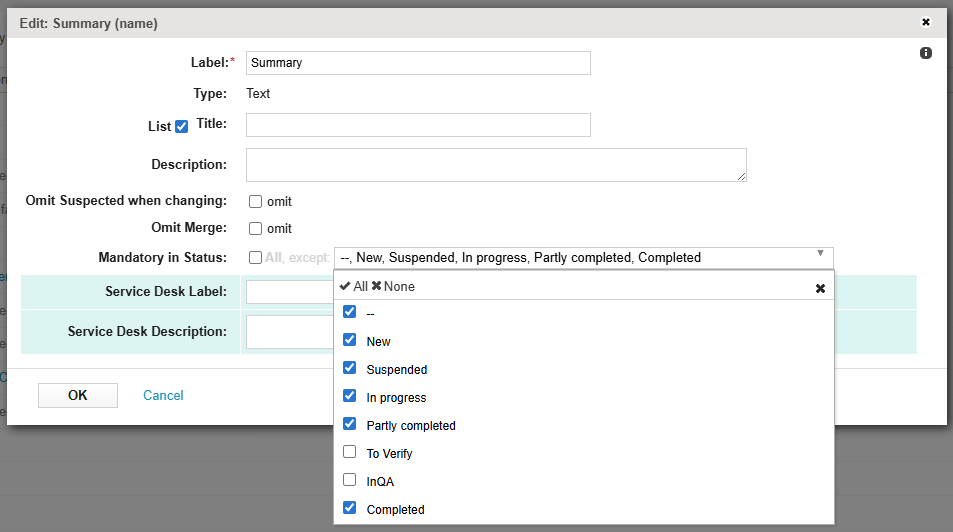
Errors can sometimes cause the Mandatory in Status list to be lost, that is, to be deleted or to be set to empty when it should not be empty. This is different from cases when the list was never configured at all.
This correction checks earlier revisions of the tracker field to find a revision where the Mandatory in Status list was configured, that is, when it was not empty. This indicates that the list was set to empty as a result of an error. The correction then sets the list in the newest revision to be the same as the list in the most recent revision where the list was not empty.
Clicking Detect checks for empty Mandatory in Status lists in tracker field configurations where an earlier revision had a non-empty Mandatory in Status list and creates the report table.
Clicking Restore performs the action specified in the action column of the report table, creating a new revision with the changes. This requires manual input in the report table.
Creating the Report Table
To create the report table, click Detect.
This detects empty Mandatory in Status lists in tracker field configurations where an earlier revision had a non-empty Mandatory in Status list. The report table is created.
Manual input must be entered in the action column of the generated report table.
By default, the action column is set to NO_ACTION. Manual input must be entered to decide how the correction should handle the detected issues.
Preparing the Report Table
Before using Restore, manual input must be entered in the report table.
To prepare the report table, enter a valid input into the action column for each detected issue.
The following inputs are valid in the action column:
• NO_ACTION—Clicking Restore does not affect this issue. This is the default value for this column.
• UPDATE_REQUIRED—Clicking Restore updates the Mandatory in Status list in the head revision, changing only whether the listed statuses are flagged as mandatory.
The contents of the list are not changed. Only the required flag of each listed status is updated to match the older revision.
For example, if both lists contain the New status, but this status is required in the older revision, and not required in the head revision, Restore updates the New status in the head revision to be required.
• UPDATE_LIST—Clicking Restore updates the Mandatory in Status list in the head revision, changing only the contents of the list.
The required flag of each listed status is not changed. Only the list of statuses is updated to match the older revision.
For example, if the Mandatory in Status list in older revision contains the New and Suspended statuses, but the Mandatory in Status list in head revision only contains the New status, Restore updates the list in the head revision to contain New and Suspended.
• UPDATE_BOTH—Clicking Restore updates the Mandatory in Status list in the head revision, changing both the contents of the list and the required flag of each status in the list to match the older revision.
After the report table is prepared, Restore performs the actions selected during preparation.
Report Table
The report table for the DeletedMandatoryExceptList correction is named deleted_mandatory_except_list_correction_report. It contains the following information:
|
Column
|
Description
|
||
|---|---|---|---|
|
id
|
The ID number for the detected issue.
Detected issues are numbered, starting at 1.
|
||
|
project_id
|
The ID of the project that contains the tracker where the issue was detected.
|
||
|
project_name
|
The name of the project that contains the tracker where the issue was detected.
|
||
|
tracker_id
|
The ID of the tracker that contains the field where the issue was detected.
|
||
|
tracker_name
|
The name of the tracker that contains the field where the issue was detected.
|
||
|
field_object_id
|
The global ID of the field where the issue was detected.
This ID is used to differentiate between copies of the same field. Copies of the same field have the same field_reference_id, but different field_object_ids.
|
||
|
field_name
|
The name of the field where the issue was detected.
|
||
|
revision
|
The head revision number.
|
||
|
description
|
Text field containing the complete configuration of the field in the head revision, including the Mandatory in Status list, in JSON format.
|
||
|
current_required
|
A flag that shows whether the field is required in the head revision. The following values are possible:
• true—The field is required in all statuses, except in the statuses set in the Mandatory in Status list.
• false—The field is not required, except in the statuses set in the Mandatory in Status list.
|
||
|
old_required
|
A flag that shows whether the field is required in the older revision. The following values are possible:
• true—The field is required in all statuses, except in the statuses set in the Mandatory in Status list.
• false—The field is not required, except in the statuses set in the Mandatory in Status list.
|
||
|
old_mandatory_in_status
|
The IDs of the statuses in the Mandatory in Status list of the identified older revision.
|
||
|
action
|
Manual input must be entered here to decide how the correction should handle the detected issues. By default, this is set to NO_ACTION.
The following inputs are valid:
• NO_ACTION—Clicking Restore does not affect this issue.
• UPDATE_REQUIRED—Clicking Restore updates the Mandatory in Status list in the head revision, changing only whether the listed statuses are flagged as mandatory.
The contents of the list are not changed. Only the required flag of each listed status is updated to match the older revision.
For example, if both lists contain the New status, but this status is required in the older revision, and not required in the head revision, Restore updates the New status in the head revision to be required.
• UPDATE_LIST—Clicking Restore updates the Mandatory in Status list in the head revision, changing only the contents of the list.
The required flag of each listed status is not changed. Only the list of statuses is updated to match the older revision.
For example, if the Mandatory in Status list in older revision contains the New and Suspended statuses, but the Mandatory in Status list in head revision only contains the New status, Restore updates the list in the head revision to contain New and Suspended.
• UPDATE_BOTH—Clicking Restore updates the Mandatory in Status list in the head revision, changing both the contents of the list and the required flag of each status in the list to match the older revision.
|
||
|
flag
|
The flagged status of the issue, which can be 0 or 1. Clicking Restore corrects issues with a flagged status of 1.
For more information, see Flagging and Processing Inconsistencies.
|
||
|
processed
|
The processed status of the issue, which can be 0 or 1.
For more information, see Flagging and Processing Inconsistencies.
|