Analyzing the Item
The Requirement Assistant analyzes the items against the INCOSE rules.
Click Analyze in the editor to analyze the item.
After the analysis, the Requirement Assistant provides a list of issues detected in the item, as shown in the next image.
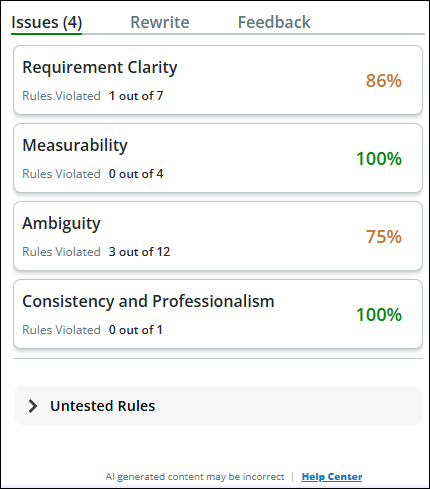
The issues are classified into two categories:
• Tested Rules—Lists every rule that was used for analyzing the item, along with the Explanation, Tip, Example, and Source Criteria.
 |
PTC collects positive, negative, and detailed feedback from the users. If your administrator has selected the Allow detailed analytics checkbox while integrating Codebeamer with PTC SaaS platform, PTC will get detailed tracker item information when you send the feedback.
|
• Untested Rules—Specifies a list of rules against which the item has not been analyzed by the Codebeamer AI Requirement Assistant. PTC recommends that you review the items against these rules and ensure that they are met.
|
|
The Analyze feature currently supports and is certified for German and English languages. Other languages are not supported.
|