Integrate Codebeamer with the PTC SaaS Platform
To use PTC SaaS Platform services, the configuration requirements differ for PTC-hosted and customer-hosted deployments and must be applied accordingly.
• For PTC-hosted deployments, configuring the service principal is mandatory. This configuration enables access to AI services from the PTC SaaS platform, and AI functionality will not work without it.
• For customer-hosted deployments, this configuration is optional and is only required if you want to use the platform analytics.
Configure Codebeamer and PTC Admin Center connection as follows:
1. Log in into Codebeamer as a system administrator using a web browser.
2. Open the URL {{CODEBEAMER_BASE_URL}}/sysadmin/aiAtlasConfiguration.spr. For example, https://localhost:8080/sysadmin/aiAtlasConfiguration.spr.
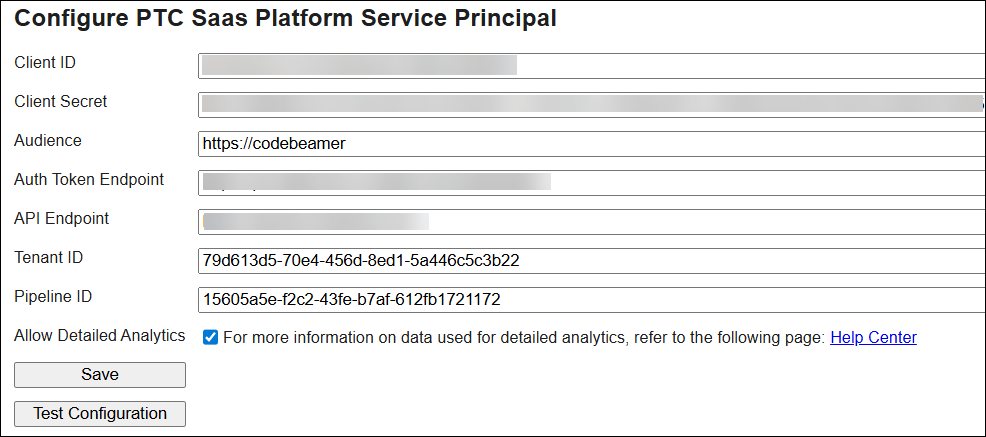
3. To configure the service principal, enter the values for the following parameters:
|
Parameter
|
Values
|
Description
|
|
|---|---|---|---|
|
Client ID
|
Provided while creating the service principal.
|
You can find this value in the OAuth 2.0 Credentials tab of the service principal details page on the PTC Admin Center.
|
|
|
Client Secret
|
Provided while creating the service principal.
|
You can find this value in the OAuth 2.0 Credentials tab of the service principal details page on the PTC Admin Center.
|
|
|
Audience
|
For PTC-hosted Codebeamer AI and Codebeamer+
https://codebeamer
|
For PTC-hosted Codebeamer AI and Codebeamer+, you can find this value in the OAuth 2.0 Credentials tab of the service principal details page on the PTC Admin Center.
|
|
|
For customer-hosted deployment
https://ptc-analytics
|
For customer-hosted deployment, use https://ptc-analytics value if you want to use PTC analytics service.
|
||
|
Auth Token Endpoint
|
https://ptc-atlas-prod.us.auth0.com/oauth/token
|
Access token for the Codebeamer API.
|
|
|
API Endpoint
|
For Customer-hosted deployments
https://api.portal.ptc.com
|
For customer-hosted deployments, use the retrieved access token to call your API.
|
|
|
For PTC-hosted deployments
<preferred subdomain>.ai.codebeamer.com
|
For PTC-hosted deployments, use a unique URL for each Codebeamer instance. PTC provisions a separate AI search environment for each instance. Specify a preferred subdomain name in your request to provision the Codebeamer AI environment. This configuration is required for the Indexing service and Search Assistant features to function correctly.
|
||
|
For Codebeamer+
<instance name>.ai.codebeamer.com
|
For Codebeamer+, use a unique URL for each Codebeamer instance. PTC provisions a separate AI search environment for each instance. This configuration is required for the Indexing service and Search Assistant features to function correctly.
For more information, see Environment Types, URLs, and Access.
|
||
|
Tenant ID
|
14ae5d85-e563-44fe-bed1-8ff7975ac96c
|
Identifies the PTC Admin Center tenant (namespace) that owns the analytics data.
|
|
|
Pipeline ID
|
e98ef4f3-7b5d-4048-ad13-effd487f1b79
|
Identifies the specific ingest pipeline within the tenant.
|
4. Select the Allow Detailed Analytics checkbox if you want to send tracker item information in the feedback. If this option is not selected, only user feedback and feature usage patterns are sent to PTC for analysis. To know more about sending feedback, see Sharing Feedback.
PTC collects positive, negative, and detailed feedback from the users. If your administrator has selected the Allow Detailed Analytics checkbox, PTC will get detailed tracker item information when you send the feedback.
5. Click Save.
6. Click Test Configuration for a ping test to the connection services. The result message is OK for successful connections, or else Failed!.
 |
In a cluster environment, make sure that Config.json exists on all instances. When running Codebeamer in a container environment, mount this directory as a volume.
|
This configuration uses the existing Codebeamer Config.json and has the service principal SecretKey encrypted.