Initializing Fields of New Downstream References
To create a Downstream Reference for a requirement click  and select the Test Cases tracker as shown in the image below.
and select the Test Cases tracker as shown in the image below.
Copy Attachments
You can copy attachment from the source item to the Downstream Reference item.
Check the Copy Attachments when creating a new Referring Item option in the User Preferences General Settings.
If you select Always ask, a confirm overlay is displayed while you create a downstream reference, where you can decide whether you want to copy the attachments from the source item or not. Select Automatically copy or Do not copy to copy or discard the attachments without asking.
Initializing fields of New Downstream references
The function is based on the defined relations between the trackers via reference fields:
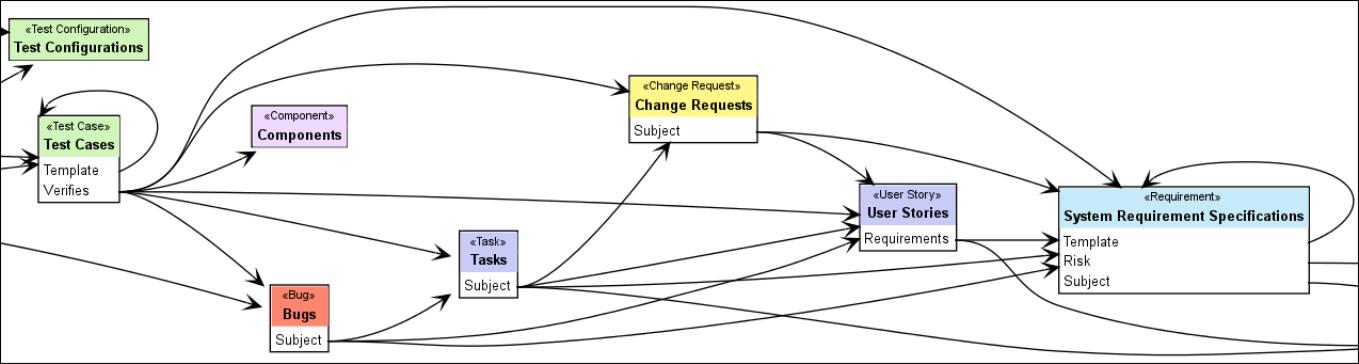
The example Tracker Dependency Diagram above shows references to System Requirement Specifications from the following:
• User Stories (Requirements).
• Change Requests (Subject).
• Bugs (Subject).
• Tasks (Subject).
• Test Cases (Verifies).
• System Requirement Specifications itself as a template.
For each downstream reference, there is an appropriate entry in the New Referring Item menu of the referenced target tracker.
In the previous versions of Codebeamer, the reference field such as Verifies (subject), that establishes the relation between the new item and the item where New Referring Item was called from, was automatically available, along with the following:
• Assigned to.
• Release.
In the latest Codebeamer versions, you can define rules on how to initialize other fields of the New Referring Item with values taken from fields of the referenced item.
• In a configuration file named my-NewReferringItem.properties. Create this if it does not exist.
• In ~/CB-.../tomcat/webapps/cb/WEB-INF/classes/.
The file my-NewReferringItem.properties is a Java Properties file.
The key of each entry is a String of the form: Tracker[@Project].references->Tracker[@Project] that identifies:
• A Tracker, identified either by tracker name or tracker type name:
◦ Bug
◦ Change Request
◦ Component
◦ Contact
◦ Platform
◦ Release
◦ Requirement
◦ Risk
◦ Task
◦ Team
◦ Testcase
◦ Testconf
◦ Testset
◦ Testrun
◦ Usecase
◦ User Story
• Since Codebeamer-8.0, you can also use these tracker type names:
◦ Item, as a placeholder for any type of work/configuration item
◦ Issue, as a placeholder for any type of work items
◦ Configuration Item, as a placeholder for any type of configuration items
• Optionally in (@) the Project with the specified project name or in a project with the specified category,
• References using a reference field that is identified by a name or by internal attribute or a property name.
• Another Tracker that is identified by tracker name or tracker type name.
• In (@) the Project with the specified project name or in a project with the specified category.
If a Tracker is specified without a Project, then this means trackers with this name or stereotype are in any project.
Examples for Tracker:
|
Tracker
|
Refers to
|
|---|---|
|
Bug
|
Any tracker of type Bug in any project.
|
|
Bug@Test
|
Any tracker of type Bug in a project whose name or category is Test.
|
|
Bugs@Codebeamer
|
The Bugs tracker in the Codebeamer project.
|
Examples for a new Test case referring to a System Requirement Specification as Verifies subjects:
• Test\ [email protected]>System\ Requirement\ Specifications@Test This only applies for creating new items in the Test Cases tracker of the Test project, referring to items of the System Requirement Specifications tracker (in the same project) via the reference field named Verifies subjects.
• Test\ Cases.Verifies->System\ Requirement\ Specifications This applies for creating new items in the Test Cases tracker of any project, referring to items of the System Requirement Specifications tracker in any project via the reference field named Verifies subjects.
• Testcase.subjects->Requirement This is the most generic form. It applies for all trackers of type Test case in any project, referring to items of trackers of type Requirement in any project via the subjects field.
Blanks within the tracker/project/field names must be escaped, for example Customer Requirement Specification must be written as: Customer\ Requirement\ Specification.
Configurations via project names, tracker names and/or reference field names have precedence over configurations via project categories, tracker types and/or reference field property names.
If multiple configurations are applicable, they are applied in their order of precedence.
If a field has a default value, this default value will always have precedence over any setting in my-NewReferringItem.properties.
The value of each entry in my-NewReferringItem.properties is a list of field initialization (Field = value), separated by semicolon (;):
• Field identifies a field in the item to initialize left Tracker in the identifier/key and can be either:
◦ The field property or attribute name preferred.
◦ Or the field label, but only:
▪ If the label only consists of alphanumeric characters ([A-Z],[a-z],[0-9]), ‘$’(dollar sign) and ‘_’ (underscore),
▪ Does not start with digits 0-9.
▪ And does not contain HTML markup
▪ For example: Color is allowed, but Background color, Best.-Nr., Estimated<br/>Effort or <b>v</b><sub>max</sub> v max are not allowed as field identifiers
◦ Or the RESTful field name lower camel case of field label, with all HMTL markup and not allowed characters removed.
▪ For example: Color, Background color, Best.-Nr., Estimated<br/>Effort or <b>v</b><sub>max</sub> can be referenced as color, backgroundColor, bestNr, estimatedEffort and vmax
• The value is a Unified Expression Language (EL) expression, that defines the initialization value for this field. See Computed Fields for more information.
◦ Within the value expression you can refer to the value of fields from the referenced item like the Tracker after -> in the identifier/key. See the rules for Field identifiers above.
◦ Semicolons (;) within a value expression must be escaped as \;
◦ Backslashes (\) within the value expression must be escaped as
\\
, For example, a Wiki Markup Newline (
\\
) must be written as (
\\\\
)
Default NewReferringItem.properties:
Item.*->Item: \
	versions   = versions; \
	assignedTo = assignedTo


Requirement.subjects->Requirement: \
	categories    = categories; \
	namedPriority = namedPriority; \
	severities    = severities; \
	name          = name; \
	description   = fn:concat("Refinement of: \\\\[<<description>>|ISSUE:", id, "]"); \
	Color         = customField[0]; \
	Risk          = choiceList[1]


Testcase.subjects->Requirement: \
	categories    = categories.{category|category.name}; \
	namedPriority = namedPriority; \
	name          = fn:concat("Test ", name); \
	description   = fn:concat("This is to be tested: \\\\[<<description>>|ISSUE:", id, "]");
For better readability, definitions in the above example have been broken up into multiple lines. Therefore the “\” at the end of each line is necessary, to indicate that this definition continues on the next line. This means the following:
• The target fields of the value assignments (field = value) belong to the left tracker in the definition key.
• The source fields referenced in the value expression belong to the tracker specified right of -> in the definition key.
 |
Copying static choice field options between different tracker types works only when the choice option IDs are identical in both trackers. Therefore, assign choice options directly only if you are certain that their IDs match in the source and target trackers. For example, namedPriority:
|
Testcase.subjects->Requirement: \
    namedPriority = namedPriority;
Otherwise you should assign choice options by name:
Testcase.subjects->Requirement:\
    categories = categories.{category|category.name};
So, a New Referring Item in the Test Cases tracker, for the System Requirement Specification in the above displayed image would be initialized as:
Since Codebeamer-8.0, the initialization of assignedTo and versions is also done via this mechanism and not longer hard coded. This allows overriding the initialization.
For example, my-NewReferringItem.properties:
System\ Requirement\ Specifications.subjects->Customer\ Requirement\ Specifications:\
        assignedTo = null
Will override default NewReferringItem.properties:
Item.*->Item: \

	...

	assignedTo = assignedTo
 |
To override an initialization of a field, to not initialize this field, assign the value null.
|