Sessions Page
The Sessions page provides information about the number of sessions, session duration, and the type of session exits for users over a specific period.
You can access the Sessions page from the dashboard by using either of the following methods:
• From the Go to page list, select Sessions.
• From the MODELING SESSIONS gadget, click MODELING SESSIONS.
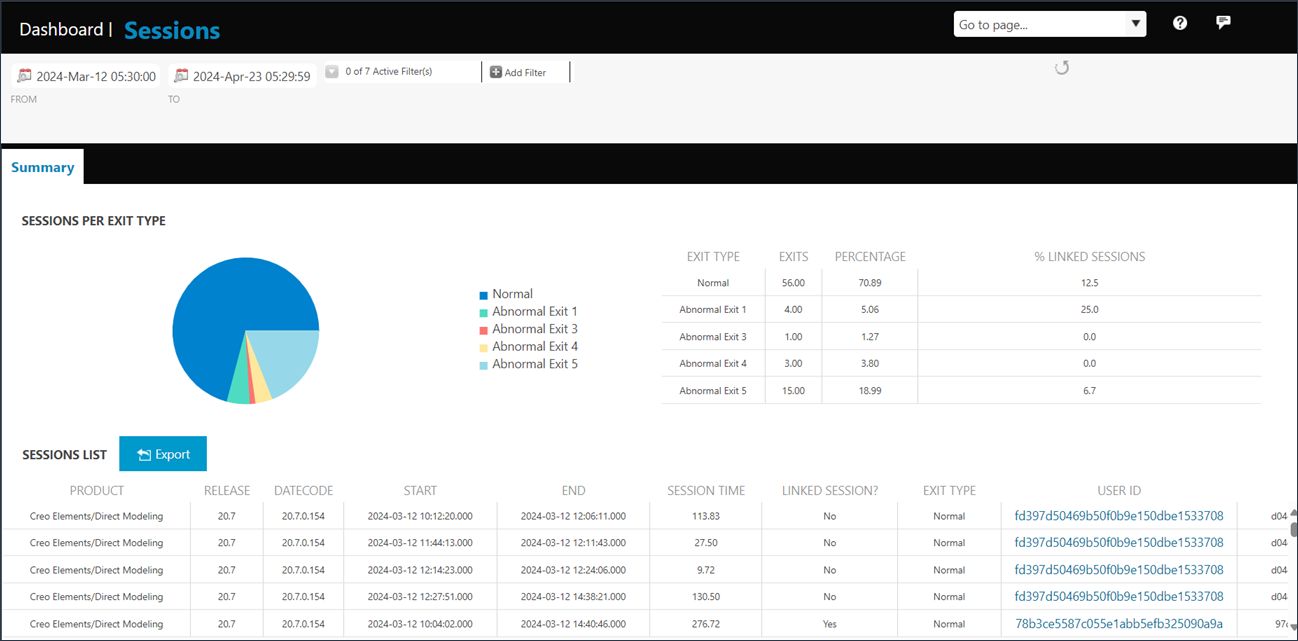
The SESSIONS PER EXIT TYPE gadget displays the percentage of normal and abnormal exits. Abnormal Exits is the term used to refer to all exits that are not normal. Abnormal exits range from Abnormal Exit 1 to Abnormal Exit 7. Use this gadget as a guide to initiate deeper investigations. Place the pointer on the pie chart to see the percentages of normal exits and abnormal exits. The table next to the pie chart also provides the details of normal and abnormal exits. The percentage of sessions that were linked to Creo Elements/Direct Model Manager during the exit is also listed.
The SESSIONS LIST table provides user details such as ID, session time, exit type, and so on, during the specified date range.
Use Add Filter to filter session data over a selected period in the SESSIONS LIST table.
In the SESSIONS LIST table you can find the details of the Creo Elements/Direct Modeling applications, their releases and datecodes used on the machine. You can also see if a session was linked to Creo Elements/Direct Model Manager.
The details of Creo Elements/Direct Modeling sessions used on this machine, exit type, and the ID of the user who worked on each session are also available. Click a USER ID to open the Users Page.