Module Usage Details Page
The Module Usage Details page provides detailed information about the usage of Creo Elements/Direct Modeling modules. It lists all the functionality tracked by Creo Elements/Direct Modeling Performance Advisor. In the Go to page list, select Module Usage Details to view this information.
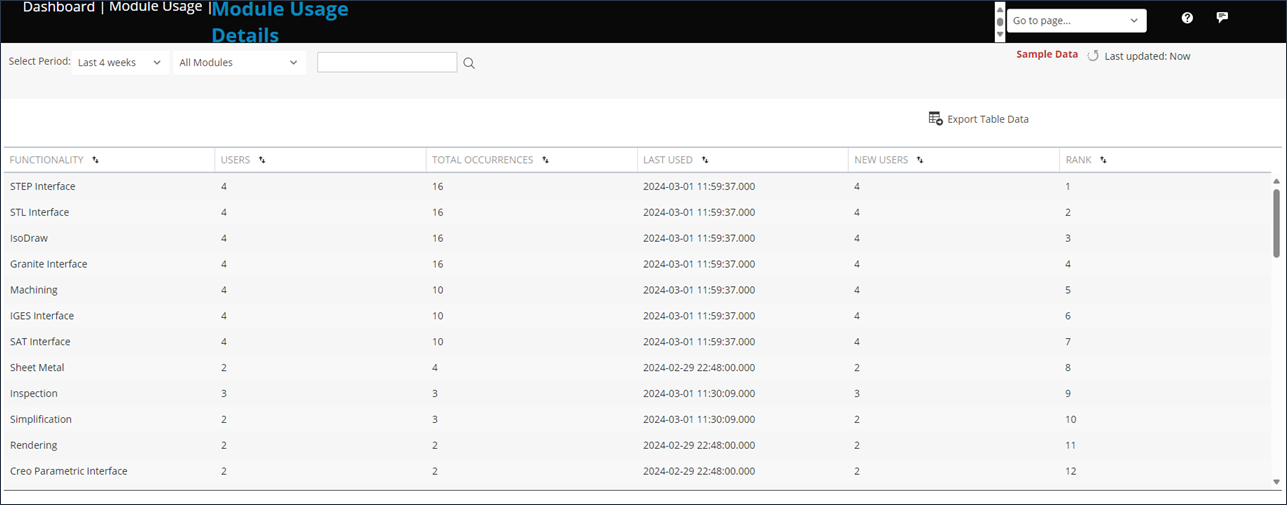
By default, the information for last 4 weeks appears. You can change the time span.
You can configure the list to show:
• All Modules—Displays information for all modules in Creo Elements/Direct Modeling. If you do not use a particular Creo Elements/Direct Modeling functionality, it is still listed in the table with all fields set to 0 and LAST USED field set to ---.
• Used Modules—Displays information for Creo Elements/Direct Modeling modules that have been used in the specified time period.
• Not Used Modules—Displays information for Creo Elements/Direct Modeling modules that have not been used in the specified time period.
The configured display option is saved. The next time you visit the Module Usage Details page, information is displayed according to your selection.
The table on this page specifies the following:
• FUNCTIONALITY—The names of the Creo Elements/Direct Modeling modules.
• USERS—The number of all users who have used the module one or more times in the specified time period.
• NEW USERS—The number of new users. The new users are the users who have never used the module before the specified time period.
• TOTAL OCCURRENCES—The number of times the module was used.
• LAST USED—The date of the session in which the module was last used
Click Export Table Data to export the data displayed on the page to a .csv file for additional analysis.