|
Pro/ENGINEER Wildfire 2.0 Interface
There are 3 important components of the main Pro/ENGINEER Wildfire 2.0 interface:
- Navigator
- Web Browser
- Main Interface
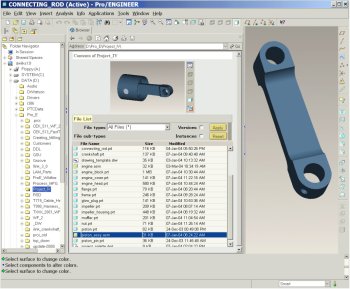
Pro/ENGINEER Wildfire 2.0 interface |
Navigator
- Folder Navigator (left of the screen)
- Allows you to browse folders on your machine.
- A collapsible panel.
Web Browser
- File List & Preview Window (middle of the screen)
- Select a folder in the Folder Navigator to view its contents.
- Select a model to preview it.
- A collapsible panel.
- Browse Internet
- You can also use the browser to view web sites or html pages.
Main Interface
- Graphics Window (gray portion of screen)
- Create Parts, assembles, and drawings in this window.
- Main Menu (top of the screen)
- This pull-down menu has common menu options such as File, Edit, Insert, Tools, and Help.
- Main Toolbar (top of the screen)
- A toolbar containing common file, undo/redo, and viewing icons.
- Feature Toolbar (right of the screen)
- A toolbar containing icons to start feature tools.
|


 Previous
