Previous Page 41 of 89 Next
Information

Chamfer Dimension Schemes

Chamfer dimension schemes can be specified using the dashboard, or by right-clicking on the model.

Task 2-12. Create a chamfer, experimenting with dimensioning options.

  1. Start the Chamfer Tool from the feature toolbar.
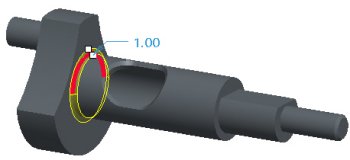
    1. Select the edge shown in the following figure.
    2. Drag the chamfer distance to 1.


Selecting an Edge

  1. Click Saved View List from the main toolbar and select LEFT.
    1. Zoom in near the chamfer drag handles, and drag the chamfer distance to 2.
    2. Right-click and select D1 x D2.
    3. Notice the chamfer dimensioning scheme has updated in the dashboard, and two drag handles are now available.


Changing Dimension Scheme

Previous Home Next