 |
|
|
Rib Feature Depth Options
Rib features may use a one side or both sides depth. |
|
| Task 2-9. Create a Rib from an existing sketch, for strength purposes. |
- Select the Insert Indicator
 from the model tree. from the model tree.
- Right-click and select Cancel, then click Yes.
- Click Saved View List
 from the main toolbar and select RIB_VIEW. from the main toolbar and select RIB_VIEW.
- Start the Rib Tool
 from the feature toolbar, and select the RIB_SKETCH. from the feature toolbar, and select the RIB_SKETCH.
- Drag either thickness handle to a width of 2.
- Click Complete Feature
 from the dashboard. from the dashboard.
 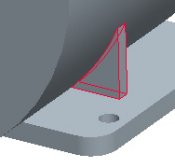
Creating a Rib |
|


 Previous

