
Electronic Services from PTC Customer Service
Offering access to the following Customer Service resources 24 hours a day, 7 days a week.Technical Support:
- Log a new call
- Check the status of an existing call or SPR
- Find the answer in our Knowledge Database
- Analyze the benefits of upgrading to a newer version of software
- Learn about new software issues as soon as they're discovered

License Management:
- Configure and install a new license
- Receive a copy of your existing license pack
- Create your own Site Detail report
Order Management:
Pro/CALL LOGGER
- Open Calls with PTC Customer Service via the WWWPro/CALL LOGGER EXPRESSOpen calls with PTC Customer Service anytime, anywhere Call numbers are provided immediately upon submission of information Upload relevant data directly from your Web browser
- Quickly Open Calls with PTC Customer Service via the WWWPro/Call Tracker and Pro/SPR TRACKERSame functionality as Pro/CALL LOGGER without the guidance of the Wizard. Allows you to open a new call with a simple, single screen interface Open calls with PTC Customer Service anytime, anywhere Call tracking numbers are provided immediately upon submission of information
Upload relevant data directly from your Web browser
- Check on the status of your company's Calls or SPRsView the status of all your Calls and SPRs placed with PTC Customer Service - anytime, anywhere Contact Technical Support Engineers or License Management Representatives directly by adding comments to calls - Customer Service personnel are automatically notified when you add comments Determine the corrected PTC software release and version for your SPRs Utilize the robust searching and reporting capabilities to track multiple issues View your search results in an easy to read tabular format View details for Calls and SPRs including: Open Date, Status, Issue Description and Resolution

PTC Knowledge Base - Over 13,000 Technical Documents
- Suggested Techniques, Frequently Asked Questions, Technical Application Notes and TPIsTechnical information spanning all PTC software products - organized by functional area with powerful searching and browsing capabilities Step-by-Step instructions including color graphics for performing common design tasks compiled from the PTC Customer Service Database
Answers to the most commonly asked questions compiled from the PTC Customer Service Database
Pro/TAN TRACKER
- Planning to upgrade to a newer version of software? Now you can make an informed decision.
View descriptions which explain full functionality of PTC software products Examine and implement Alternate Techniques for common software issues Search and report on issues filed or resolved in specific versions or releases of PTC software products
Example of Pro/TAN TRACKER search result

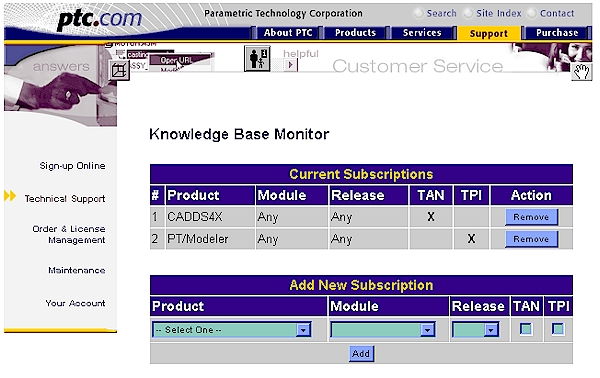
- Knowledge Base Monitor
- Now you can be informed about issues dealing with PTC software as soon as they're discovered.
The new Knowledge Base Monitor allows you to subscribe to multiple Product and Module combinations. When we detect a match between a TAN or TPI and your predefined criteria, PTC will send you notification via Email with a link to the new or modified Technical Document. Go to Technical Support and click on Online Support Applications.
Example of the Knowledge Base Monitor subscription form
License Management:
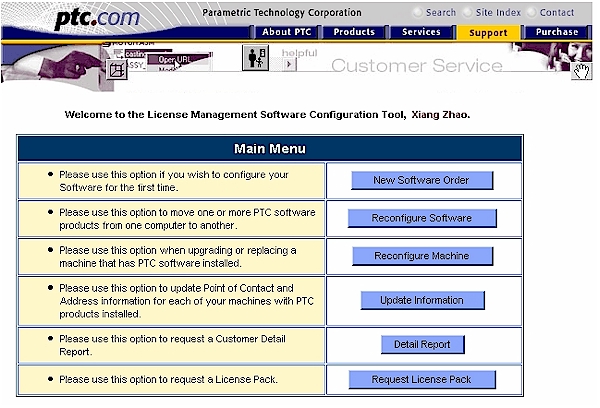
Software Configuration Tool - New Software Order
- Customers can install and configure new products without the assistance of an LM representative.License Packs are delivered via Email within minutes. Ability to create a new hardware definition if installing on a new machine.
Software Configuration Tool - Request License Pack
- Customers can request a copy of a license pack for a product already installed.Software Configuration Tool - Detail Report
- License Packs are delivered via Email within minutes.
- Request a report of all licenses for your company
- Reports show all licenses, products and configurations
- can be imported into Excel using a template which we provide
- Reports are delivered via Email within minutes.
Order Management:
Request Software Updates via the WWW
- Need the latest version of software?Shipment TRACKER
- Obtain the most recent version of PTC software through an easy to use interface.
- Receive a call number via email to help track your request
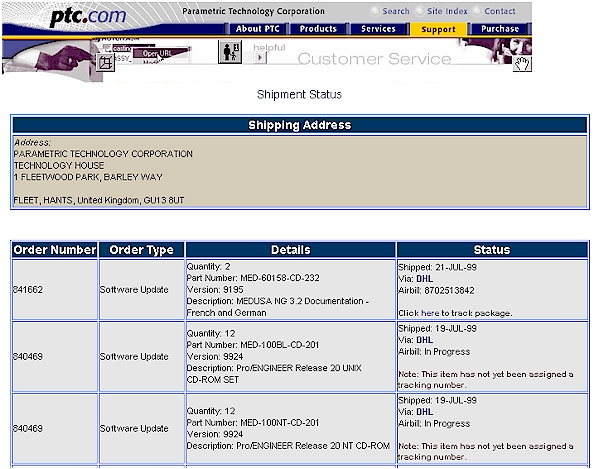
Track the status of an expected shipmentExample of Shipment Tracker
- Automatically lists shipments sent to the site of your choice.
- Maintenance Release and Software Update shipments for previous 2 months are shown
- Includes tracking numbers and hyper links to the carriers web site
Access to the Customer Service area of the PTC WWW site requires a user name and password. If you have not already obtained an account, any PTC Customer with an active maintenance agreement can register on-line at http://wwa.ptc.com/wrb-bin/cs/wac/wac_p1.pl or by contacting PTC Technical Support at 1-800-477-6435.