 |
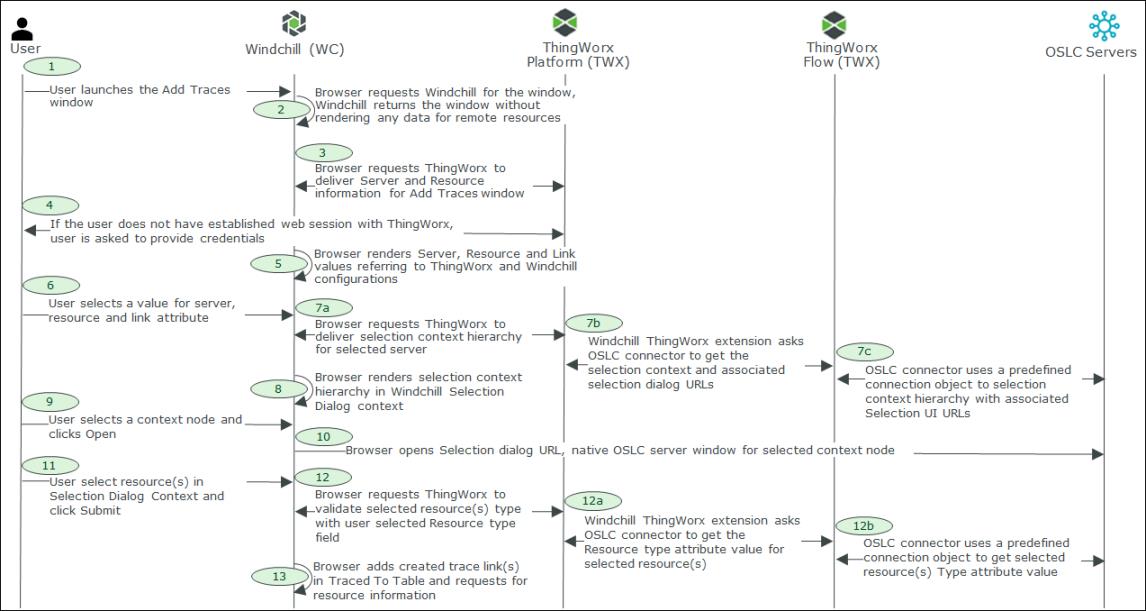
For basic authentication support, ThingWorx server authentication credentials are required to fetch the external resource data traced to the Windchill traceable object.
|
|
|
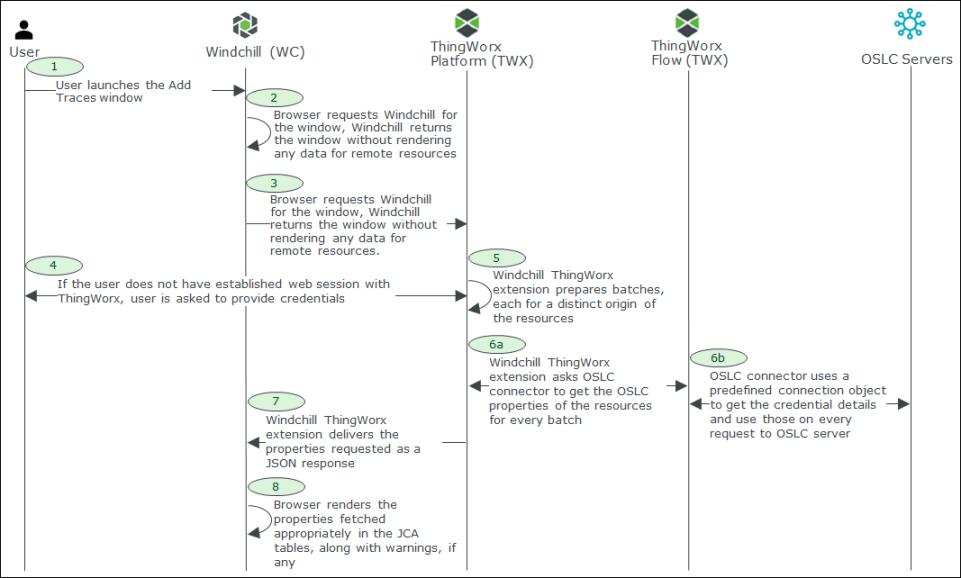
For basic authentication support, ThingWorx server authentication credentials are required to fetch the external resource data traced to the Windchill traceable object.
|
|
|
You need the required permissions in Windchill and ThingWorx to view and manage trace links.
|
 is available on the toolbar of the Traced To table. It creates a trace link, Satisfy, Allocate, or Implement between an external item and Windchill traceable object.
 | Duplicate trace links cannot exist between a traceable object and a remote object. |
| | For Windchill Modeler server, in the Selection Dialog Context table, the display of root or child nodes is determined by the TRACELINKS ROOT SELECTION DIALOG model tag. PTC strongly recommends that you select the root only in the Selection Dialog Context table in Windchill and expand the tree in the delegated UI of the external OSLC server. |
| | • The type of link between an external item and Windchill object is unique. For example, link between requirement XYZ and Windchill part ABC. You can create an Allocate or Satisfy link between them. If Satisfy link exists between XYZ and ABC, you cannot create another Satisfy link for them. However, you can create and an Allocate link between them. Similarly, you can create an Implement link between an architecture item XYZ and Windchill part ABC. • When a trace link is added to an object with link types Satisfy or Implement, a new iteration of the part is created. |
| | OSLC servers configured with Windchill RV&S do not support large preview. |
| | • A preview opens only if you log on using the authentication credentials for basic authentication of the external system. • Out-of-the-box, the Number attribute is configured to display a preview. For more information, see Configuring the Windchill DPT Extension. |
 action and then paste the copied objects using the
  action.
| | • The copied objects are not displayed in the clipboard. • Duplicate trace links cannot exist between a traceable object and a remote object. |
 action or clear suspect flag using the
  action in Windchill. These actions are available only on the latest version of a revision. The actions are not available if the object is checked out by another user. For more information, see Suspect Links in Working with Traces.
 action to delete trace links. Select one or more objects with a trace link and click .
| | • action is available only on the latest version of a revision, and is not available if the object is checked out by another user.• If an Allocate link is deleted, it is removed from all the versions of a revision. • If a Satisfy or Implement link is deleted from a version of an object, a new version is created. The link is removed from the new version of the object, though, the link is present in earlier versions. |