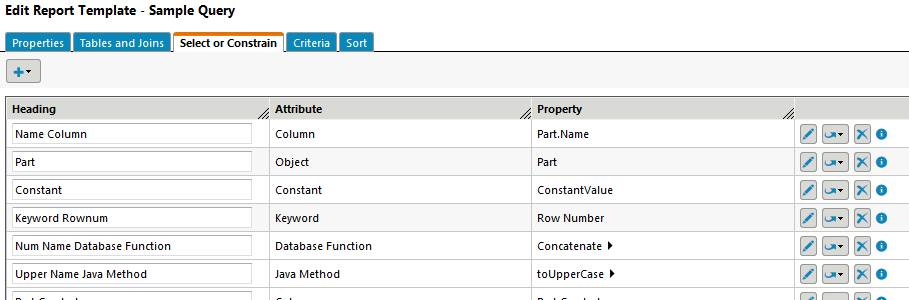
 drop-down list:
Item | Description |
Reportable Item | Launch the Select Attributes to Add window, and select attributes from the tables (types or report templates) specified on the Tables and Joins tab. |
Constant | Add a constant value, such as a string or a number. |
Keyword | Add a keyword from the database. |
Database Function | Add a database function. Add arguments to a Database Function by clicking the expand icon  , and selecting a report item from the add , and selecting a report item from the add  drop-down list below the Database Function report item. These expressions represent function arguments. drop-down list below the Database Function report item. These expressions represent function arguments. |
Java Method | Add a Java class and method. Add arguments to a Java Method by clicking the expand icon , and selecting a report item from the add drop-down list below the Java Method report item. These expressions represent arguments that are passed to the Java method. The Java method is called for each row in the output results. |
Parameter Value | Add a parameter value. Parameter values are obtained from the user at query execution time, and are typically used in generating criteria specified on the Criteria tab. |
Section Header | Add a section header to the Select or Constrain table, and enter the desired header text. A section groups attributes and places a border around the grouping in the criteria pane of the Report Builder. The section includes all attributes up to the next section, if any. Sections can be collapsed and expanded in the Report Builder criteria pane using the + and — icons next to the section label. The Select All and Deselect All actions are also generated within the section border, and apply to all attributes in the section. Section names are displayed as shortcut links at the top of the Report Builder criteria pane, allowing for easy navigation. If no header text is entered for the section header, it displays as SECTION NAME NOT SPECIFIED in the Report Builder criteria pane. |
Divider | Add a dividing line to the Select or Constrain table. Dividers can be used to further group or organize attributes. |
Page Text | Add page text. Page text displays on the criteria pane of the Report Builder, and can provide additional information, instruction, or clarification to users running the report. |
. Click the expand icon to view or add arguments for the function.. Click the expand icon to view or add arguments to be passed to the Java method. icon to select a new item from the drop-down list to replace the current item.
 to remove the item from the Select or Constrain tab.
 to view the properties currently set for the report item, without launching the edit window..
 to
to