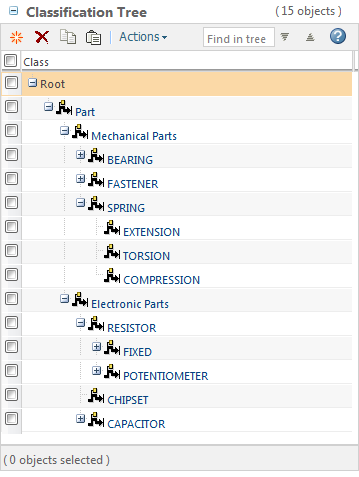
 | For information about the terminology used, see Windchill PartsLink Terminology. |
Action | Description | ||
 Expand All Expand All | Expand all nodes in the classification structure. | ||
 Collapse All Collapse All | Collapse all nodes in the classification structure. | ||
 Insert Node Insert Node | Create a new node. Use the right-click actions menu or select the table row of an existing node. For more information, see Insert Classification Nodes. | ||
 Delete Delete | After you confirm the deletion, the selected node is deleted. This action can be performed on multiple nodes.
| ||
 Copy Selected Object Copy Selected Object | Copies the selected node to the clipboard.
| ||
 Paste Paste | Paste the copied node as a child of the selected classification node.
| ||
 Export Export | Exports the classification structure to a file. You can export to either a CSV or XML file. For more information, see Export a Classification Structure. | ||
 Import Import | Imports a classification structure. For more information, see Import a Classification Structure.
| ||
Find in tree | Search nodes within the classification tree. |
