About the Refreshed Web Interface Home Page
The Home page of the Refreshed Web Interface helps you to manage your data and organize it easily. It lets you to view and export the results from your configured tables. The Home page displays information in tabular format. To access these tables, you can either scroll through the Home page, or click the Table Bookmarks displayed on the left side of the Home page.
You can perform various table-related operations. For more information, see the topic, About Table Operations.
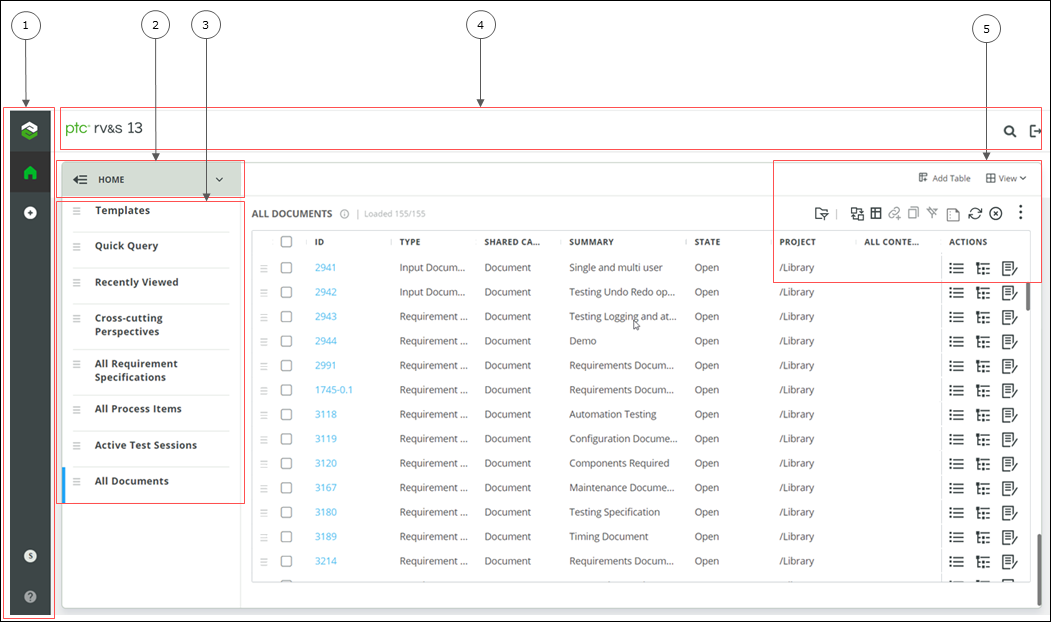
1. Left Navigation Pane
2. Home
3. Query Table Bookmarks
4. Title Bar
5. Table Operations
The following table describes the different components in the Refreshed Web Interface Home page.
|
Component
|
Description
|
|---|---|
|
Left Navigation Pane
|
The left navigation pane enables you to perform the following actions:
•
 : Remain on the same page. : Remain on the same page.•
 : Create a new item. : Create a new item.•
 : Display a menu with three options. The icon displays the first character of the logged-in user’s first name and last name, or the first character of the username, if the first name and last name are missing. : Display a menu with three options. The icon displays the first character of the logged-in user’s first name and last name, or the first character of the username, if the first name and last name are missing.The menu displays the following:
◦ The first name and last name, if available, and the username of the logged-in user.
◦ Language: Displays the selected language. The language that you set in the earlier web interface will be used when you log in to the Refreshed Web Interface. Click to change the language.
Language settings in both interfaces are mutually exclusive. Once a language is set in the Refreshed Web Interface, it will be used every time you log in to the Refreshed Web Interface.
◦ My 3600 View: Click to launch the Simplified User Management My 3600 View.
•
 : Launch the product Help in a new tab. : Launch the product Help in a new tab. |
|
Home
|
The Home menu enables you to view the Dashboards, Charts, and Reports table.
• Dashboards: View and manage all dashboards created by you or shared with you.
• Charts: View and manage all charts created by you or shared with you.
• Reports: View and manage all reports created by you or shared with you.
After you select an option, a table corresponding to the related option is displayed in the page. For more information on dashboards, charts, and reports, see About Dashboards, Charts, and Reports in the Refreshed Web Interface.
Select Home from the menu to go back and view the configured tables and perform table related operations.
 and and  : Collapse or expand the bookmarks. : Collapse or expand the bookmarks. |
|
Query Table Bookmarks
|
The query table bookmark is a list of bookmarks for tables you have added using queries.
• Favorite Items, Quick Query, Recently Viewed, and Cross-cutting Perspectives tables: These tables are available by default. For information on adding tables, see Adding a Custom Table.
|
|
Title Bar
|
The title bar enables you to perform the following actions:
•
 :Quickly search through PTC RV&S items in the database. For more information, see Performing Search Operations. :Quickly search through PTC RV&S items in the database. For more information, see Performing Search Operations.•
 : Log out from the Refreshed Web Interface. : Log out from the Refreshed Web Interface. |
|
Table Operations
|
Enables you to perform various operations on query tables. For example, you can add and replace a table from a query. For more information, see Table Operations.
|
Related Topics