使用 *.slddrt、*.sldblk 與 *.sldbomtbt 檔案
Windchill Workgroup Manager 13.1.0.1 及更新版本支援範本檔案,例如 *.slddrt、*.sldblk 與 *.sldbomtbt。在 Windchill 中,這些範本檔案分類在「文件類別」:「格式」之下。欲使用這些檔案,請遵循下列步驟將 Windchill 共用區資料夾新增至 SOLIDWORKS System Options:
1. 在 SOLIDWORKS 中,導覽至 > ,然後按一下 File Locations。
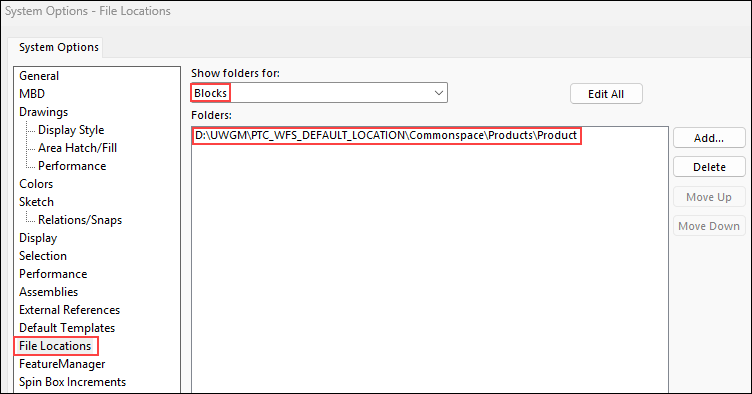
2. 在 Show folders for box 中,選取下列其中一個選項來輸入檔案位置:
◦ Sheet Formats (*.slddrt)
◦ Blocks (*.sldblk)
◦ BOM Templates (*.sldbomtbt)
3. 在 Folders 方塊中,輸入共用區資料夾路徑。
例如,針對 *.sldblk 檔案,在 Show folders for 清單中選取 Blocks,然後將路徑新增至 Windchill 共用區資料夾,如下面的範例所示:
在將路徑新增至 Windchill 共用區之後,您可以在 SOLIDWORKS 中使用來自 Windchill 的入庫範本檔案。
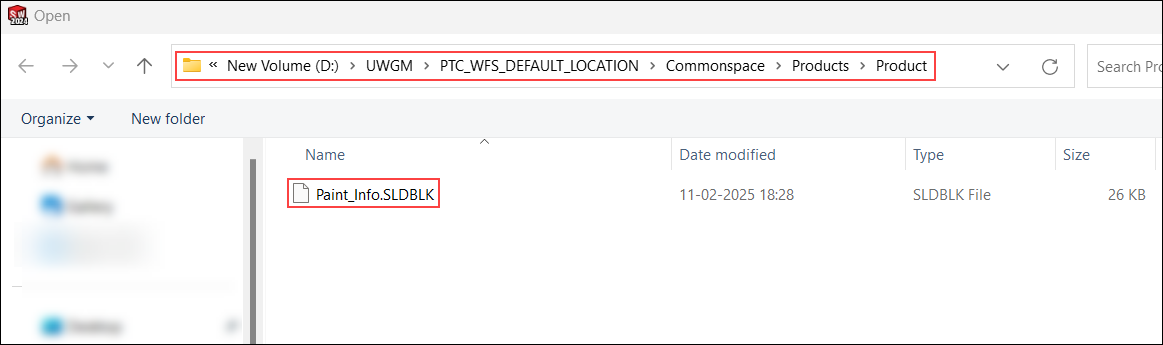
針對 Blocks,您也可以在 SOLIDWORKS 設計物件庫中新增共用區資料夾路徑。這可讓您將 Blocks 從設計物件庫直接拖曳到 SOLIDWORKS 圖形區中。
 | *.slddrt、*.sldblk 與 *.sldbomtbt 檔案格式不支援下列 PDM 動作: • > • Open from Windchill |
從 Windchill 13.1.1.0 開始,會針對 SOLIDWORKS,將 Disallow Product Structure Links by Document Types 偏好設定的預設值設定為 FORMAT。即使您在入庫期間選取 Auto Associate Parts to CAD Documents 核取方塊,此設定也可防止 Format 文件類別中的 CAD 文件建立與 Windchill 零件的擁有者關聯。請參閱配置自動關聯。
| | 欲自動關聯零件與 Format 文件類別中的 CAD 文件,請清除預設偏好設定值。 |