Design with Neutral Format CAD Data in Windchill
In your CAD application, you can open neutral format CAD data such as STEP, IGES, JT, and PARASOLID stored in Windchill. This technique enables you to seamlessly integrate the imported data with your design and save it back to Windchill.
For example, if you create a neutral data file in NX and save it to Windchill, you can open it in SOLIDWORKS, or any other CAD applications connected to Windchill.
Open Neutral Format CAD Data Files in the CAD Application
Support for a neutral data file is applicable only when you open it using the native > command in the respective CAD application.
To open neutral format CAD data files from the workspace, click > in the respective CAD application.
 |
For NX, SOLIDWORKS, and Autodesk Inventor, open the neutral format CAD data from the workspace.
For Creo Elements/Direct Modeling and CATIA V5, open the neutral format CAD data from the Workspace Local Directory (PTC_WLD_ROOT).
|
Convert Neutral Format CAD Data and Save to Windchill
After you open a neutral format CAD data in a CAD session, you can save it to Windchill as a native CAD format.
For NX, SOLIDWORKS, and Autodesk Inventor, click > to save the files to Windchill.
For Creo Elements/Direct Modeling and CATIA V5, click > to save the files to Windchill.
You can also insert the converted data into an assembly, but save the converted data to the workspace before inserting it into an assembly.
|
|
• If the neutral format CAD data file contains an assembly structure, open it as a single part and then save it as a native CAD format to Windchill to avoid ghost links.
• In SOLIDWORKS, only a Parasolid of part files (*.x_t) can be saved to Windchill as a native CAD file format (*.SLDPRT). Parasolids of assembly files are currently not supported.
|
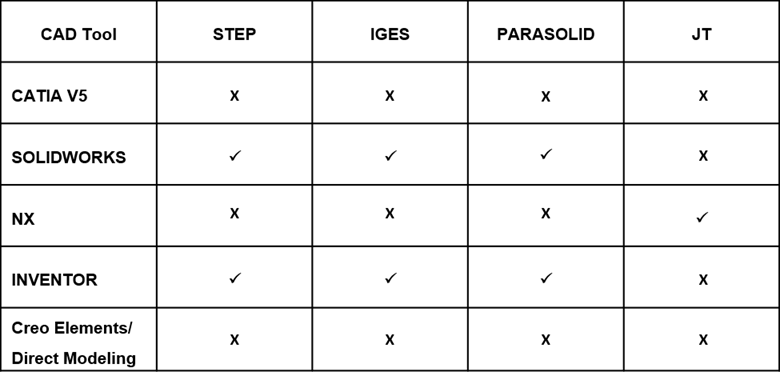
Here is the list of the supported neutral CAD data formats that CAD tools can open and save to Windchill as native CAD data using Windchill Workgroup Manager.
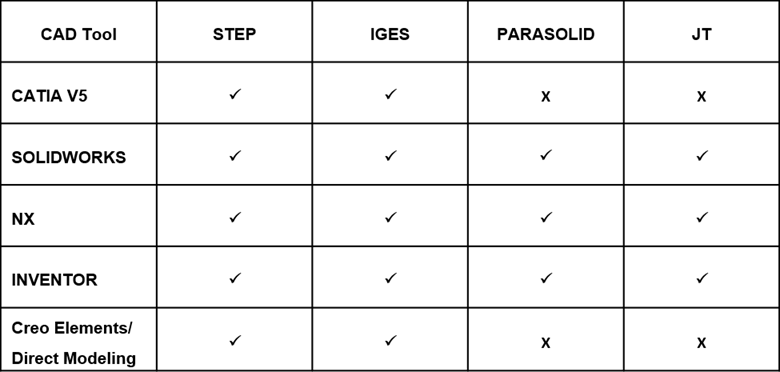
Supported Neutral CAD Data Formats in Windchill
Here is a list of neutral CAD data formats that CAD tools can create and save to Windchill using Windchill Workgroup Manager.
| | *.x_b Parasolid files are currently not supported in Windchill. |