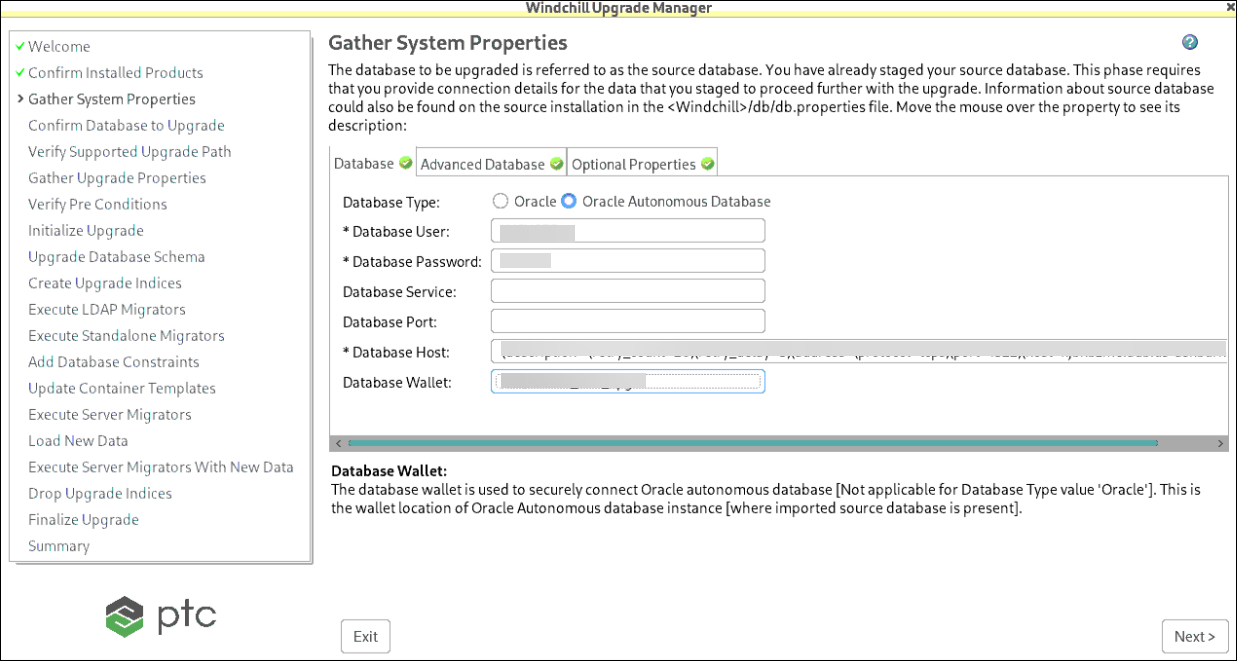
Database
The database to be upgraded is referred to as the source database. Information about source database could also be found on the source installation in the <Windchill>/db/db.properties file. The following is a brief description of each input field:
 |
To use the advanced connection string option, put the entire connection string in the Database Host field and leave the Database Port, Database Name (SqlServer only), and Database Service fields empty.
|
Input Field | Description | ||
|---|---|---|---|
Database User | Database username used during source installation. Refer to property wt.pom.dbUser in db.properties on the source system. | ||
Database Password | Password for source database user. Refer to property wt.pom.dbPassword in db.properties on the source system. | ||
Database Name | This field is prompted only if the target installation has been configured with SQL Server. It should be set to the same value as the Database User field. See the property wt.pom.jdbc.database in db.properties on the source system. Leave this blank for target environments configured with the advanced connection string option. | ||
Database Service | Refer to the wt.pom.jdbc.service property in the db.properties file on the source system. For Oracle, this should be set to the name of database service. For SQL Server, it should be set to SQL Server Instance Name. Use default if named instance is not being used. Leave this blank for target environments configured with the advanced connection string option. | ||
Database Port | Port number that database service is running on. Refer to property wt.pom.jdbc.port in db.properties on the source system. Leave this blank for target environments configured with the advanced connection string option. | ||
Database Host | Hostname where database is installed. This value depends on the database that you are upgrading: • Upgrading a copy of the source database which has been imported into a new host, then specify the new hostname. • Upgrading a production source, refer to the property wt.pom.jdbc.host in the db.properties file on the source system.
Use the Database Host field for the complete connection string for target environments configured with the advanced connection string option. |
Input Fields for Oracle Autonomous Database
Input Field | Description |
|---|---|
Database Type | Enabling the database type would enable dependent property input. |
Database User | Database username that is used during the source installation. |
Database Password | This is the password for the source database user. |
Database Service | This input field is disabled for Oracle autonomous database. |
Database Port | This input field is disabled for Oracle autonomous database. |
Database Host | This is the connection string of the Oracle Autonomous database instance where the source database user is imported. |
Database Wallet | This is the wallet location of the Oracle autonomous database where the imported source database is present. |