Deploying Security Update Patch
This topic explains how to install an Security Update Patch (SUP) in Windchill. PTC releases Security Update Patches (SUPs) at regular intervals to deliver security enhancements. SUP sets are installed in the same way as a typical Maintenance Release, though some of the screens and options may vary slightly. It is recommended to run PTC Solution Installer using the same user account that was used to install Windchill. SUP releases are cumulative. The latest SUP includes all the security fixes from the previous releases. The SUP set is a self-contained download. No additional downloads are needed to install the SUP. For information on updating a Windchill instance, refer to Installation and Configuration — Update Existing Installation Guide. Each SUP release provides a Release Notes document with installation steps and the list of the updated files. SUP sets can be found on PTC’s Release advisor page, located here: Release Advisor.
 |
If you have standalone patch installed on your environment, before you apply this Security Update Patch (SUP), ensure that you compare the changed code file list (Changed_filelist.txt available in the patch JAR) with the changed file list available in the SUP Release Notes to find common code files. If common code files are found, do not apply this SUP as it may overwrite applied patch code.
To proceed in such cases, you must first update the system to the Maintenance release which has the standalone patch code merged, and then deploy the SUPs supported for the Maintenance release.
|
Guidelines for SUP Deployment with Upgrade
1. Install the target release.
2. Perform Upgrade.
3. Install the latest SUP set post-upgrade.
Guidelines for SUP Deployment with Update
1. Update to the latest base installation from your previous release setup. PSI panel allows fresh installation, but it is not supported.
2. Install SUP set.
| | PSI displays the options Install Optional Components and Add Language, but these options are not supported on SUP version. To install an optional component or language, you must move to the next valid maintenance release and run the base release PSI version. 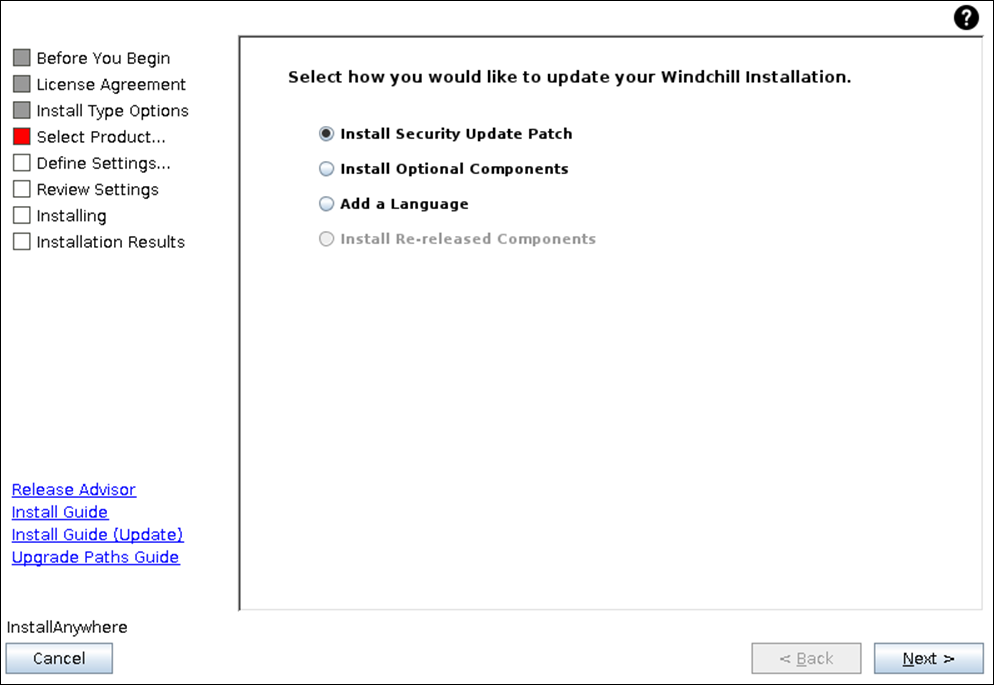 |
Installation of Security Update Patch
1. Download the SUP set and extract it to the staging directory. Ensure that all the extracted files maintain the same directory structure.
2. Stop Windchill and Apache/ HTTPServer/ Windchill Performance Advisor (when installed).
3. Start Windchill directory server (LDAP) and the database, if it is not already running.
4. Launch PSI. Within the staging directory, navigate to ptc_solution_installer_xx.xx.
a. For Windows, Click setup.vbs
b. For Linux, Click setup.sh
6. Ensure the <WINDCHILL_HOME> directory has full control access.
7. Accept the license agreement.
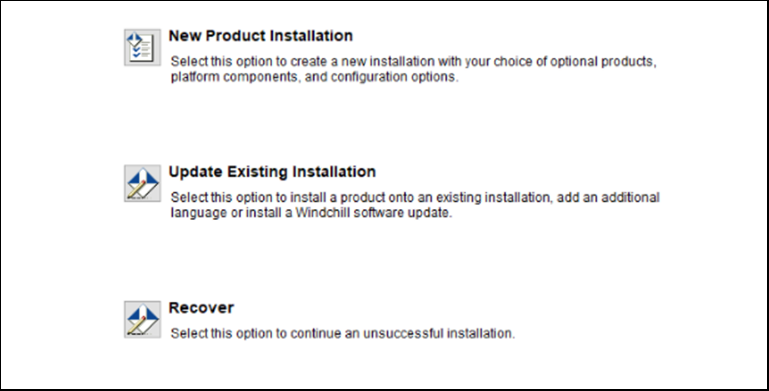
8. When prompted, select Update Existing Installation.

9. Select the Windchill instance where the SUP is required to be applied.
10. Click Next.
11. Select Install Security Update Patch.
12. Verify the staging area directory and the original Install Staging Area directory for the SUP.
13. Click Next
14. Complete the remaining PSI screens using the same process you follow for a maintenance release installation.
15. Ensure the required CDs are available in the staging area. Download and copy any missing CDs to the staging location.
16. Click Install to install the Security Update Patch set.
17. Ensure that the installation completed successfully.
18. Start Apache or HTTPServer.
19. Start Windchill.
| | Additional steps are required for the following cases: • When the option to preserve HTTP Configuration is selected during installation - For details, see article CS306977 • When the ThingWorx Navigate is installed on the source version - For details, see article CS235736 |
SUP Update Guidance
• You are not required to use the Update Tool when applying a patch to an SUP that originates from a base release.
• When you transition from an existing Upgrade or Update release to the next release or its SUP, you must run the Upgrade Manager or the Update Tool respectively to ensure proper configuration and compatibility.
• For cluster environment setup, apply the SUP to one node and then clone the node to the other systems.
• For systems with file server, SUP installation updates the CCSDSU.zip file. You must deploy CCSDSU.zip to all the file servers.
• The Windchill version reflects updates for affected modules only when you install the SUP. If a module was updated earlier, running windchill -version displays mismatched datecode and release ID.