Tool for Marking Data for Replication Participation
In a replication process, the source system (the data owner) sends data to the target system (which receives and stores the replicated data).
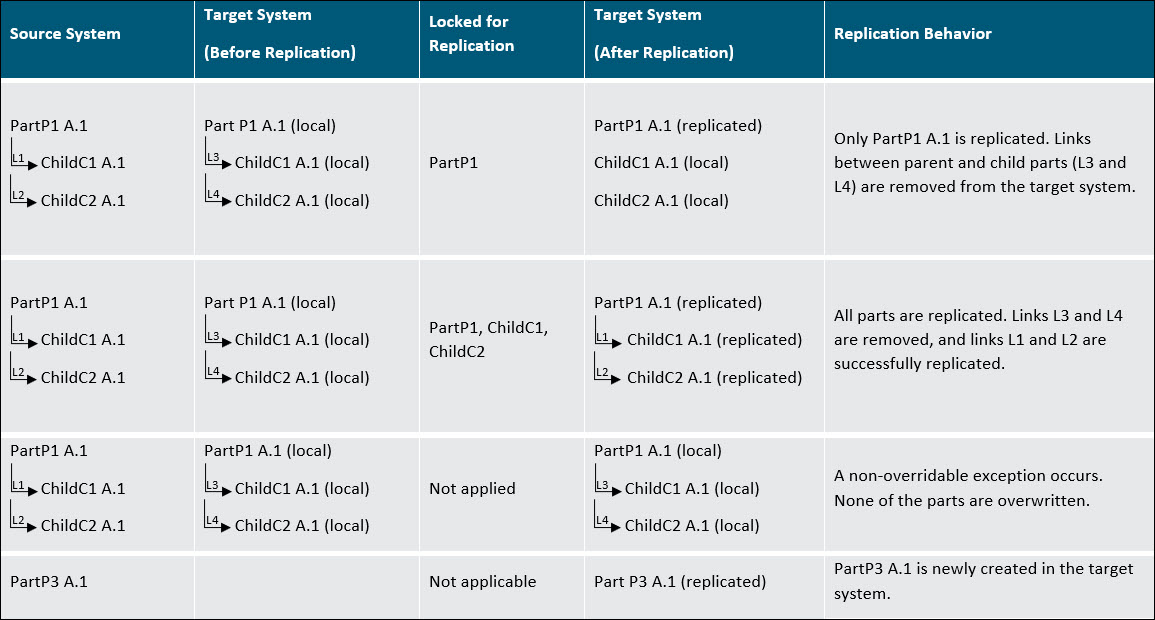
In certain scenarios, the data in the target system is intended to mirror the data in the source system. However, not all data must be replicated automatically. In cases where selective replication is necessary, a replication lock called Locked for Replication is introduced to control which data elements within the target system are eligible to participate in the replication process. The replication lock serves this purpose by allowing specific data in the target system to be explicitly marked for replication. This mechanism ensures the preservation of data integrity throughout the replication operation.
The image below illustrates how replication behaves under different conditions—when the replication lock is applied, partially applied, or not applied at all.
Important Replication Rules
• Strong-side links are removed during replication
• Weak-side links are retained during replication
For more information, see Replication Behavior When Locking Strong-side and Weak-side Links.
 |
• Replication locks cannot be applied to — Managed baselines, electrical parts, and objects that are not supported for replication.
• Even with a replication lock and no version mismatch, some objects may still be ineligible for overwriting to preserve data integrity.
For example, if a family table contains four CAD parts but only three are eligible for replication, none of the parts will be replicated when the lock is applied.
• Before initiating data replication, you must set the property com.ptc.windchill.wp.enabledVersionThrottling to false.
|