Route the Package
Routing assigns tasks to team members for adding, reviewing, and approving package contents. Email notifications are sent to assignees for task actions and to the package creator for tracking progress.
The package creator can also force-approve a task if needed, which removes the task from the assignee’s list and completes the routing. Notifications are also sent when a task is completed or fails.
Steps to Route a Package
To route a package, do the following:
1. In the Route window, under Select Routing Process, select one of the following options to initiate routing with an In-transit lock:
◦ Dependency Evaluation and Locking for Participation in Replication Routing for Object Collector Package
◦ Dependency Evaluation and Locking for Participation in Replication Routing for Context Collector Package
These options are collectively referred to as dependency review routing. If needed, you may select other routing processes before applying the In-transit lock.
Available routing options:
◦ Content Routing for Object Collector Package or Content Routing for Context Collector Package: Assigns contributors to add content to the package.
◦ Approval Routing for Object Collector Package or Approval Routing for Context Collector Package: Assigns reviewers and approvers to evaluate and approve the package contents. The review task is optional. Once routed for approval, the package enters the Under Review state.
◦ Dependency Evaluation and Locking for Participation in Replication Routing for Object Collector Package or Dependency Evaluation and Locking for Participation in Replication Routing for Context Collector Package: Collects the dependent objects, and assigns reviewers and approvers to evaluate summary reports generated during routing. The review task is optional. Only members of the Replication Authority group can initiate this process. The package moves from the Evaluation state when collecting the dependents, and then to the Summary and Review state.
2. In Define Distribution List, select the participants responsible for adding content, reviewing, or approving the package or its summary reports.
◦ For Context Collector Package participants must be members of the Replication Package Administrators Group.
◦ Reviewers and approvers involved in the dependency review routing must belong to the Replication Authority group.
3. (Optional) Complete the following steps as needed:
◦ In the Specify Instructions field, include any notes or special instructions.
◦ In the Specify Due Date field, specify a duration for the routing activity or select a due date using the calender.
◦ In the External Participants field, specify any additional participants to be notified who were not included in Step 2 above.
4. Click Finish to initiate the routing process.
Routing Outcomes
When the dependency review routing action completes successfully, an in-transit lock called In Transit for Replication is placed on both the selected objects and their dependents within the package. These objects remain locked and cannot be modified until the lock is lifted. For more information, see Removing the Replication Lock.
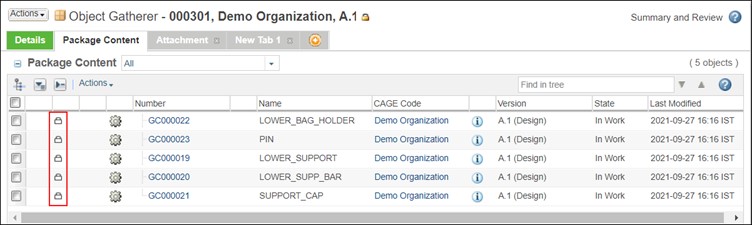
If the dependency review routing action fails, the in-transit lock named In Transit for Replication is not applied to any objects in the package, and the package transitions to the Failed state.
This failure can occur under the following conditions:
• None of the objects in the package qualify for the in-transit lock, such as electrical parts, managed baseline, or objects not supported for replication.
• All the objects in the package have already been replicated.
• The package is empty and contains no objects.
• An error or exception arises during the process of collecting dependent objects.
If at least one object in the package qualifies for the in-transit lock, the routing process proceeds successfully, and the lock is applied to those eligible objects. Summary reports are then generated for the routed package, allowing you to identify which objects are approved for replication and whether any violators are blocking the application of the lock. If violations are detected, the package transitions to the Rework state. For more information, see Replication Summary Reports.