Multibody Design Concept
A body is a container object for geometry. You can create parts that contain one or more geometric bodies. Each body can be handled individually and can have different characteristics.
Using bodies in CAD provides the following advantages:
• You can easily add or remove material to a single finished part.
• You can design together parts whose geometry is tightly coupled.
• You can represent different materials used in a single part.
When the model represents only one Part in the eBOM, you can relate the multibodied model's CAD Document to a Part. However, if the model represents multiple Parts, then it is recommended to use the master model methodology. When using master model approach, you start the design as a single model; but later save each Part as a separate model. As a result, there will be a one-to-one relationship between the CAD Documents and Parts.
First, let us consider an example, where you can use multibody design capabilities resulting in a single multibody model.
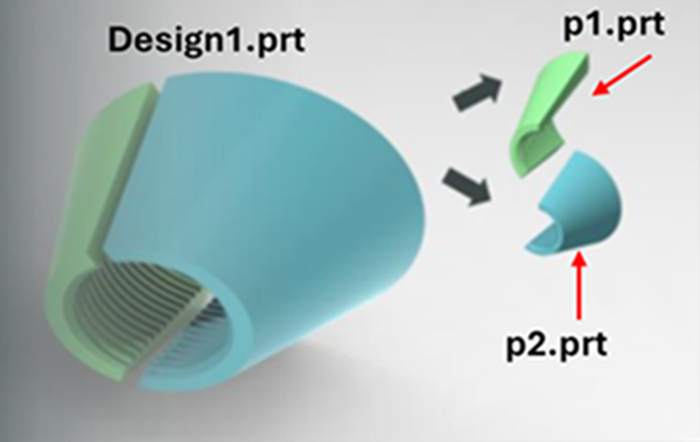
In this example the two halves are designed together as they contain a common thread. After designing it together, the model is split in half. The eBOM contains the two separate halves and each half has its own Part number, p1.prt and p2.prt.
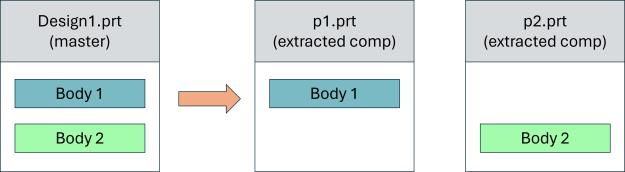
Using the master model technique in the diagram above, you start with one multibody CAD model stored on a single CAD Document. However, it is saved as two separate, but related CAD Documents. Each CAD document is associated to a different Part used in a eBOM with an owner association. The Design1.prt (master part) here, is not associated to a Windchill Part, like a family table generic. Instead, it is used to only construct or drive the individual halves of the cap, while p1.prt and p2.prt are assembled in the eBOM assembly.
Another method would be where the eBOM contains only a single part number because the cap design is an inseparable assembly. In such scenarios, the bodies do not need to be saved into their own models. In the same example for the cap above, if the manufacturing is outsourced and you cannot order each of the halves separately, then the design part would be related to the single Part in the eBOM using this method.
In summary, the multibody design starts the design as a single model; but later may require you to save each body as a separate model to have one-to-one relationship between the CAD Documents and Parts.
 | The multibody parts should not replace the use of assemblies as it consists of multiple solid bodies that are not dynamically configured. |
A general rule to follow is that one part (multibody or not) should represent one part number in a eBOM.