Frequently Used Preferences in Windchill Preference Management Utility (Creo Elements/Direct Modeling)
This section contains some of the more frequently used preferences that can be set or modified depending on your Windchill role.
 |
The intent of this section is to list the most frequently used preferences, and not every preference that can be set using the Preference Management utility. For the complete list of preferences for Creo Elements/Direct Modeling that can be managed from the Preference Management utility, refer to the Preference Management utility in Windchill.
|
The following tables list the most frequently used preferences in the categoriesOperation, Workgroup Manager Client, and Workspaces that can ne managed for Windchill Workgroup Manager for Creo Elements/Direct Modeling per your Windchill role.
Preferences under Operation
To view the server-side preferences that can be set from the Operation category and its subcategories, refer Operation Preferences.
Preferences Under Workgroup Manager Client
|
Preference Name
|
Contexts
|
Values
|
||
|---|---|---|---|---|
|
Check In Content Options
|
• Site
• Organizations
• Products
• Projects
• Libraries
• User
|
• Models Only
• Models and Viewables
|
||
|
Default Drawing Frame Location
|
• Site
• Organizations
• Products
• Projects
• Libraries
• User
|
/<path>
|
||
|
Default Load Type
|
• Site
• Organizations
|
• Full
• Structure
• Partial
• Lightweight
|
||
|
Define Library Used by Application
|
• Site
• Organizations
• Products
• Projects
• Libraries
|
<Windchill library>/<folder in this library>
|
||
|
Disable Check out on the fly
|
• Site
• Organizations
• Products
• Projects
• Libraries
|
Controls the display of the Conflicts (for Check out on the fly) window upon execution of Save action and resolves the checkout conflict with one of the following options:
• Check-out — Disable the Conflicts (for Check out on the fly) window and checkout the document.
• Revise and Check out — Disable the Conflicts (for Check out on the fly) window; revise and checkout the document.
• Continue — Disable the Conflicts (for Check out on the fly) window and continue to save the document without a checkout.
• No (default) — Enables the display of the Conflicts (for Check out on the fly) window.
|
||
|
Manage Top Level Instance
|
• Site
• Organizations
|
• Modified Only
• None
• All
|
||
|
>
|
• Site
• Organizations
|
The default value is PTC_WM_CREATED_BY.
Identifies the name of the property that shows the name of the user that created the CAD document.
|
||
|
>
|
• Site
• Organizations
|
The default value is PTC_WM_CREATED_ON.
Identifies the name of the property that shows the date and time that the CAD document was created.
|
||
|
>
|
• Site
• Organizations
|
The default value is PTC_WM_MODIFIED_BY.
Identifies the name of the property that shows the name of the user that last modified the CAD document.
|
||
|
>
|
• Site
• Organizations
|
The default value is PTC_WM_MODIFIED_ON.
Identifies the name of the property that shows the date and time that the CAD document was last modified.
|
||
|
Synchronize Number and File Name
|
• Site
• Organizations
|
• Yes
• No
|
||
|
Undo Checkout Overwrite Local Content
|
• Site
• Organizations
• Products
• Projects
• Libraries
• User
|
• Yes
• No
|
||
|
Update Overwrite Local Content
|
• Site
• Organizations
• Products
• Projects
• Libraries
• User
|
• Yes
• No
|
||
|
Upload CAD/Dynamic Document and Attachment Filter
|
• Site
• Organizations
• Products
• Projects
• Libraries
• User
|
• CAD/Dynamic Document Type
• Attachment File Type
• Content Category
|
|
|
• When you upgrade from an older release to Windchill 11.1 M020, a performance issue may be observed when you open a large CAD assembly saved in the previous release. This is because for Windchill 11.1 M020 onwards, the Windchill Workgroup Manager enforces to propagate additional Windchill system attributes (Created On, Created By, Modified On, Modified By) to CAD models when opening CAD documents from Windchill by default. This propagation of the Windchill system attributes increases the loading time of the files as compared to that without propagating these attributes.
• If these Windchill system attributes are not a part of your requirement, you can ignore these attributes by setting their attribute names to blank values. The Windchill Workgroup Manager will not propagate the Windchill system attributes to CAD models and performance degradation for legacy data will be avoided. The following image displays that the attributes with blank values were not propagated. 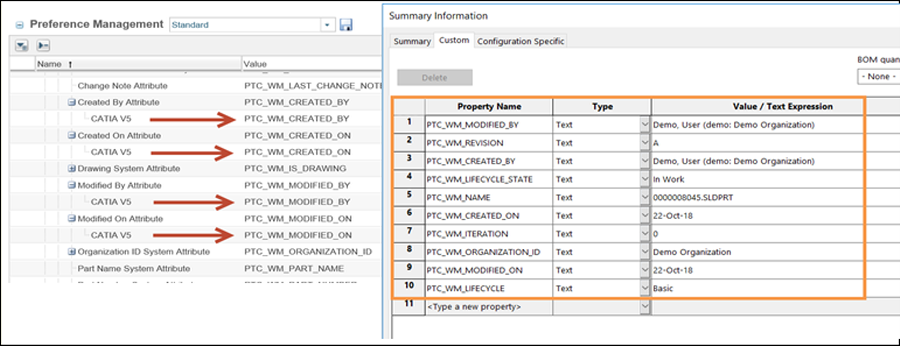 |
Preferences under Workspace
|
Preference Name
|
Contexts
|
Values
|
|---|---|---|
|
>
|
• Site
• Organizations
• Products
• Projects
• User
|
• SELECTED_AND_MODIFIED
• SELECTED
• ALL
|
|
Workspace Display
|
• Site
• Organizations
• Products
• Projects
• User
|
• All items
• Featured items
|
Preferences under Revise
The following table describes the revise preferences.
|
Name
|
Context
|
Description
|
||
|---|---|---|---|---|
|
> >
|
• Site
• Organizations
|
The Include Related CAD / Dynamic, Include Related Documents and Include Related Parts values are set by default.
|