Search Results
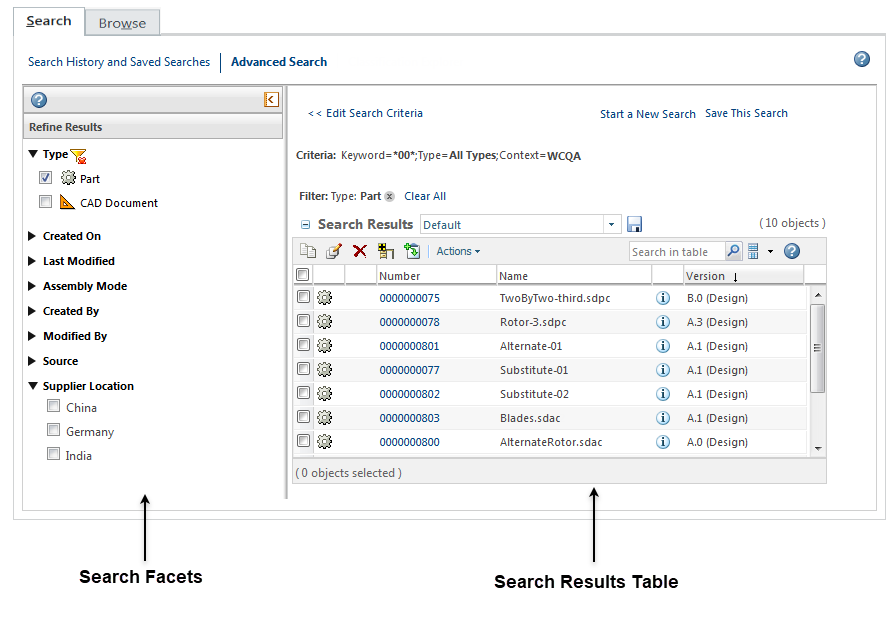
Advanced and global search results appear under the Search tab in the Navigator. The Search Results table displays all objects returned for your search.
For more information, see the following topics:
• Search Results Table—Use this table to perform actions on one or more objects at once.
• Faceted Search Results—Use search result facets to narrow your results by filtering attribute values.
• Unexpected Results—This topic provides information on possible reasons why your search might not include the results you expect.
 | If you want to search for duplicates of this part, select the part, right‑click it, and click the Search for Duplicates action. This action launches a similarity search for the selected part and opens the Compare Parts in Group page of Duplicate Part Search feature to display potential duplicate or similar parts. For more information, see the Compare Parts in Group topic. The action is available only when the Windchill AI Parts Rationalization plugin is installed, the user has a valid Windchill AI license, and exactly one part (WTPart) is selected. For more information, see Using AI Plugin for Duplicate Part Search and Search Duplicate Parts for a Selected Part. |