Use Case: Select a Downstream Parent to Propagate
Use the  Select a downstream parent to propagate action in the Review and Resolve Discrepancies dialog box to propagate a newly added upstream part to a different parent in downstream. You can use this action in usage and occurrence mode.
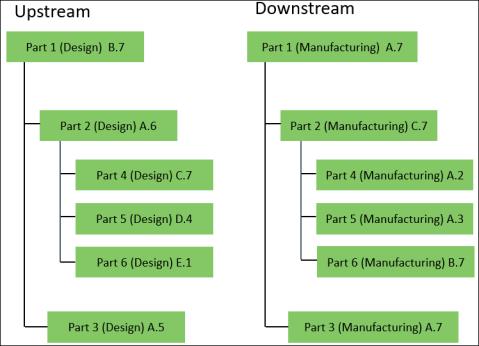
Select a downstream parent to propagate action in the Review and Resolve Discrepancies dialog box to propagate a newly added upstream part to a different parent in downstream. You can use this action in usage and occurrence mode.Consider the following structure:
1. In upstream, add Part 7(Design)A.1 to Part 1(Design)B.7.
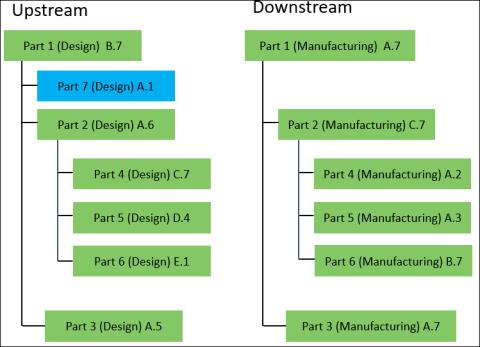
As per business requirement, propagate the newly added part in upstream to a different part in downstream.
2. Select Part 1(Design)B.7 and click  Detect Discrepancies. The Review and Resolve Discrepancies dialog box opens.
Detect Discrepancies. The Review and Resolve Discrepancies dialog box opens.You can view the downstream parent part information in the Downstream Parent column of the Review and Resolve Discrepancies dialog box.
3. Select a discrepancy related with Part 7(Design)A.1, that has Criteria of Added Parts and Status as Auto.
4. In downstream, select Part 6(Manufacturing)B.7.
 | You must select only one part in downstream. |
5. In the Review and Resolve Discrepancies dialog box toolbar, click Select a downstream parent to propagate.
Select a downstream parent to propagate.A confirmation message appears.
6. Click OK. The downstream parent part information in the Downstream Parent column of the Review and Resolve Discrepancies dialog box is updated.
| | The changes are not propagated after you click OK. You must click  , after you click OK, to propagate the changes. , after you click OK, to propagate the changes. |
7. Click to propagate the changes. The part is added to Part 6(Manufacturing)B.7 in downstream.
to propagate the changes. The part is added to Part 6(Manufacturing)B.7 in downstream.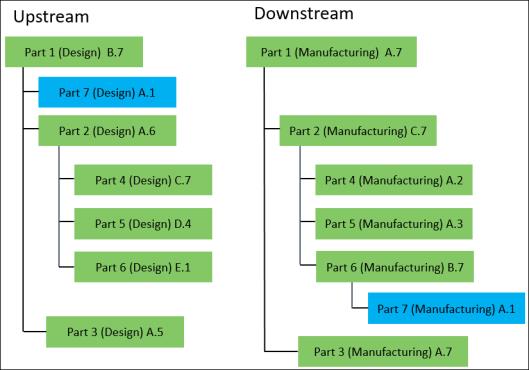
| | • You can use the action only for discrepancies that have Criteria of Added Parts, Status as Auto, and a single downstream parent part.• A part can have multiple usages present in downstream. In such a case, you can select any one of the usages before initiating the action. When you propagate the changes by using the action, the added part is propagated to all the usages. If you initiate the  Select in downstream structure action, the usage that you selected before initiating the action is highlighted. Select in downstream structure action, the usage that you selected before initiating the action is highlighted.• A part can have multiple occurrences present in downstream. In such a case, you can select any one of the occurrences before initiating the action. When you propagate the changes by using the action, the added part is propagated to all the occurrences. If you initiate the Select in downstream structure action, the occurrence that you selected before initiating the action is highlighted. |