Use a Workflow Variable to Activate Enhanced Release Logic (Version 1)
The Change Notice Version 1 Workflow is provided out-of-the-box with these new functionalities. You can either configure this new workflow or extend the existing Change Notice Workflow to include several new functionalities, such as the workflow variable optInFinishedAndCancelledFilter and the releaseChangeable2 API.
This topic describes how change administrators can extend the Change Notice Workflow to add the optInFinishedAndCancelledFilter.
To add the optInFinishedAndCancelledFilter variable to the workflow, follow these steps:
1. Go to the Utilities page from the Site  , Organizations
  , Products
  , or Libraries
  contexts and click Workflow Template Administration.
, Organizations , Products , or Libraries contexts and click Workflow Template Administration.2. On the Change Notice Workflow page, click Properties.
3. In the Change Notice Workflow window, click the Variable tab.
4. To add this variable, click Create.
The Create Variable window opens.
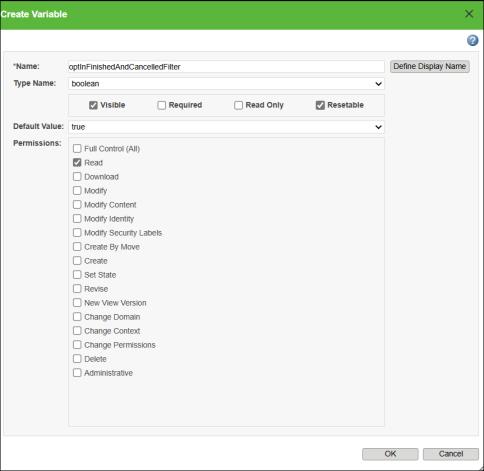
5. In the Create Variable window, enter the following details for these fields:
◦ Name: optInFinishedAndCancelledFilter
◦ Type Name: boolean
◦ Default Value: true
◦ Permission: Read
6. Click OK.
The added variable appears in the Variables list with details.
7. Click OK.
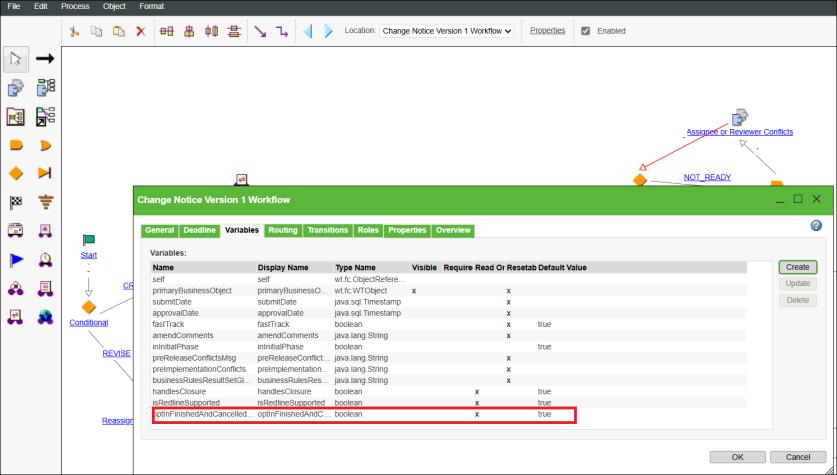
This workflow, along with the releaseChangeable2 API, activates the enhanced release logic for the change notice and change task.