Configuring CATIA V5 to Read PMI
Before you configure Windchill Workgroup Manager to read PMI, ensure that you have the FTX license for CATIA V5. Without FTX license, CATIA allows you to add only text annotations.
You can configure Windchill to read PMI through:
• wgmclient.ini file
• Windchill Server-side settings
• Theorem CADverter (or CATIA CAD Worker)
• Creo View
Configuring wgmclient.ini File
In the wgmclient.ini file, set the expose.model.annotations preference to None (default) to stop exposing PMIs, All to expose all PMIs to Windchill, or Designated to expose the selected PMIs to Windchill.
For a complete list of frequently used preferences, refer to Frequently Used Preferences in Wgmclient.ini File.
 |
Starting from Windchill Workgroup Manager 13.1.1.0 or later, the reference dimension annotations created in CATIA V5 are not exposed to Windchill as model items and control characteristics. The previously created link between associated parts and control characteristics that include reference dimensions remains intact when you check in or check out the model. To break this link and avoid reference dimensions in Windchill, change the reference dimension type to another type, and then save and upload the model. For more information, see Save to Workspace (CATIA V5).
|
To expose the selected PMI types to Windchill when the expose.model.annotations is set to Designated, perform the following steps:
1. In CATIA V5, right-click an annotation set and click Properties.
2. In the Properties window, click Manufacturing and select the To manufacture checkbox.
Mapping CATIA V5 Instance Names to Windchill
Starting with Windchill 13.1.1.0 and Windchill Workgroup Manager 13.1.1.0, you can control whether instance names from CATIA V5 are mapped to component names in the Windchill Uses tab by setting the Set CAD Component Name preference.
To set this preference in the Windchill Preference Management utility, click > .
• When Set CAD Component Name preference is set to Yes (default), the instance names in the CATIA V5 CAD assembly are mapped to the component names in the Windchill CAD structure.
This value is automatically propagated to the reference designator in the WTPart structure when building a part structure.
• When set to No, the instance names are not mapped to the component names in the Windchill CAD structure. This prevents automatic propagation of component names to the reference designator in the WTPart structure, giving you more flexibility and control over how reference designators are managed and assigned.
Windchill Server Side Setting
Set the publish.copyrepresentationsforward.restrict property to False at Windchill Server-side.
Creo View
Configure your Creo View to display floating annotations such that the annotations in the model are displayed parallel to the screen. For more information, refer to To Set Annotation Options.
Theorem CADverter
The Theorem CADverter is used to convert the native CATIA V5 data into CreoView format and enables Windchill to use PMI data from 3D models for downstream processes.
|
|
There are multiple combinations of settings available which allows you to configure Theorem CADverter to read PMI. This section only covers the default settings.
|
To configure Theorem CADverter, perform the following steps:
1. Open the CATIA V5 Setup file CATIA5_pv in Recipe Editor.
The configuration dialog box is displayed.
2. In the Basic tab, select the Required Entities, Output Options, and file format through the Advanced Options sections.
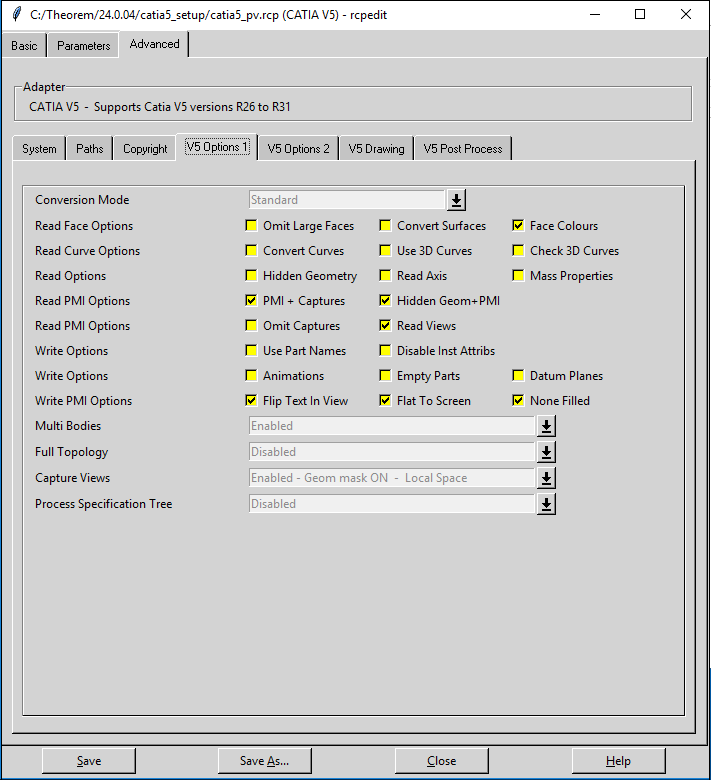
3. Click the Advanced tab and click V5 Options 1 sub-tab.
4. From Conversion Mode drop-down list, select Standard.
5. In the Read PMI Options and Write PMI Options row, select the options as shown in the image.
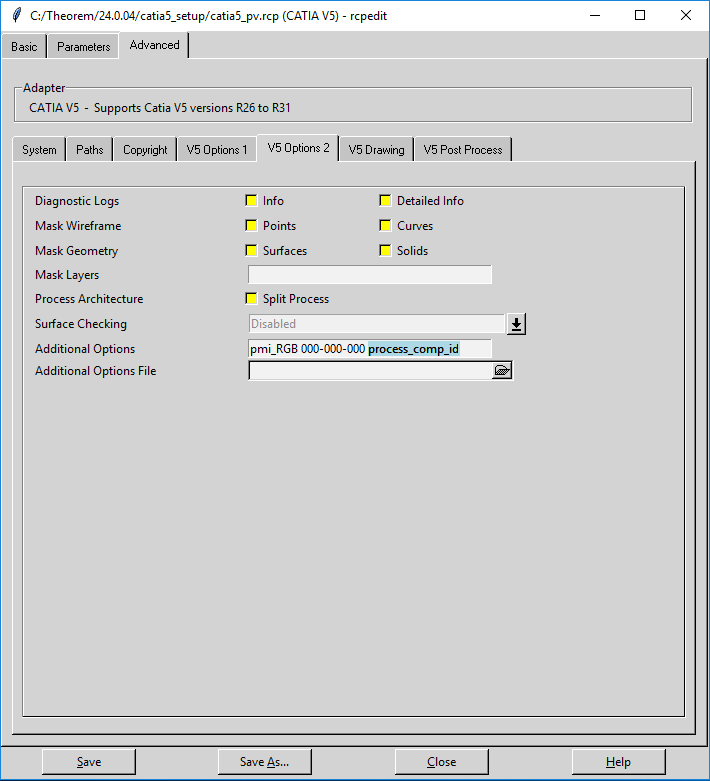
6. Click V5 Options 2 sub-tab.
7. In the Additional Options field, define component ID property process_comp_id. The component ID property allows you to avoid mismatch in identifying assembly instances.
8. Click Save.
Instance Name Mapping from CATIA V5 to Windchill
By default, Windchill Workgroup Manager maps instance name from CATIA V5 to Windchill as Component Name or Reference Designator.
To stop mapping instance names from CATIA V5 to Windchill, set the following preference in the wgmclient.ini file: set.component.name = No.
Setting this preference keeps the Component Name and Reference Designator columns empty in Windchill, enabling you to input custom values.