Open (NX)
In NX, the Open action is available in the File menu.
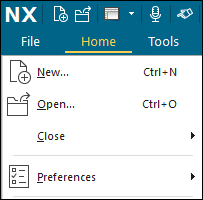
When NX is connected to Windchill Workgroup Manager, clicking > lets you browse and open CAD documents from the Windchill workspace or commonspace.
The default location to open files is workspace. You can also pin the commonspace and workspace locations to the Quick Access toolbar as shown in the following figure.
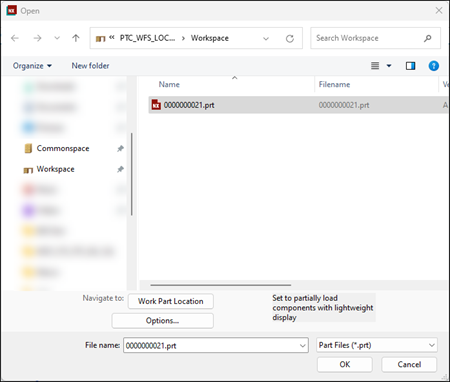
In the Open window, you can click Options to select the load options: Fully Load, Partially Load, Fully Load – Lightweight Display, and Partially Load – Lightweight Display. See Assembly Load Options (NX).
When you perform the Open action, the files that you open from the commonspace are automatically added to the workspace. Other objects that are required to open the selected CAD document are also collected. See Opening Objects in a CAD Application.
When there is no primary server and primary activated workspace, the Open window displays the last-browsed location. You can also browse to another location to find the object you want to open.
Information that is modified in Windchill is updated when it is opened from a workspace. When you change a parameter in a CAD model (the name, for example), the Windchill attribute also changes and becomes the default for NX.