Frequently Used Preferences in the Windchill Preference Management Utility (CATIA V5)
This topic lists the most frequently used preferences that you can set or modify depending on your Windchill role, and not every preference that can be set using the Preference Management utility. For a complete list of preferences that can be set for Windchill Workgroup Manager for CATIA V5, refer to the Preference Management utility in Windchill.
 |
• Descriptions for these preferences are available within the Windchill Preference Management utility Set Preference window.
• Preferences by the same name, managed in the wgmclient.ini file on the client system, have priority.
|
Preferences Under Operation
To view the server-side preferences that can be set from the Operation category and its subcategories, refer Operation Preferences.
Preferences Under Workgroup Manager Client
The following table describes the most frequently used preferences that can be set or modified from the Workgroup Manager Client category and subcategories.
|
Name
|
Context
|
Values
|
||
|---|---|---|---|---|
|
|
• Site
• Organizations
|
• Yes
• No
|
||
|
|
• Site
• Organizations
|
• Yes
• No
|
||
|
|
• Site
• Organizations
|
_AllCATPart
|
||
|
|
• Site
• Organizations
|
• Yes
• No
|
||
|
|
• Site
• Organizations
|
• Yes
• No
|
||
|
Assembly-level CGR parameter
|
• Site
• Organizations
• Products
• Projects
• Libraries
|
Part Parameter
|
||
|
CATIA V5 Template Part Number
|
• Site
• Organizations
• Products
• Projects
• Libraries
|
Part Number
|
||
|
>
|
• Site
• Organizations
• Products
• Projects
• Libraries
|
ProductTemplate.CATProduct
|
||
|
> >
|
• Site
• Organizations
• Products
• Projects
• Libraries
|
ProductTemplate.CATProduct
|
||
|
>
|
• Site
• Organizations
|
• True
• False
|
||
|
>
|
• Site
• Organizations
• Products
• Projects
• Libraries
• User
|
• Assembly Only
• Full
• Lightweight
• Geometry
|
||
|
>
|
• Site
• Organizations
• Products
• Projects
• Libraries
• User
|
• Full
• Lightweight
• Geometry
|
||
|
>
|
• Site
• Organizations
• Products
• Projects
• Libraries
• User
|
<CAD tool template value>
|
||
|
>
|
• Site
• Organizations
• Products
• Projects
• Libraries
• User
|
• Yes
• No
|
||
|
>
|
• Site
• Organizations
• Products
• Projects
• Libraries
• User
|
• Yes
• No
|
||
|
>
|
• Site
• Organizations
• Products
• Projects
• Libraries
|
• Yes
• No
|
||
|
Disable Check out on the fly
|
• Site
• Organizations
• Products
• Projects
• Libraries
|
• Check out – Disable the Conflicts (for Check out on the fly) window and check out the document.
• Revise and Check out – Disable the Conflicts (for Check out on the fly) window; revise and check out the document.
• Continue – Disable the Conflicts (for Check out on the fly) window and continue to save the document without a checkout.
• No – (default) Enables the display of the Conflicts (for Check out on the fly) window.
|
||
|
>
|
• Site
• Organizations
• Products
• Projects
• Libraries
|
• Yes
• No (default)
|
||
|
Enable Environment Management
|
• Site
• Organizations
|
• Yes
• No
|
||
|
Enable Read Only In Session
|
• Site
• Organizations
|
• Yes
• No
|
||
|
Enable Replace in CAD Session on Refresh
|
• Site
• Organizations
|
• Yes
• No
|
||
|
Enable Support for Parameters or Properties with Units
|
• Site
• Organizations
|
• Yes
• No
|
||
|
Environment Management Parameter
|
• Site
• Organizations
|
PTC_WM_ENVMGMT
|
||
|
Expose Annotation Text Notes From Specification Tree
|
• Site
• Organizations
|
• Yes
• No
|
||
|
Expose Manufacturing Information
|
• Site
• Organizations
|
• Yes
• No
|
||
|
Expose Measure Inertia Property
|
• Site
• Organizations
|
• Blank
• PartBody
|
||
|
Expose Parameters under Specific Geometrical Set From Specification Tree
|
• Site
• Organizations
|
• Blank
• Names
• All
|
||
|
>
|
• Site
• Organizations
• Products
• Projects
• Libraries
|
• All
• Assembly
• Parts
• Disable
|
||
|
Identify Standard Part
|
• Site
• Organizations
|
<Standard Part string value>
|
||
|
Ignore Missing Dependents
|
• Site
• Organizations
|
• Yes
• No
|
||
|
Independently Modify Instances
|
• Site
• Organizations
|
• Yes
• No
|
||
|
Managed Environment Variable
|
• Site
• Organizations
|
<environment value>
|
||
|
Managed Read Only Area Folders
|
• Site
• Organizations
• Products
• Projects
• Libraries
|
<file system path value>
|
||
|
>
|
• Site
• Organizations
|
• PTC_WM_ITERATION
• CAD Document Iteration System Attribute
|
||
|
>
|
• Site
• Organizations
|
• PTC_WM_LIFECYCLE_STATE
• CAD Life Cycle State System Attribute
|
||
|
>
|
• Site
• Organizations
|
• PTC_WM_LIFECYCLE
• CAD Life Cycle System Attribute
|
||
|
>
|
• Site
• Organizations
|
• PTC_WM_NAME
• CAD System Attribute
|
||
|
>
|
• Site
• Organizations
|
• PTC_WM_NUMBER
• CAD System Attribute
|
||
|
>
|
• Site
• Organizations
|
The default name is set to a blank value.
Setting the property name to PTC_WM_CREATED_BY creates the property that displays the name of the user that created the CAD document.
|
||
|
>
|
• Site
• Organizations
|
The default name is set to a blank value.
Setting the property name to PTC_WM_CREATED_ON creates the property that displays the date and time when the CAD document was created.
|
||
|
>
|
• Site
• Organizations
|
The default name is set to a blank value.
Setting the property name to PTC_WM_MODIFIED_BY creates the property that displays the name of the user that last modified the CAD document.
|
||
|
>
|
• Site
• Organizations
|
The default name is set to a blank value.
Setting the property name to PTC_WM_MODIFIED_ON creates the property that displays the date and time when the CAD document was last modified.
|
||
|
>
|
• Site
• Organizations
|
• PTC_WM_ORGANIZATION_ID
• <CAD System Attribute>
|
||
|
>
|
• Site
• Organizations
|
• PTC_WM_PART_NAME
• CAD System Attribute
|
||
|
>
|
• Site
• Organizations
|
• PTC_WM_PART_NUMBER
• CAD System Attribute
|
||
|
>
|
• Site
• Organizations
|
• PTC_WM_REVISION
• CAD System Attribute
|
||
|
Note default soft type
|
• Site
• Organizations
|
${internet_domain_name}.Note
|
||
|
>
|
• Site
• Organizations
• Products
• Projects
• Libraries
• User
|
• Required
• All
• None
|
||
|
>
|
• Site
• Organizations
• Products
• Projects
• Libraries
• User
|
• None
• All
• Initially Selected
|
||
|
Open In CAD Tool for Non-native Objects
|
• Site
• Organizations
• Products
• Projects
• Libraries
• User
|
• Yes
• No
|
||
|
Set CAD Component Name
|
• Site
• Organizations
• Products
• Projects
• Libraries
|
Controls whether the CATIA V5 instance name is mapped to the component name in the CAD structure and used as the reference designator in the Windchill WTPart structure.
• Yes (default)—Maps the instance name to Windchill and propagates it to the Reference Designator column in the Windchill Occurrences tab.
• No—Does not map the instance name to Windchill. The Reference Designator column remains blank.
|
||
|
Resolve Broken Links Using CATIA Instance Name
|
• Site
|
• Yes
• No
|
||
|
Save data with active environment
|
• Site
• Organizations
|
• Yes
• No
|
||
|
Store formula values for parameters
|
• Site
|
• Yes
• No
|
||
|
Storing exported files
|
• Site
• Organizations
• Products
• Projects
• Libraries
|
• Attachment
• Windchill CAD Document
|
||
|
Undo Checkout Overwrite Local Content
|
• Site
• Organizations
• Products
• Projects
• Libraries
• User
|
• Yes
• No
|
||
|
Un-managed Read Only Area locations
|
• Site
• Organizations
• Products
• Projects
• Libraries
• User
|
<search file path>
|
||
|
Update Overwrite Local Content
|
• Site
• Organizations
• Products
• Projects
• Libraries
• User
|
• Yes
• No
|
||
|
Upload After Native Save
|
• Site
• Organizations
• Products
• Projects
• Libraries
• User
|
• Yes
• No
|
||
|
Upload CAD/Dynamic Document and Attachment Filter
|
• Site
• Organizations
• Products
• Projects
• Libraries
• User
|
• CAD/Dynamic Document Type
• Attachment File Type
• Content Category
|
||
|
Upload CGR files
|
• Site
• Organizations
• Products
• Projects
• Libraries
|
• Yes
• No
|
||
|
>
|
• Site
• Organizations
• Products
• Projects
• Libraries
|
• Yes
• No
|
||
|
Mapping Custom System Attributes and File Properties
|
Site
|
Specifies the additional attributes from the objects related to the CAD document that are shown as parameters or properties in the CAD tool.
|
|
|
• When you upgrade from an older release to Windchill 11.1 M020, a performance issue may be observed when you open a large CAD assembly saved in the previous release with one of the above properties configured with non-empty name. This is because for Windchill 11.1 M020 onwards, the Windchill Workgroup Manager enforces to propagate additional Windchill system attributes to CAD models when opening CAD documents from Windchill by default. This propagation of the Windchill system attributes increases the loading time of the files as compared to that without propagating these attributes.
• If these Windchill system attributes are not a part of your requirement, you can ignore these attributes by setting their attribute names to blank values. The Windchill Workgroup Manager will not propagate the Windchill system attributes to CAD models and performance degradation for legacy data will be avoided. The following image displays how the Windchill server preference setting were set and the default system attributes were propagated. 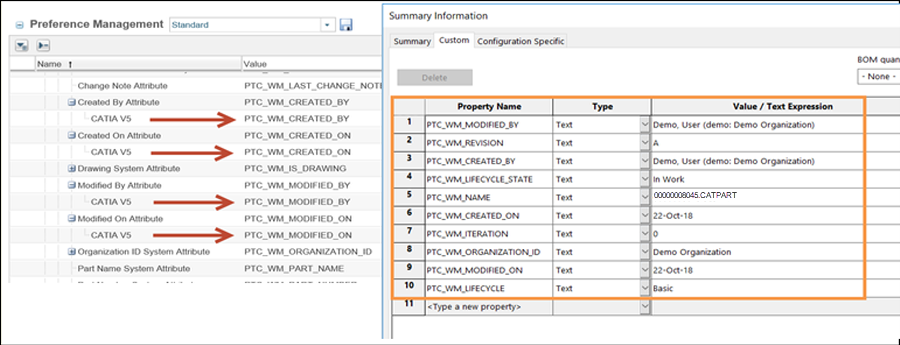 |
Preferences Under Workspace
The following table describes the most frequently used preferences that can be set or modified from the Workspace category and subcategories.
|
Name
|
Context
|
All Values
|
||
|---|---|---|---|---|
|
>
|
• Site
• Organizations
• Products
• Projects
• User
|
• DOWNLOAD
• LINK
|
||
|
> <preference name>
|
• Site
• Organizations
• Products
• Projects
• User
|
Select the preference and the appropriate value from the list of preferences for CATIA V5.
|
||
|
>
|
• Site
• Organizations
• Products
• Projects
• User
|
• Yes
• No
|
||
|
> <preference name>
|
• Site
• Organizations
• Products
• Projects
• User
|
Select the preference and the appropriate value from the list of preferences for CATIA V5.
|
||
|
>
|
• Site
• Organizations
• Products
• Projects
• User
|
• Yes
• No
|
||
|
>
|
• Site
• Organizations
• Products
• Projects
• User
|
• Yes
• No
|
||
|
>
|
• Site
• Organizations
• Products
• Projects
• User
|
• DEFAULT
• LATEST
• AS_STORED
|
||
|
>
|
• Site
• Organizations
• Products
• Projects
• User
|
• DEFAULT
• LATEST
• AS_STORED
|
||
|
>
|
• Site
• Organizations
• Products
• Projects
• User
|
• SELECTED_AND_MODIFIED
• SELECTED
• ALL
• REQUIRED
|
||
|
>
|
• Site
• Organizations
• Products
• Projects
• User
|
• Yes
• No
|
||
|
|
• Site
• Organizations
• Products
• Projects
• User
|
Controls whether the out-of-date check is enabled for the embedded workspace listing and working copy of the CAD Document information pages.When enabled, the system performs a periodic check on whether any content in the local workspace is out-of-date relative to the commonspace.
• Yes—Enables the workspace page out-of-date check feature. If the content in local workspace is out of date, an out-of-date indicator icon is displayed next to the action menu on the top of the workspace listing and the working copy of the CAD document information pages.
• No—Disables the workspace page out-of-date check feature.
|
||
|
> > <preference name>
|
• Site
• Organizations
• Products
• Projects
• User
|
Select the preference and the appropriate value from the list of preferences for CATIA V5.
|
||
|
Workspace Display
|
• Site
• Organizations
• Products
• Projects
• User
|
• All items
• Featured items
|
Revise Preferences
The following table describes the revise preferences.
|
Name
|
Context
|
Description
|
||
|---|---|---|---|---|
|
>
|
• Site
• Organizations
|
The Include Related CAD / Dynamic, Include Related Documents and Include Related Parts values are set by default.
|