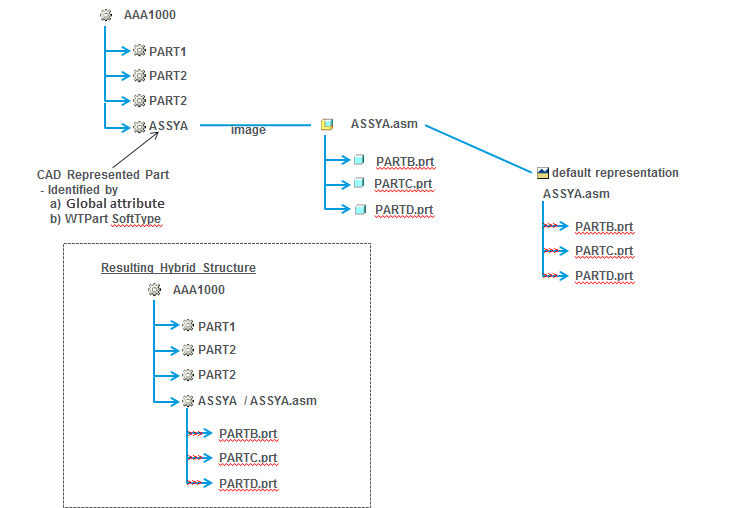
Visualization of CAD Represented Parts
When a dynamic part structure is displayed, the graphics are composed of the merged representations of parts in the structure. For certain Windchill Parts, the child part structure is either not present, or is incomplete and the children do not have graphics associated to them. The supplier parts are an example of this. With supplier parts, there is a single Windchill Part in the structure which represents the complete supplier assembly. In these cases, the 3D graphic is not complete. The Windchill Part structures that are missing the child part structure are called CAD Represented Parts.
It is possible to configure Windchill to display the 3D graphic for CAD Represented Parts. The whole representation of CAD Represented Parts is used to display the 3D graphic. The representation used to display the graphic is the default representation of the part. If the default representation is missing, it uses the default representation on an image associated EPMDocument, and the complete representation, including all children, is merged. Any child Windchill Parts of the CAD Represented Part in the Windchill Part structure are removed from the visualization structure.
In the example below, the Windchill Part “ASSYA” has an image association to a CAD Assembly that has three children. The CAD Assembly has a published representation. When this part is identified as a CAD Represented Part, the resulting visualization structure includes the children of the CAD Assembly.