Show and Hide Actions in the Process Plan Browser
Windchill 13.1.0.0
Description
Use the  Show or
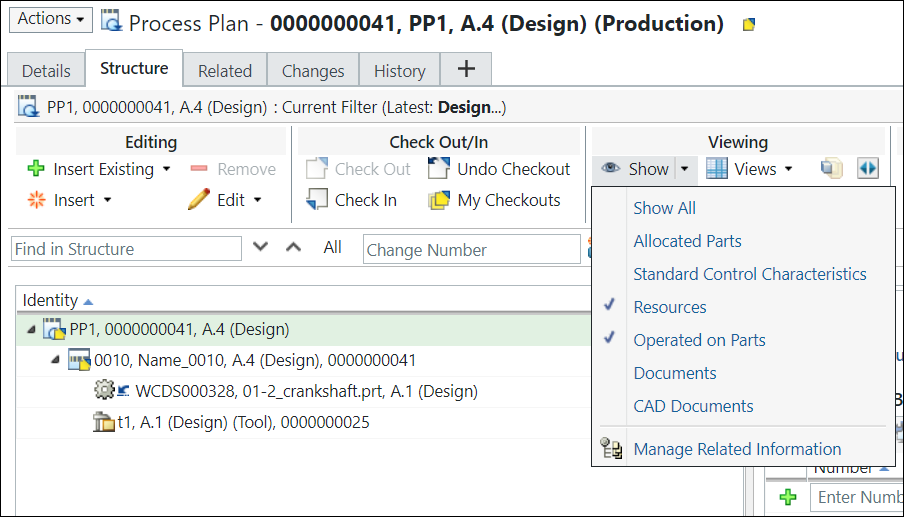
  Hide actions to view or hide objects present under the operation holder (Process Plan, Standard Procedure, Operation, or Sequence) objects in the process plan tree structure based on your business requirements. You can selectively display objects in the process plan tree structure using these actions. For example, if you want to view only the resources present under an operation, you can select the operation in the process plan tree structure and click the Show action or the list to display only the resources present under the operation.
Show or Hide actions to view or hide objects present under the operation holder (Process Plan, Standard Procedure, Operation, or Sequence) objects in the process plan tree structure based on your business requirements. You can selectively display objects in the process plan tree structure using these actions. For example, if you want to view only the resources present under an operation, you can select the operation in the process plan tree structure and click the Show action or the list to display only the resources present under the operation.Advantage
Improved user experience — These actions enable you to view a trimmed version of the process plan tree structure. For example, a process plan tree structure can contain over a thousand operation holder objects. Using these actions, you can focus on only those objects that are necessary for your work.
Related Information
For more information, see Viewing Action Set - Process Plan Browser.