配置 NX 以讀取 PMI
先決條件
在配置 NX 以讀取 PMI 之前,請確保您已安裝 NX 1899 版或更高版本。
欲配置 Windchill 以讀取 PMI,請設定下列項目:
• Windchill Workgroup Manager 用戶端設定
◦ 配置 wgmclient.ini 檔案
◦ 建立一個專用參數
• Windchill 伺服器端設定
• 適用於用戶端可檢視項的 ug2pv.pvr 檔案
• 適用於伺服器端可檢視項的 NX CAD Worker
配置 wgmclient.ini 檔案
在 wgmclient.ini 檔案中,將 expose.model.annotations 偏好設定設為 All 或 Designated。偏好設定的預設值為 Designated。如需偏好設定的更多詳細資訊,請參閱 wgmclient.ini 檔案中的常用偏好設定。
 |
從 Windchill Workgroup Manager 13.1.1.0 或更新版本開始,在 NX 中建立的參照尺寸註釋不會顯露給 Windchill 作為模型項目與控制特徵。當您入庫或出庫模型時,關聯零件與控制特徵 (包括參照尺寸) 之間先前建立的連結會保持不變。欲中斷此連結並避免在 Windchill 中出現參照尺寸,請將參照尺寸類型變更為其他類型,然後儲存並上載模型。如需詳細資訊,請參閱儲存 (NX)。
|
在 Windchill Workgroup Manager 用戶端建立參數
使用下列步驟,可在 3D 註釋或尺寸上建立專用參數:
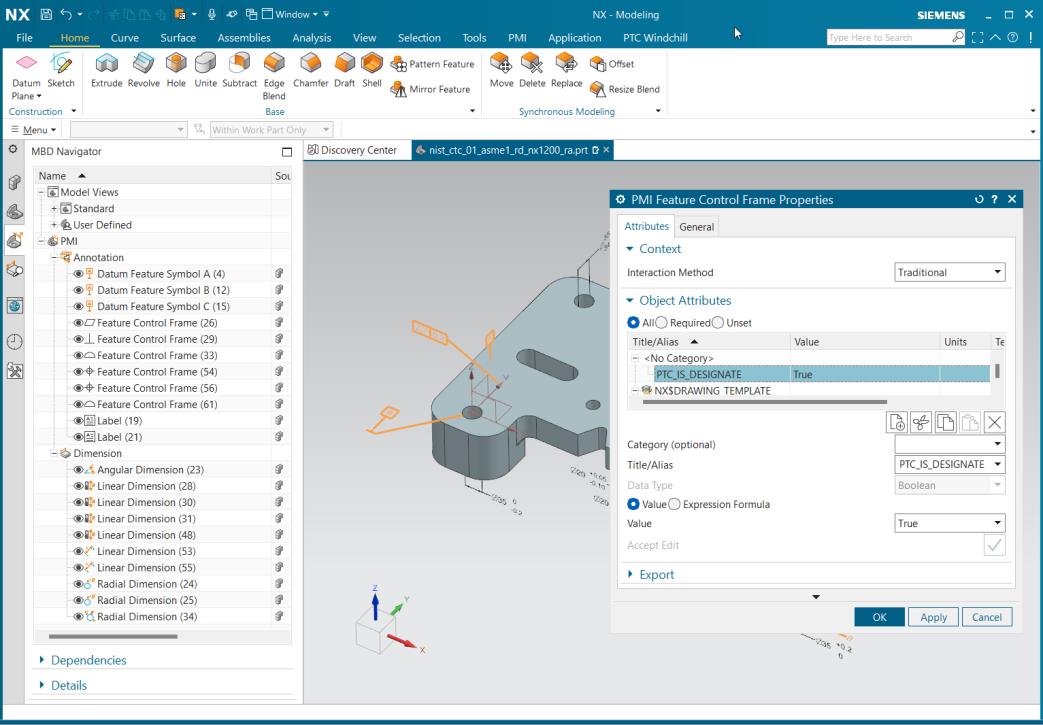
1. 轉至 > ,在註釋或尺寸上按一下滑鼠右鍵,然後轉至 Properties。如此即會開啟 PMI Feature Control Frame Properties 精靈。
2. 在此精靈中,執行下列操作:
a. 在 Title/Alias 中,新增參數 PTC_IS_DESIGNATE。
b. 在 Value 中,選取 True。
3. 按一下右側按鈕。
4. 按一下「確定」。即會建立參數。
Windchill 伺服器端設定
1. 在 codebase\WEB-INF\conf\wvs.properties.xconf 檔案中,將 publish.copyrepresentationsforward.restrict 內容設定為 false。
2. 在 codebase\wt.properties 檔案中,將 com.ptc.core.meta.common.NumericToolkit.IGNORE_PRECISION_ENABLED 內容設定為 true。
3. 欲在「模型結構報告」(MSR) 頁中檢視「模型項目」標籤,請在 codebase\wt.properties 檔案中設定伺服器內容,com.ptc.windchill.cadx.ShowModelItemInMSR=true。
配置 ug2pv.pvr 檔案以在用戶端可檢視項中讀取 PMI
欲在用戶端可檢視項中讀取 PMI,請設定 ug2pv.pvr 檔案中的偏好設定 adapter/outputAnnotPlanar=1,該檔案位於 \wgm\libs\i3libs\resources\recipe。
適用於伺服器端的 NX CAD Worker
NX CAD Worker 會將原生 NX 資料轉換為 Creo View 格式,並可讓 Windchill 針對下游流程使用來自 3D 模型的 PMI 資料。
欲配置 NX CAD Worker,請執行下列步驟:
1. 在 recipe 編輯器中開啟 ug2pv.pvr 檔案。
2. 在 Basic 標籤中,啟用 Planar Annotations。
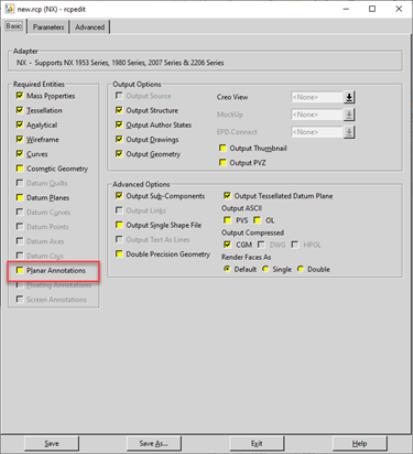
3. 按一下 Save。