組件載入選項 (NX)
「組件載入選項」可讓您在將模型從 Windchill 開啟至 NX 時,變更模型的載入選項。
欲存取組件載入選項,請執行下列操作:
• 在 NX 的 Home 標籤中,按一下 > > > 。
或者,
• 按一下 > > 。Assembly Load Options 視窗即會開啟。
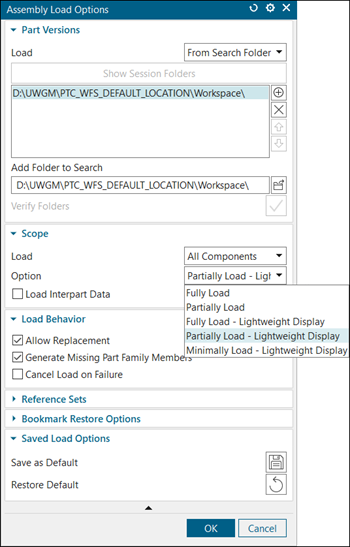
用於將 NX 檔案匯入 Windchill 的支援載入
當將 NX 檔案匯入 Windchill 時,可在 Assembly Load Options 視窗中的 Part Versions 群組下找到用於載入的選項,如下所示:
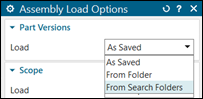
• As Saved - 從最近儲存的位置開啟 NX 組件及其元件。它會追蹤儲存元件的資料夾位置。此資料不會儲存在 Windchill 中。
• From Folder - 從本機資料夾開啟 NX CAD 檔案。當所有 CAD 文件都存在於單一本機資料夾中時,可以使用此選項。
• From Search Folder - 這是將 NX 連接至 Windchill Workgroup Manager 時的預設載入。預設會新增使用中工作區的資料夾路徑。
用於在 NX 中開啟 Windchill CAD 文件的支援載入
當在 NX 中開啟 Windchill CAD 文件時,可在 Scope 群組下找到用於載入的選項,如下所示:
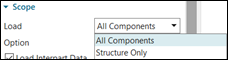
• All Components - 開啟組件的所有元件。
• Structure Only - 僅開啟組件結構。不會載入任何元件。當您使用 Structure Only 載入類型從共用區開啟組件時,預設會將 Windchill 中的所有相依物件自動與組件一起新增至工作區。
欲使用 Structure Only 選項獲得最佳效能,請在將物件新增至工作區時,在 Basic 標籤中將 Dependents 值設定為 None。
或者,
a. 導覽至 > > > 。
b. 將 Include Dependent CAD / Dynamic Document 偏好設定設為 None。
用於在 NX 中開啟 Windchill CAD 文件的支援選項
您可以在 Scope 群組下找到這些選項,如下所示:
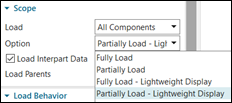
• Fully Load
• Partially Load
• Fully Load - Lightweight Display
• Partially Load - Lightweight Display
您也可以在 NX「啟動」目錄的 load_options.def 組態檔案中設定載入選項。例如,欲將載入選項設定為 Fully Load,請在 load_options.def 組態檔案中設定 LoadOptions_PartLoadOption: fully_load 偏好設定。
 | 欲變更 load_options.def 組態檔案的位置,您可以按照如下方式設定 UGII_LOAD_OPTIONS 環境變數:UGII_LOAD_OPTIONS=D:\NX_loadoptions\load_options.def。 |
如需詳細資訊,請參閱最佳作法:從 Windchill 開啟 NX CAD 資料。