Viewing Summary Reports
The summary reports are available in the Attachments tab of the package. To access the tab, in the Object Collector or Context Collector page of your package, add a new tab. Click the Customize menu in the upper-right corner, and select General -> Attachments.
The given example shows the objects that are added to the package to mark with the replication lock. In this example, the part Bolt is checked out, the part Nut is the common affected object for ChangeTask001 and ChangeRequest005, Actuator_Baseline is managed baseline, and the part Left_Actuator is parent of Left_Arm and is also associated with the document Doc1.
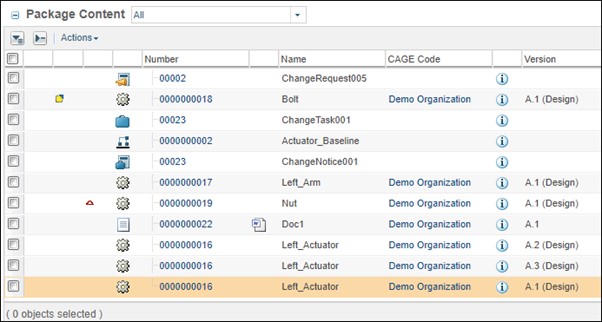
The reports generated for the example are listed below:
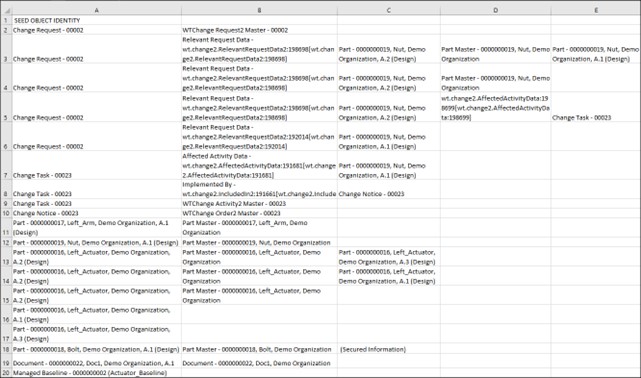
Summary_Dependency_Chain.csv
Shows a chain of objects that are dependent on the objects selected and collected for replication lock. Only objects that are configured to be collected as dependents are listed. For more information, see Dependent Objects Included in Replication Locks.
The first column in the report displays the identity of the selected object, the second column displays the identity of its dependent, the third column displays the identity of the object dependent on the object listed in the second column, and so on.
Each row in the report shows the following information:
• Rows 2 to 6: The dependents of Change Request – 00002 are collected. In the first row, the master of the change request is collected. Then, the different versions of the affected object - Nut A.1 and A.2 are collected. Change Task – 00023 is also collected as Nut is the common affected object between the change task and change request.
• Rows 7 to 9: The affected object Nut, the associated change notice, and the master are collected as dependents of Change Task 00023.
• Row 10: Only the master is collected as dependent for Change Notice 00023.
• Rows 11 to 17: The different versions of the selected parts are collected with their master.
• Row 18: Bolt is checked out, so the identity of the working copy of this part is displayed as Secured Information.
• Row 19: The master of the selected document is collected.
• Row 20: Although managed baseline is displayed as part of the collected objects in the report, it will not be locked for replication. The objects that are not supported for the replication lock are explicitly called out in the Summary_ExcludedObjects.csv report.
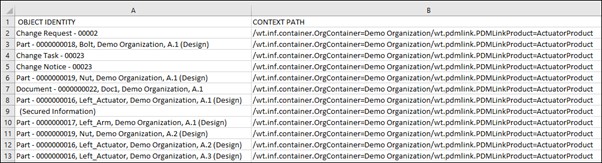
Summary_Objects_ToBe_Marked.csv
Lists the objects that are eligible for the replication lock. The report displays the identity and the context path where the objects are located. In the given report, the listed parts, change task, change notice, change request, document, and the working copy of the checked-out part Bolt will be locked for replication.
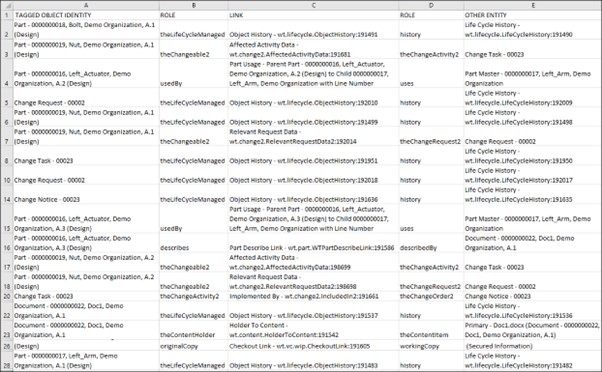
Summary_ToBe_Deleted_Links.csv
Lists the links that will be deleted after replication. As an exception, change task will be deleted from the target system during the import. The report shows the identity of the selected object, the link, the Role A and Role B objects of the link, and the dependent object.
In the given report, the following links which are associated with the collected objects are eligible for deletion during the import: Object History, Part Describe Link, Implemented By, Affected Activity Data, Relevant Request Data, Checkout Link, Part Usage, and Holder To Content.
Summary_ExcludedObjects.csv
Lists the objects that are not eligible for the replication lock or are not supported for replication. The objects that are already replicated are also displayed in this report. The report shows the identity of the object and the context path where the objects are located.
Managed baseline is displayed in the report because it is not supported for the replication lock.

Summary_Open_Workflows.csv
Lists the objects that are eligible for replication lock but have workflow processes that are still running. Such workflow processes are terminated before the replication lock is applied after the approval vote. If rejected, the workflow processes are not terminated. The report shows the identity of such objects and the running processes.
The given report shows the change request, change task, and change notice workflows running for the respective change objects.

Summary_Violators.csv
Lists the objects that prevent the in-transit lock from being applied. A violation occurs when the object to be locked is checked out or is a working copy, or if it falls in any of the following categories:
• Reserved working copy: The object is checked out in Creo.
• Private working copy: A private copy of the object is modified and uploaded to the database without checking it out in Creo.
• Workspace only: The object is created in Creo, but not uploaded to Windchill.
• Checked out to sandbox: The object is checked out from PDM to a project.
• Terminal iteration: The object that is checked out to a project is sent back to PDM.
• One-off Version: The object is created as a one-off version, which will not be reflected in the main version sequence. Checking out an object to a project also creates a one-off version.
A rework task is created, and the routing process is set to rework in this case. You can fix the violations and route the package again for dependency review. The report shows the identity of the objects that are violators along with the values TRUE or FALSE for the categories listed above. Bolt is listed in the given report as checked out.

 | • The Copy delivery information checkbox displayed on the Revise dialog box is not functional for the Object Collector or Context Collector package. The delivery is not copied to the new package revision even if you select the checkbox. • Users in the Package Approver role must be part of the Replication Package Administrators group along with the Replication Authority group to view the contents and summary reports generated for the Context Collector package. |