Replication Behavior When Locking Strong-side and Weak-side Links
When an object is marked with a replication lock, its dependent objects are automatically collected to ensure consistency during replication. These dependents typically include version history, CAD objects, and change objects. For a comprehensive list of all collected dependents, see Dependent Objects Included in Replication Locks.
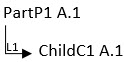
In this example, PartP1 A.1 resides on the strong side of link L1, as the link originates from it. Conversely, ChildC1 A.1 is on the weak side, since the link terminates at this object.
The behavior of link replication depends on the position of the marked object:
• If the marked object is on the strong side of a link, the existing links from this object in the target system are removed. The corresponding links from the source system are then replicated into the target system.
• If the marked object is on the weak side, the existing links in the target system are retained as-is.
Exception: Certain links may still be removed even when the marked object is on the weak side. For more information, see Removal of Weak-side Links.
 |
If a part in the source system contains a missing object link, the corresponding object is displayed as missing in the target system following replication, even if it previously existed locally.
|
Additionally, users must have the necessary access rights to remove eligible links during the import process. If access is not granted, the replication of the entire package will fail. Administrators can configure a property to bypass this access check. For more information, see Configuring Access Check for Links During Import.
Administrators also have the ability to define whether a link should be retained or removed during replication. For configuration guidance, see Configuring Link Behavior During Replication.