Incorporating Upstream Changes in Split Assemblies
Use the  New Split Assemblies action, available in the upstream view, to create split assemblies in the downstream view from existing assemblies in the upstream view. For more information, see Creating Multiple Split Assemblies in Downstream View from Assemblies in Upstream View.
New Split Assemblies action, available in the upstream view, to create split assemblies in the downstream view from existing assemblies in the upstream view. For more information, see Creating Multiple Split Assemblies in Downstream View from Assemblies in Upstream View.After the creation of the split assemblies, you can make changes in the assembly in the upstream view. You can incorporate the changes in the split assemblies in the downstream view.
Example
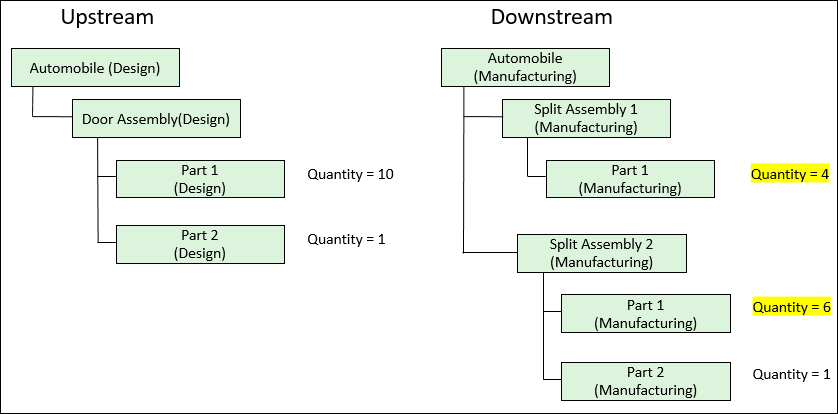
Consider the following structure present in the BOM Transformer:
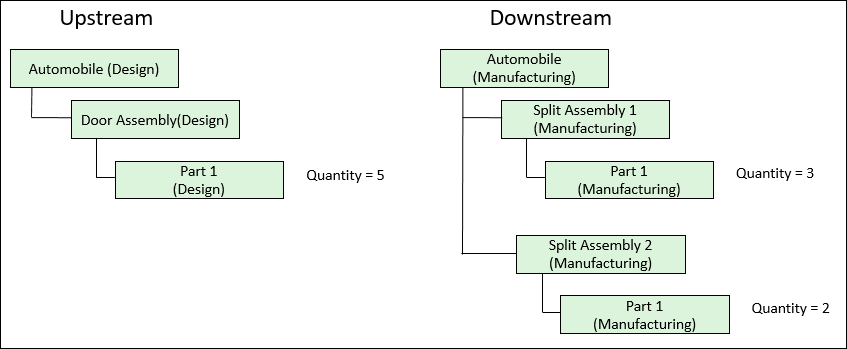
The Door Assembly(Design) is split into Split Assembly 1(Manufacturing) and Split Assembly 2(Manufacturing).
1. Make changes in the assembly in the upstream view.
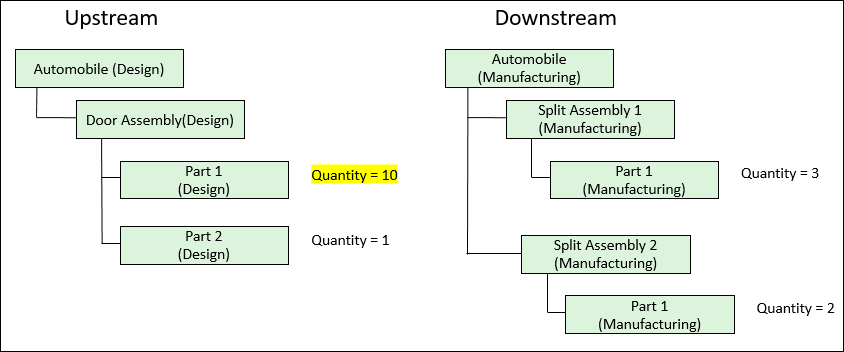
2. Click  Detect Discrepancies or
  Synchronize Structures. Depending upon the action you clicked, the Review and Resolve Discrepancies or Synchronize Structures dialog box opens. It displays the discrepancies for the parts in the upstream view of the BOM Transformer.
Detect Discrepancies or Synchronize Structures. Depending upon the action you clicked, the Review and Resolve Discrepancies or Synchronize Structures dialog box opens. It displays the discrepancies for the parts in the upstream view of the BOM Transformer. | • For discrepancies with criteria Quantity and Added Parts, the Status appears as Interactive. You can resolve these discrepancies. The New Split Assemblies dialog box opens when you use the  action to resolve the discrepancies with Status as Interactive. action to resolve the discrepancies with Status as Interactive.• For discrepancies with criteria other than Quantity and Added Parts, the Status appears as Auto. You can resolve these discrepancies. The New Split Assemblies dialog box does not appear when you use the action to resolve the discrepancies with Status as Auto. |
3. Select the check boxes for the discrepancies.
4. Click to propagate the changes. The New Split Assemblies dialog box opens.
to propagate the changes. The New Split Assemblies dialog box opens.5. Enter appropriate values in the New Split Assemblies dialog box.
6. Click Finish. The New Split Assemblies dialog box closes. The updated structure appears in the BOM Transformer.