開啟 (CATIA V5)
在 CATIA V5 中,只能從 File 選單與 Standard CATIA V5 工具列找到 Open 動作。
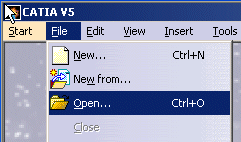
您可以從本機目錄中開啟 CAD 物件,並將其入庫至 Windchill。如需有關入庫的詳細資訊,請參閱入庫 (CATIA V5)。
欲從 Windchill 共用區或工作區開啟文件,最佳作法是使用「從 Windchill 開啟」,而不是 > 。
在 CATIA V5 中開啟大型組件的最佳作法
• Work with Cache System - 啟動 CGR (CATIA 圖形表示) Cache Management 模式。此偏好設定可讓您在輕量表示中開啟組件的子零件,進而在使用更少資源的同時更快地載入大型組件。欲啟用 CGR 快取支援,請導覽至 > > > > ,並選取 Work with Cache System 核取方塊。請參閱 CATIA V5 CGR 組態與 CGR 快取管理 (CATIA V5)。
• Assembly-level CGR - 使用組件層級 CGR 或超級 CGR 更快地開啟組件與子組件。請參閱組件層級 CGR。
• Do not activate default shapes on open - 更快地開啟大型組件,而無需在 CATIA V5 圖形視窗中載入模型幾何。欲在 CATIA V5 中啟動此偏好設定,請導覽至 > > > > ,然後選取 Do not activate default shapes on open 核取方塊。