显示表格的菜单栏操作
1. 在 actions.xml 文件中定义操作。有关详情,请参阅定义新操作。
2. 将操作添加到操作模型。有关详情,请参阅定义新操作。对于在菜单栏中使用的操作模型,操作模型名称中需要包含 "menubar"。要获得从主菜单中飞出的菜单,请在操作模型中添加一个子菜单:
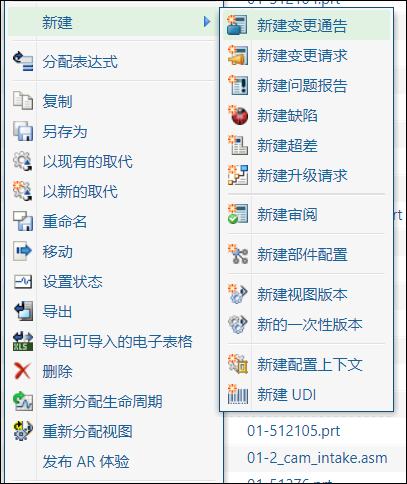
<model name="folderbrowser_toolbar_actions">
<description>Folder browser toolbar actions menu for all Folders.</description>
<submodel name="folderbrowser_toolbar_open_submenu" />
<action name="customLaunchMatrixEditorWizard" type="productfamily"/>
<action name="separator" type="separator" />
<submodel name="folderbrowser_toolbar_new_submenu" />
</model>
<model name="folderbrowser_toolbar_new_submenu" resourceBundle="com.ptc.windchill.enterprise.folder.FolderActionResource">
<description>'New' submenu for folder browser toolbar actions menu.</description>
<action name="create" type="changeNotice" />
<!-- New Change Notice -->
<action name="createChangeDirective" type="changeDirective" shortcut="true" />
<!-- New Change Directive -->
<action name="create" type="changeRequest" shortcut="true" /> <!-- New Change Request -->
<action name="create" type="problemReport" /> <!-- New Problem Report -->
</model>
<description>Folder browser toolbar actions menu for all Folders.</description>
<submodel name="folderbrowser_toolbar_open_submenu" />
<action name="customLaunchMatrixEditorWizard" type="productfamily"/>
<action name="separator" type="separator" />
<submodel name="folderbrowser_toolbar_new_submenu" />
</model>
<model name="folderbrowser_toolbar_new_submenu" resourceBundle="com.ptc.windchill.enterprise.folder.FolderActionResource">
<description>'New' submenu for folder browser toolbar actions menu.</description>
<action name="create" type="changeNotice" />
<!-- New Change Notice -->
<action name="createChangeDirective" type="changeDirective" shortcut="true" />
<!-- New Change Directive -->
<action name="create" type="changeRequest" shortcut="true" /> <!-- New Change Request -->
<action name="create" type="problemReport" /> <!-- New Problem Report -->
</model>
3. 通过在 MVC 构建器中调用 setMenubarName(action_model_name) 将操作模型添加到您的表格中。
public ComponentConfig buildComponentConfig (ComponentParams params) {
ComponentConfigFactory factory = getComponentConfigFactory ();
JcaTableConfig table = (JcaTableConfig) factory.newTableConfig ();
// add the menu bar action model to the table
table.setMenubarName ("folderbrowser_toolbar_actions");
....
return table;
}
ComponentConfigFactory factory = getComponentConfigFactory ();
JcaTableConfig table = (JcaTableConfig) factory.newTableConfig ();
// add the menu bar action model to the table
table.setMenubarName ("folderbrowser_toolbar_actions");
....
return table;
}
故障排除
问题说明 | 解决方案 |
|---|---|
某些操作的图标缺失 | 只有显示在表格工具栏中的操作,才能在操作菜单中拥有图标。 |
某些操作未显示在 UI 的列表中 | 可能是针对此操作配置的验证器在某些条件下隐藏了该操作。有关使用验证器配置操作的信息,请参阅 Windchill 客户端体系结构的操作框架。 将 jcaDebug=true 添加到 URL,以查看隐藏的操作。启用 jcaDebug 选项后,菜单中将显示更多信息,并且列表的末尾会显示一项操作,用于转至该菜单的操作模型报告。  |