AML/AVL Tab
The AML/AVL (Approved Manufacturer List/Approved Vendor List) tab displays information such as sourcing context, manufacturer/vendor part number, manufacturer/vendor organization id, manufacturer/vendor, and manufacturer/vendor sourcing status in a table. For more information on AML/AVL, see Managing the AML/AVL and History Reports.
The AML/AVL tab is visible when the selected part is a BOM redline. It is hidden if the selected part is a part master in the redline structure tree. Out-of-the-box, the tab appears after Occurrences. However, you can change the sequence by dragging the tab.
 |
To view the AML/AVL tab, the SUMA (Windchill Supplier Management) module must be installed.
|
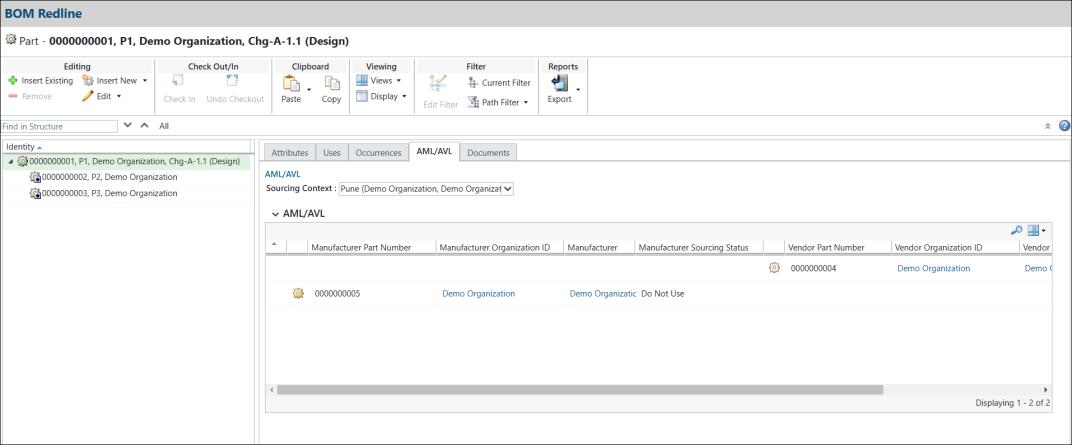
The AML/AVL table is read-only; you cannot perform actions such as Add, Edit, or Delete. However, you can customize the table view as needed. There are three default views: AML, AVL, and ALL. The view of the AML/AVL table can also be customized.
If there are multiple parts, you can find the desired part using the Search  action.
action.The AML/AVL tab follows the standard practices of redline process. Merging the redline with the affected object version and the synchronizing the redline with the latest released resulting object follow the same conventions. For more information, , see the Redline Process.
When you delete the entire BOM redline, including the parent and child redlines, the AML/AVL information is also deleted.
The AML/AVL table column displays the following information.
Tab | Description | ||
|---|---|---|---|
Sourcing Context | Displays a list of sourcing context based on the Part Structure Browser and allows you to change the value.
| ||
Manufacturer Part Number | Specifies the manufacturer part number. | ||
Manufacturer Organization ID | Specifies the manufacturer organization ID. | ||
Manufacturer | Specifies the name of manufacturer. | ||
Manufacturer Sourcing Status | Indicates the relationship of supplier parts to the OEM part, showing whether the manufacturer part is approved, preferred, or not used. | ||
Vendor Part Number | Specifies the vendor part number. | ||
Vendor Organization ID | Specifies the vendor Organization ID. | ||
Vendor | Specifies the name of vendor. | ||
Vendor Sourcing Status | Indicates the relationship of supplier parts to the OEM part, showing whether the vendor part is approved, preferred, or not used. |
Sourcing Context
The AML/AVL table includes a Sourcing Context picker, similar to the Part Structure Browser. It displays a list of sourcing contexts you have visited, with the most recently visited appearing first. Changing the Sourcing Context value will update the list of manufacturer parts and vendor parts displayed in the AML/AVL table. The Sourcing Context value is the same for both parent and child parts. Changing it for one will apply to both.
Sourcing Context values are based on the PSB. Specifying a value in the PSB will reflect in the redline structure browser and vice versa. You can add a new Sourcing Context from the PSB, after which it will appear in the redline structure browser.
For more information on sourcing contexts, see Sourcing Contexts.
Planned Modifications for AML/AVL
Currently, the AML/AVL table is read-only. Therefore, any planned BOM modifications (changes related to part uses, occurrences, documents) will be merged into the next sequential revision of the affected object. When part revisions are released using change notices, any AML/AVL modifications associated with the released part are reflected in the open BOM redlines. Modifications to the AML/AVL are synchronized when the latest released part revisions are updated on the latest released resulting object.
The updated BOM redline is an exact copy of the AML/AVL across all sourcing contexts) that was released using a change notice. There are no resulting AML/AVL changes on the open BOM redline.
Similarly, the updated BOM redline is an exact copy of the AML/AVL that was modified on the latest released part iteration. There are no resulting AML/AVL changes on the open BOM redline.
Let’s say Change Notice 1 has an AML or AVL for specific conditions. When Change Notice 1 synchronizes with Change Notice 2, the BOM redline of Change Notice 2 is updated accordingly. The AML/AVL changes from Change Notice 2 will be the same as Change Notice 1. Since the AML/AVL data is read-only, no discrepancies arise during the synchronization process for AML/AVL.
Related Topics