Windchill+ Release Management
The following diagram illustrates the Windchill+ release management cycle:
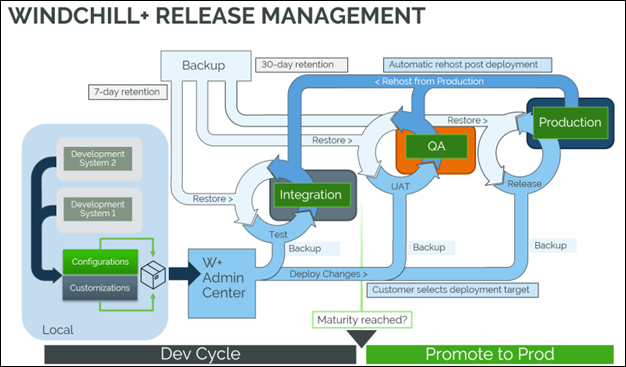
The cycle consists of these key stages:
1. Develop — CCD packages containing code and configuration are developed either on-premises or on a PTC-hosted cloud portal virtual machine.
2. Push to Integration — Changes from multiple developers and workstreams are merged and integration testing is performed.
3. Push to QA — Validated changes are pushed to the QA environment for User Acceptance Testing (UAT).
4. Release to Production — Approved changes are promoted to the production environment.
Choosing a Pipeline — What It Means for You
When setting up your deployment, you only need to select a pipeline, such as INT (integration) or PROD (production). The environments associated with each pipeline are automatically provisioned by PTC—you do not need to configure them.
• INT pipeline typically includes only the INT environment, which is used for integration or development testing.
• PROD pipeline may include multiple environments depending on your setup. In most cases, PROD includes both QA and PROD environments.
If a QA environment is not available, PROD may instead include INT and PROD. This approach simplifies your decision-making. You can focus on selecting the right pipeline, while PTC handles the environment mapping in the background.
Understanding CCD Build Types and Their Intent
When working with CCD, it is essential to understand the type of build you initiate and the behavior it is intended to follow. This ensures that your deployments are executed correctly and align with system requirements. You typically work with two types of builds:
• Full Builds
◦ May include code only, configuration only, or a combination of both.
◦ Must be cumulative. You need to include all prior changes to maintain consistency and avoid missing dependencies.
◦ Require a Windchill restart to take effect.
• Load-Only Builds
◦ Used to load the configuration without restarting Windchill.
◦ Cannot be cumulative. Each load-only build must be treated as a standalone deployment specific to the current configuration.
By identifying the correct build type and understanding its purpose, you can ensure smoother deployments and reduce the risk of configuration issues.
Key Points
• Post-deployment, integration environments are retained for 7 days; whereas, QA environments are retained for 30 days. During this period, the customer must approve or reject the deployment.
• After this retention period, to conserve SaaS resources, the environments are automatically restored to their pre-deployment state.
• A full backup is performed before each deployment to support environment restoration if needed.
 | Automated re-hosting to lower environments (such as INT or QA) does not occur after a successful deployment. If you need to re-host to a lower environment, submit a separate request for that action. |
Parent topic