Autonaming Rules
You can configure rules to ensure that classified object names follow a uniform format.
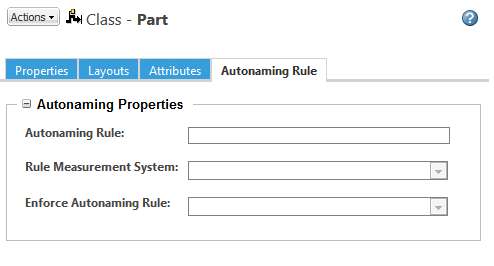
To add, remove, or modify the autonaming rule properties, the node must be in edit mode.
Use the Autonaming Rule tab to specify the following values:
Autonaming Rule | Enter a rule to use when generating the name for a classified object.
| ||
Rule Measurement System | Select the measurement system to use when converting attribute values when generating the classified part name. This property applies if your rule includes a Real Number with Units attribute value.
| ||
Enforce Autonaming Rule | You can use this field to enable or disable the autonaming rule. |
When a user creates a part with a node that has an autonaming rule enforced, the Name field is generated and any previously entered value is removed:

If the user adds another classification node or clears their node selection, Name is converted back to an editable field.
 | Autonaming rules are not enforced when more than one node is selected per object. |
Autonaming Rule Elements
The autonaming rule can include one or more of the following elements. Separate each element with a plus sign character (“+”):
CSM_NODE_NAME | This represents the node name on which the rule is added. When the name is generated, this element is replaced with the display name of the node. | ||
<attribute> | Specify the internal name of an attribute. The attribute value is displayed when the object name is generated. You can use any attribute defined for the node under the Attributes tab.
| ||
"<string>" | Enter a string to include in the object name. The string must be enclosed in double quotes.
| ||
(<attribute><function>) | If the attribute is an Integer Number or Real Number, you can specify a mathematical function. The attribute name and equation must be enclosed within parentheses. For more information on how mathematical functions can be used, see Calculated Attribute Formulas. |
| | • Once created, the generated name is not dynamic. If the user later edits the object to change the value of the attribute, the object name is not updated. If the autonaming rule is modified for the node, existing object names are not updated to match. • Strings, including the node name and attribute values, are displayed in the server locale. If Windchill Service Information Manager is installed, the string is displayed in the authoring language specified. If no authoring language is specified, the value of the com.ptc.core.td.localeForNullAuthoringLanguage property is used. If this property is not specified, the master text is used. |
Autonaming Example
You create a classification node named “Key Plug” that has the following attributes:
Internal Name | Data Type | Default Value |
|---|---|---|
Pin_Count | Integer Number | 5 |
Diameter | Real Number with Units | 1.905 |
Finish_Type | String | Bronze |
Serrated | Boolean | Yes The default value can be Yes or No. |
User_String | String |
When generating the examples below:
• The rule measurement system is CGS (centimeter-gram-second).
• The user enters lock1X in the “User_String” field.
• For all other attributes, the user accepts the default value.
Autonaming Rule | Generated Name |
|---|---|
CSM_NODE_NAME + Diameter + Finish_Type + Pin_Count + Serrated | Key Plug1.905 cmBronze5Yes |
CSM_NODE_NAME + “: ” + Diameter + “_” + User_String | Key Plug: 1.905 cm_lock1X |
Diameter + “ - CYLINDER - ” + Finish_Type + “ ” + CSM_NODE_NAME | 1.905 cm – CYLINDER – Bronze Key Plug |
"\"" + User_String + "\"" + (Pin_Count * 5) | “lock1X”25 |
Additional Configuration Options
Site administrators and site business administrators can use the following when configuring autonaming rules:
• Use the ClassificationReportGenerator API to return a list of classified parts that do not conform to a specified autonaming rule. For more information, see the Windchill Javadoc.
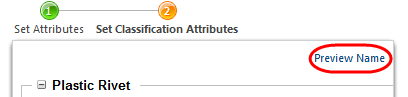
• You can use Windchill profiles to allow certain users to override the generated name. When the Override Name profile action is enabled, a Preview Name link appears under the Set Classification Attributes step. Click this link to open a new window that displays the generated name given the current attribute values:
An Override Name checkbox appears in the Preview Name window:
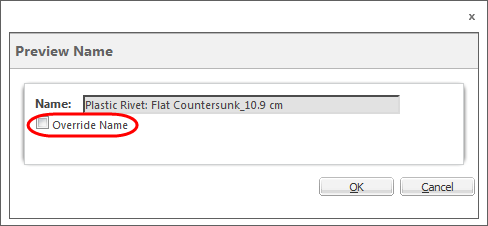
When the checkbox is selected, the Name field above is editable.
 | When editing an object, the updated attribute value is displayed: 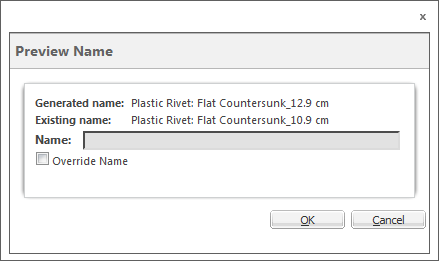 If you override the existing name by entering the generated name in the Name field, the object name is updated upon checkin. |