Workflow Tools
Workflows are defined using templates. Workflow templates are provided out-of-the-box, and additional templates can be defined from the workflow template editor.
The Workflow Process Engine interprets the workflow template and notifies users that they have a task to complete. It also executes the automated activities in the workflow process such as promoting a document through a life cycle, evaluating expressions for routing, or integrating with a third-party solution.
Use the following tools to author, test, deploy, and monitor work within your Windchill solution.
Workflow Template Administration Utility
The Workflow Template Administration utility is available from the Utilities page under Site  , Organizations
  , Products
  , or Libraries
  . The business administrators can access this utility from the Business Administration Utilities page under Site and Organizations .
, Organizations , Products , or Libraries . The business administrators can access this utility from the Business Administration Utilities page under Site and Organizations .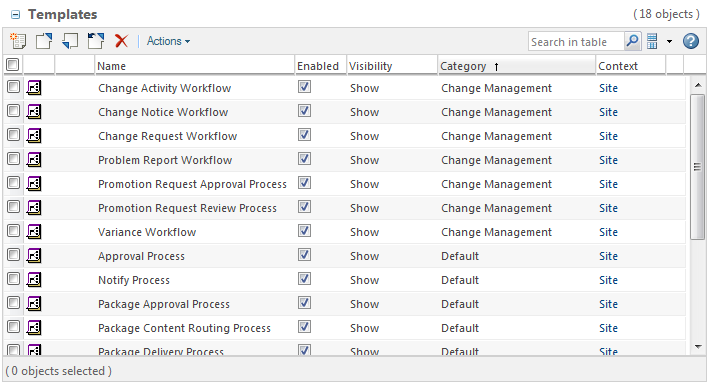
This table provides the following actions:
• Open the workflow definer in a view mode
• Control workflow template visibility
• Test the templates using the Initiate workflow process action
For more information, see Workflow Templates Table.
Workflow Process Administration Utility
The Workflow Process Administration utility provides a central location for managing and examining the health of running workflow processes and their associated process nodes.
This utility is available from the Utilities page in each context (such as Site , Organizations , Products , and Libraries ). The business administrators can access this utility from the Business Administration Utilities page under Site and Organizations .
, Organizations , Products , and Libraries ). The business administrators can access this utility from the Business Administration Utilities page under Site and Organizations .You can use the Workflow Process Administration utility to find and display running workflow processes, view the health of the workflow process, and display warning and error messages.
For more information, see Workflow Process Administration Utility.
Workflow Process Manager
The workflow process manager provides a graphical display of the workflow process in the top pane, and the properties of the process and its activities in the lower pane. You can click a node to view its properties in the lower pane:
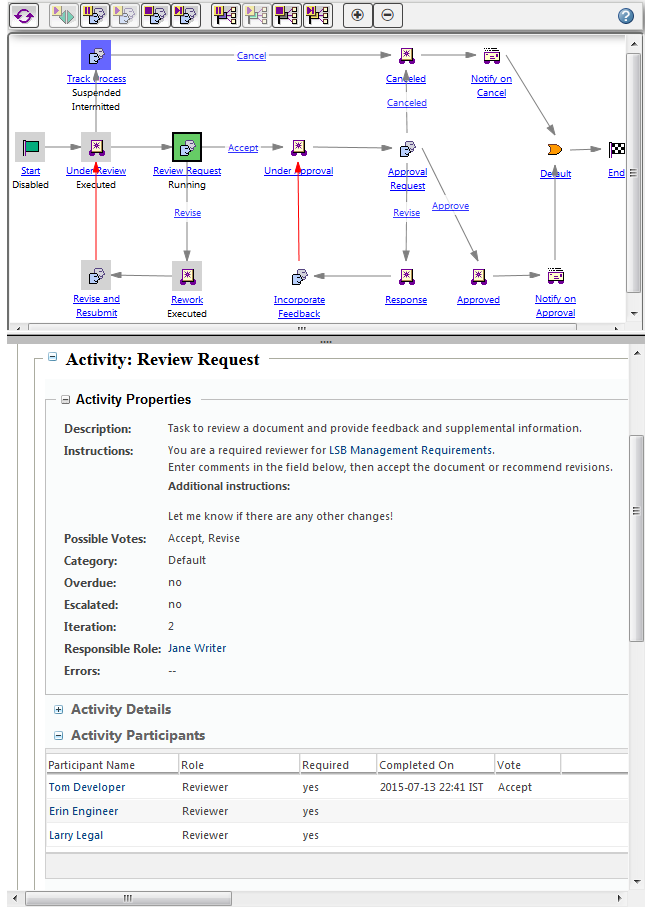
You can use the process manager to perform the following actions:
• View the status of activity nodes
• Manage the status of the process and activities
• View the properties of the process and its activities
For more information, see Workflow Process Manager.