Searching for One-Off Versions
A one-off version is a branch version created from any version within the normal revision sequence. It is used to track a unique modification to a design without disturbing the main revision sequence. It is labeled with the original version followed by a dash and a number. For example, a one-off version such as A-1.0 is composed of revision A and an instance 1. You can create a one-off version from the latest version of a revision or the latest one-off version of a revision. You can iterate an one-off version. For example, when A-1.0 is iterated, A-1.1 version is created.
By default, Windchill only searches against the latest iteration of every revision based on the criteria. Non-latest iterations are ignored. You can use the advanced search criteria or the Latest Version Search preference to extend your search to include all, the latest, or the absolute latest version of objects. For more information on using the Criteria panel, see Criteria.
Many of the following examples use various values for revision, iteration, state, and classification attributes in the Criteria panel. The Criteria panel uses the AND operator. Some of the examples include keyword search in addition to the database search.
 |
• If you are performing a keyword search with indexing enabled, and you want to search for non-latest iterations with additional criteria (such as all iterations in a certain state), then your search might return unexpected results. For more information, see Non-Latest Iterations Using Multiple Criteria.
• If you perform a keyword search only, the value of the Latest Version Search preference determines the search results. If you perform a keyword search with additional criteria, then the values of Revision and Iteration in the Criteria panel overrides the Latest Version Search preference value.
|
Example Data for a Part with One-Off Version
This example dataset illustrates how single part is managed across multiple versions, views, and one-off versions in Windchill.
• Name – Identifies the part, which in this example is Drive Shaft
• Version – Represents the different versions of the part
• Color – Represents an attribute of the part
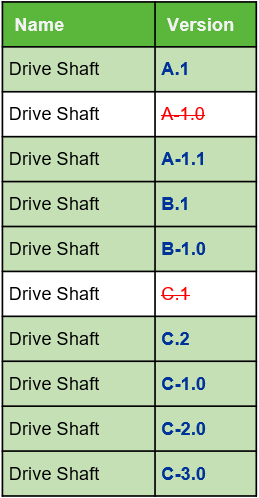
The following table shows the search results returned for Drive Shaft based on the selected Latest Version Search preference and the criteria entered in the Advanced Search page.
• Latest Version Search Preference – Contains the specified preference value.
• Criteria – Contains the criteria provided on the Advanced Search page.
• Result – Contains the search results for the specified preference value and criteria, grouped by design or manufacturing view.
Latest Version Search Preference | Criteria | Result |
|---|---|---|
All | Keyword = Red | Design: A-1.1, A.2 Manufacturing: B-1.1, B.2 Returns the latest version of a revision and all the one-off versions of a revision that contains classification attribute value as Red. |
Latest | Keyword = Red | Design: A-1.1, A.2 Manufacturing: B-1.1, B.2 Returns the latest version, all the one-off versions of the latest revision, and the latest one-off version of any revision that contains the classification attribute value as Red. |
Absolute Latest | Keyword = Red | Manufacturing: B-1.1, B.2 Returns the latest version of the latest revision and all the one-off versions of the latest revision that contains the classification attribute value as Red. |
All | Keyword = Blue | Design: B-1.1, B.2 Manufacturing: A-1.1, A.1 Returns the latest version of a revision and all the one-off versions of a revision that contains classification attribute value as Blue. |
Latest | Keyword = Blue | Design: B-1.1, B.2 Manufacturing: A-1.1, A.1 Returns the latest version, all the one-off versions of the latest revision, and the latest one-off version of any revision that contains the classification attribute value as Blue. |
Absolute Latest | Keyword = Blue | Design: B-1.1, B.2 Returns the latest version of the latest revision and all the one-off versions of the latest revision that contains the classification attribute value as Blue. |
Latest | Keyword = Red Revision = Absolute Latest | Manufacturing: B-1.1, B.2 Returns the latest version of the latest revision and all the one-off versions of the latest revision that contains the classification attribute value as Red. |
Latest | Keyword = Blue Revision = All | Design: B-1.1, B.2 Manufacturing: A-1.1, A.1 Returns the latest version of a revision and all the one-off versions of a revision that contains classification attribute value as Blue. |