Variance Substitutes
Windchill provides traceability for temporary part replacements in the product structure (BOM) through the Variance Substitutes table and Add Variance Substitutes action.
The availability of this table and the action is controlled by the wt.change2.enableVarianceSubstitutes property.
When the property is set to true, the Variance Substitutes table appears below the Affected Objects table, and the right-click action Add Variance Substitutes is enabled on the Affected Objects.
When set to false, the table and the action are not displayed.
 |
This property will be deprecated in a future release once the feature is fully implemented.
|
Add Variance Substitutes Action on the Affected Objects Table
This is a right-click action available on the Affected Objects table.
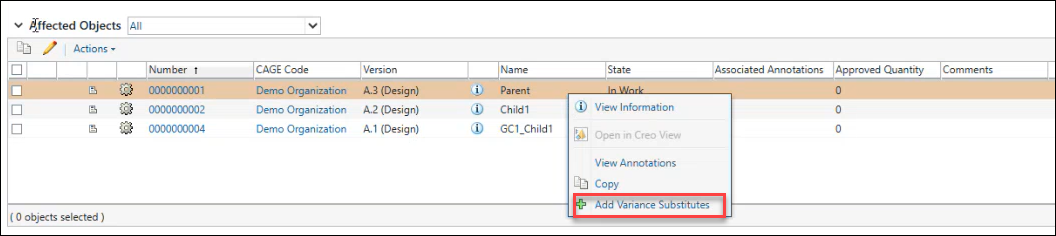
To add a variance substitute, right-click the affected object in the Affected Objects table, and click  Add Variance Substitutes. The Add Variance Substitutes page opens to display Substitute Link Attributes.
Add Variance Substitutes. The Add Variance Substitutes page opens to display Substitute Link Attributes.| | This action is enabled only when the affected object has one or more child parts. If the part is not a parent part, this action is disabled. |
Add Variance Substitutes and Substitute Link Attributes
The Add Variance Substitutes page opens when you right-click any affected object in the Affected Objects Table for variances and select the Add Variance Substitutes action.
Add Variance Substitutes action.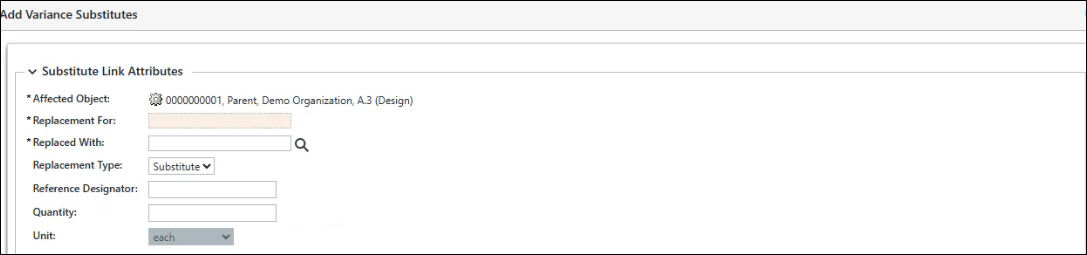
This page shows the following Substitute Link Attributes:
Attribute | Description |
|---|---|
Affected Objects | Displays the affected object and its details, where a child part will be replaced with a substitute part. |
Replacement For | Displays only the child parts directly associated with the selected parent part in the affected object’s first-level structure. For example, if the affected object has three first-level child parts, only those three parts are shown. |
Replaced With | Specifies the substitute part. You can enter the part number directly or use the search  icon to find it in the Replaced with window. icon to find it in the Replaced with window.The Find Part Search feature returns parts that are located at the first level within the structure of the affected object. If there are multiple usages of a child part in the structure, the Quick Suggest feature displays all occurrences of that part in the search results. You can use the Line Number and Find Number attribute values to select the correct replacement part. |
Replacement Type | Specifies the type of replacement. By default, a predefined replacement type is selected. You can change this value using the menu list, if you have defined additional replacement types. To add or define a default substitute replacement type, use the Customize Modeled Enumerations utility. For more details, refer to the Customize Modeled Enumerations Utility. |
Reference Designator | An alphanumeric code that identifies specific occurrences of the part within the assembly. |
Quantity | The number of substitute parts used in the assembly. |
Unit | The unit of measurement for the quantity, Select a unit from the list; for example, each. |
After you provide the details for Substitute Link Attributes and click Apply, the information is added to the Variance Substitutes table.
You cannot add a duplicate entry for the same affected object.
Variance Substitutes Table
This table appears below the Affected Objects table. It displays the details of the Substitute Link Attributes that are applied on the Add Variance Substitutes page for a specific affected object.
This table is read-only. You cannot edit the existing entries. However, you can delete an entry using  icon and then add a variance substitute for the affected object with the required specifications.
icon and then add a variance substitute for the affected object with the required specifications.If a part has an approved substitute in Part Structure Browser (PSB), the Approved column displays true, indicating that the part is approved as a replacement for the substitute.

Manage Variance Substitute Links
The Variance Substitute Links are impacted in the following scenarios:
• When the variance is deleted, the associated variance substitute links and its traceability to the replaced for part are permanently removed.
• When the variance is revised, the substitute links are carried forward to the next revision.
• When an affected object is deleted from the variance, the associated variance substitute link is also deleted.
• When the variance is moved, all associated affected object links and variance substitute records are retained.
• When an affected object is iterated, the associated variance substitute link is also carried forward.
• When the parent object (affected object) is revised, the variance substitute link is not carried forward.
Related Topics