Track Configuration Changes
The Track Changes tab in the Business Administrative Change utility enables you to track configuration changes made to business administrative objects. You can track objects that are newly created, updated, or deleted from the system.
 |
Only those changes that are supported by the Business Administrative Change utility can be tracked. For more information, see Objects Supported for Business Administrative Change Promotion.
|
To use the track changes feature, enable the following properties in the custom.site.xconf file:
• com.ptc.windchill.bac.history.tracking
• com.ptc.windchill.bac.delete.tracking
 |
To make the best use of the track changes feature, do not disable the properties after enabling them. This ensures that all configuration changes are consistently tracked.
|
For information on configuring properties, see Setting Property Values and Propagating Your Changes.
To track configuration changes, perform the following steps:
1. In the Track Changes tab, specify the date range and the context of the objects that you want to search for.
The date range should be set to the last one-month period.
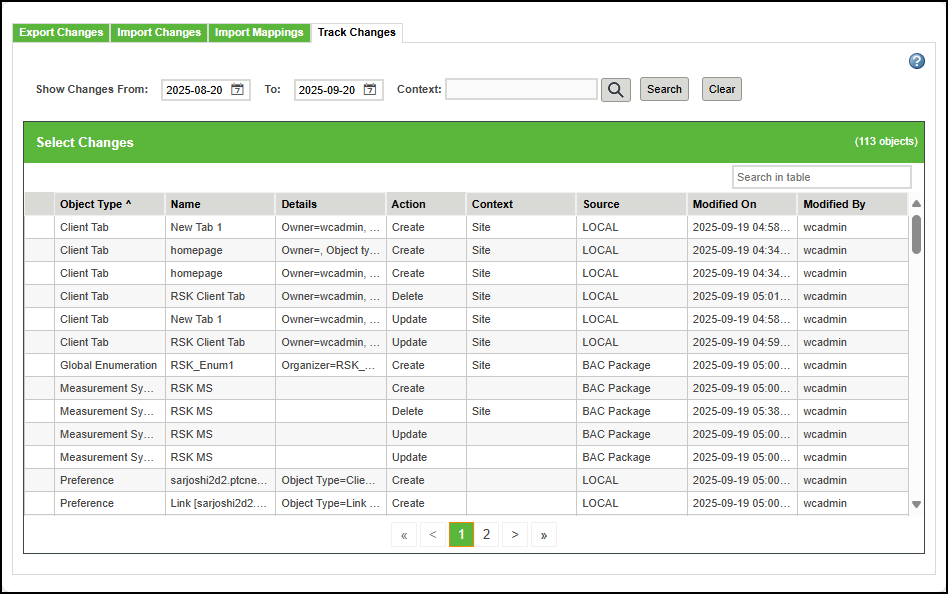
2. Click Search.
The Select Changes table lists the objects for which configuration changes have occurred. The Action column indicates whether an object was created, updated, or deleted. The Source column shows LOCAL if the changes were made using Windchill UI, LOADER if the changes were made using a loader and promoted using a CCD package, or BAC Package if the changes were made through an imported BAC package and promoted using a CCD package.