PTC Windchill Toolbar (CATIA V5)
The PTC Windchill toolbar in CATIA V5 provides easy access to Windchill PDM actions. The availability of the PDM actions depends on the status of the CAD document in the Windchill workspace.

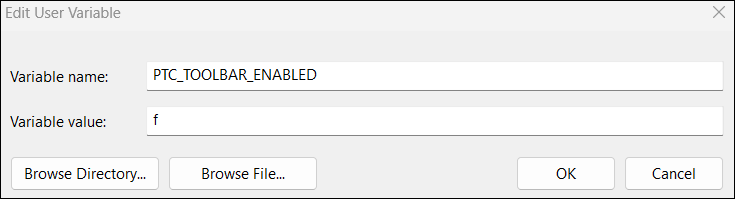
 | PTC_TOOLBAR_ENABLED is the environment variable that creates the PTC Windchill toolbar when CATIA V5 is registered. By default it is set to true or t. |
The toolbar contains the following icons.
Icon | CATIA – Windchill Action |
|---|---|
 | Opens Windchill Workgroup Manager for CATIA V5. |
 | Creates a new CAD document in the workspace. |
 | Opens a document from the workspace or the commonspace. |
 | Inserts a component into CATIA V5 from Windchill. |
 | Replaces a component in CATIA V5 from Windchill. |
 | Saves and uploads the document to a workspace. |
 | Checks in the active document interactively (custom checkin). |
 | Checks in the active document using the default values for the action (automatic checkin). |
 | Generates and checks in a CATIA V5 All-In-One CATPart. |
 | Checks out the active document. |
 | Revises and checks out the active document. |
 | Undoes a checkout for the active model. |
 | Updates the active document with information from Windchill. |
 | Updates all currently active documents with information from Windchill. |
 | Displays Windchill information about the CATIA model currently open in a session. |
 | Opens the Server Management utility. |
 | Opens the Event Management utility to view PDM transaction status for the primary server. |
 | Opens the Windchill Workgroup Manager help. |
 | Includes components from Design in Context. See Design in Context. |
 | Excludes components from Design in Context. See Design in Context. |
 | Switches the currently selected assemblies from Heterogeneous Design In Context and Assembly-Level CGRs to the Structure Mode. See: |
| | Most PDM actions are also available by right-clicking. However, right-click actions are only applicable to CATProducts, CATParts, and CATDrawings. |
Disabling the CATIA V5 Toolbar
To disable the toolbar:
1. Unregister CATIA V5 as an application and close both CATIA V5 and Windchill Workgroup Manager for CATIA V5.
2. Set the PTC_TOOLBAR_ENABLED environment variable to false or f:
3. Start Windchill Workgroup Manager and register CATIA V5 as an authoring application.
4. Start CATIA V5.