ユースケース 4: 下流コンテキストに基づいてターゲットのプラントとプラント属性値をコピー
このようなシナリオでは、BOM トランスフォーマの下流ビューにプラント固有のビューが表示されます。たとえば、Berlin プラント、Dresden プラントなどです。下流のコンフィギュレーション仕様に基づいて、プラントおよびプラント属性値をターゲットプラントにコピーできます。
BOM トランスフォーマに以下の構造が存在するとします。
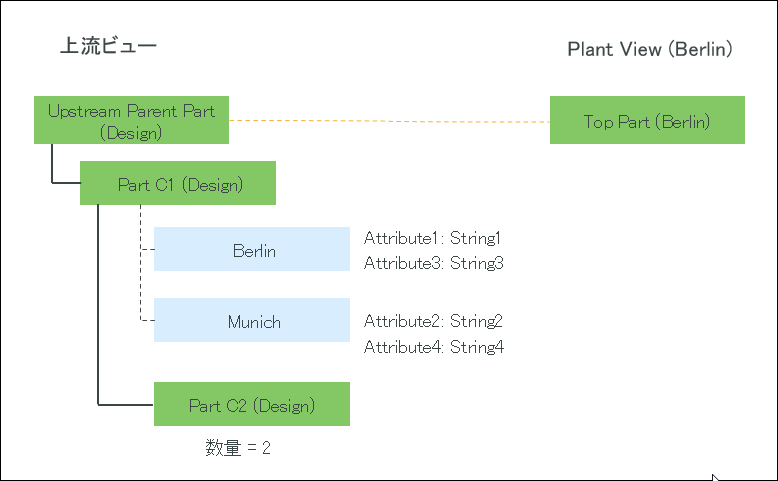
このユースケースでは、下流コンテキストは Berlin です。
• Upstream Parent Part (Design) と Top Part (Berlin) の間に対応リンクが存在します。
• Part C1 (Design) にプラント Berlin と Munich が割り当てられています。
• Part C2 (Design) は Part C1 (Design) の子部品です。
Part C2 (Design) の数量は 2 です。
• 値が String1 のプラント属性 Attribute1 がプラント Berlin に割り当てられています。
• 値が String3 のプラント属性 Attribute3 がプラント Berlin に割り当てられています。
• 値が String2 のプラント属性 Attribute2 がプラント Munich に割り当てられています。
• 値が String4 のプラント属性 Attribute4 がプラント Munich に割り当てられています。
2. 次のコンフィギュレーションを設定します。
◦ <Property name="com.ptc.windchill.mpml.copyOver.CopyOverPlantAndDepartmentData" default="true"/>
 | このプロパティによって、プラント、プラント属性、部門、および部門属性のコピーが有効になります。このプロパティが false に設定されている場合、特定のプラント、プラント属性、部門、および部門属性のコピーに関連するその他のプロパティを追加した場合でも、プラント、プラント属性、部門、および部門属性はコピーされません。 |
◦ 次のプロパティを見つけます。
<Property name="com.ptc.windchill.mpml.copyOver.mapsb.split.create.com.ptc.windchill.enterprise.data.EnterpriseData.com.ptc.windchill.enterprise.data.enterpriseData.PlantSpecificEnterpriseData" multivalued="," default=""/>。このプロパティの下に次のプロパティを追加します。
<AddToProperty name="com.ptc.windchill.mpml.copyOver.mapsb.split.create.com.ptc.windchill.enterprise.data.EnterpriseData.com.ptc.windchill.enterprise.data.enterpriseData.PlantSpecificEnterpriseData" value="IdentityAttributes::view=target_plant@CopyAttributes::Attribute1"/>
| | このユースケースでは、下流コンテキストは Berlin です。IdentityAttributes::view=target_plant という用語によって、Berlin プラントがコピーされるようになります。 @CopyAttributes::Attribute1 という用語によって、Attribute1 だけがコピーされるようになります。 |
3. 上流ビューで Part C1 (Design) を選択し、下流ビューで Downstream Parent Part (Manufacturing) を選択します。
4. 上流ビューで、 「新規/追加」 >
  「新規分割アセンブリ」の順に選択します。「新規分割アセンブリ」ダイアログボックスが開きます。
「新規/追加」 > 「新規分割アセンブリ」の順に選択します。「新規分割アセンブリ」ダイアログボックスが開きます。5. 「下にアセンブリ」ステップで、2 つの分割アセンブリ Split Assembly 1 と Split Assembly 2 を作成します。
6. 「パラメータを設定」ステップで、Part C2 (Design) の Split Assembly 1 と Split Assembly 2 のコラムに数量 1 を指定します。

詳細については、上流ビューのアセンブリから下流ビューへの複数の分割アセンブリの作成を参照してください。
7. 「完了」をクリックします。BOM トランスフォーマに以下の構造が表示されます。
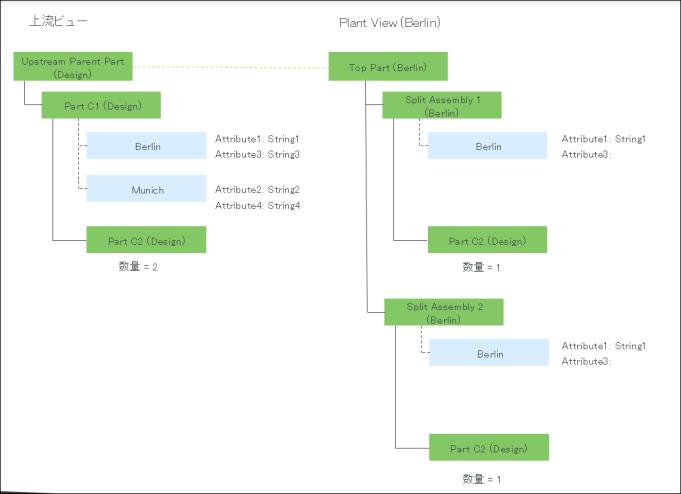
Part C1 (Design) と Split Assembly 1(Manufacturing) の間に分割タイプの対応リンクが作成されます。
Part C1 (Design) と Split Assembly 2(Manufacturing) の間に分割タイプの対応リンクが作成されます。